WooCommerceShopify

Shopify migration, including the parts the importer skips

We move stores to Shopify from WooCommerce, Wix, Squarespace and BigCommerce: products, customers, order history, blog posts, collections and menus, with every old URL redirected. Your old store keeps selling until switch day.

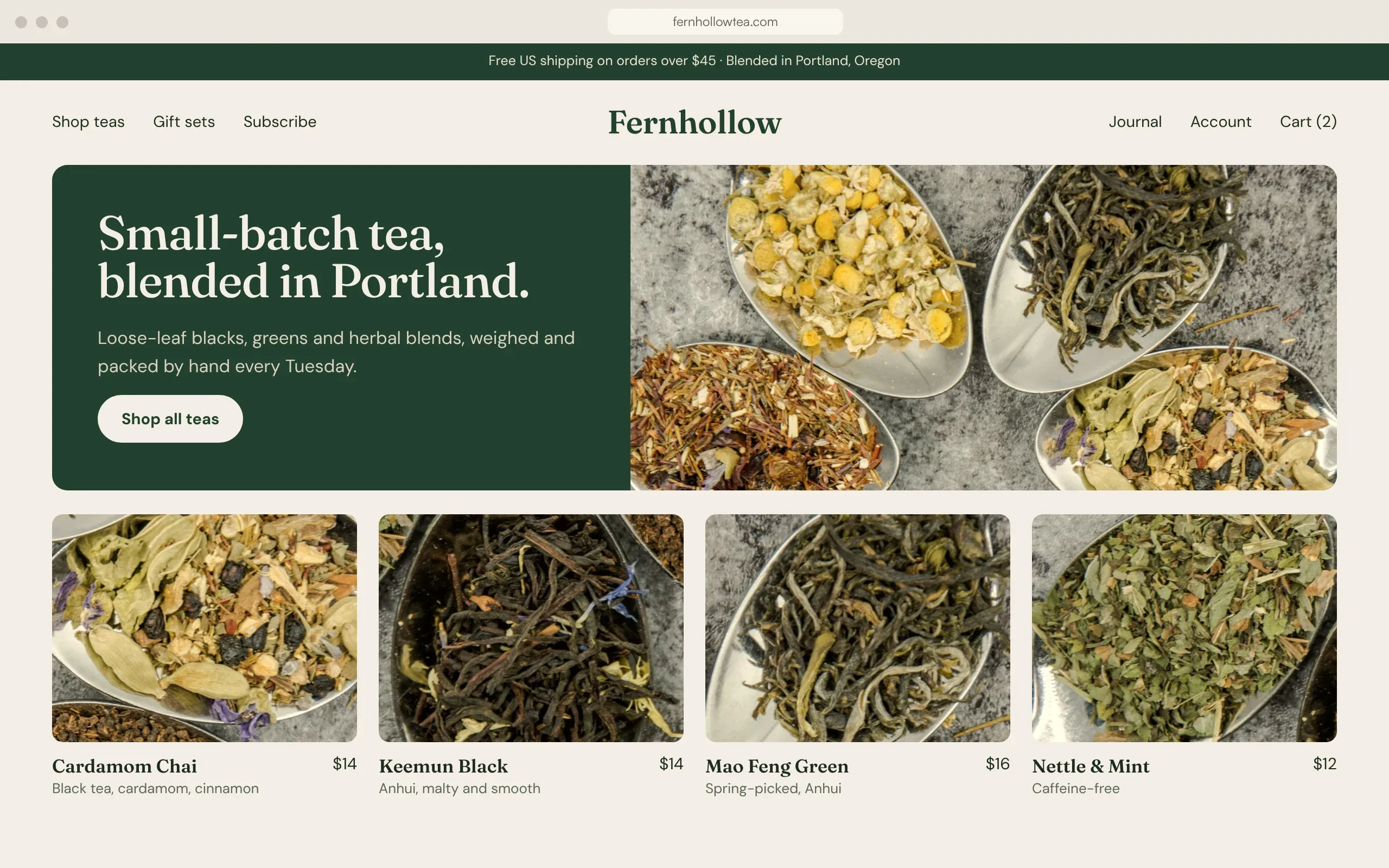
Fernhollow Tea's new Shopify homepage after the move from WooCommerce: small-batch tea blended in Portland, with four loose-leaf teas from $12 to $16
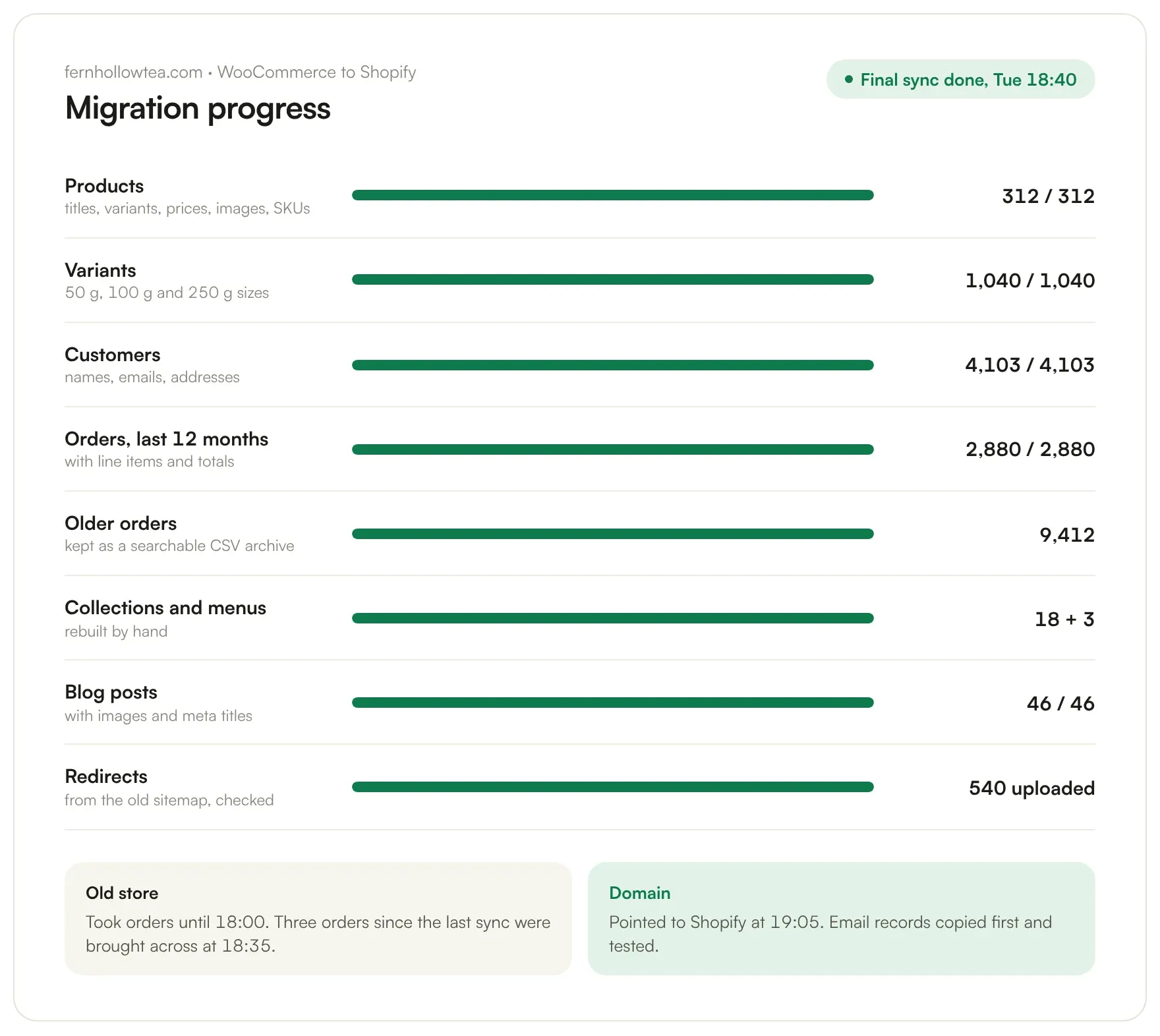
Final sync: three late orders came across at 18:35

What Shopify's importer moves, and what it leaves

Shopify's free Store Migration app does one job well: products and customers. By Shopify's own description it doesn't bring the rest. Collections, menus, SEO fields and old URLs are what keep your rankings and your navigation, so we move those by hand.

The app supports Square, WooCommerce, Etsy, Wix, Amazon, eBay, Clover and Lightspeed as sources. Squarespace and BigCommerce are not on the list. Shopify, Store Migration app

Moving from the platform you're on

Each source has its own catch.

To Shopify

From WooCommerce

WooCommerce exports products to CSV from its own Products screen, so the catalogue moves cleanly. The URLs don't: /product/linen-apron becomes /products/linen-apron. We generate those redirects from your sitemap, not by hand.

  • Product CSV export built into WooCommerce
  • /product-category/ becomes /collections/
  • Review plugin data needs its own export
To Shopify

From Wix

Wix sites can't be exported, but Shopify's importer reads Wix products. Customers come across too, and we rebuild the design as a Shopify theme.

  • Supported by Shopify's importer
  • Design rebuilt as a theme
  • Blog moved by hand

To Shopify

From Squarespace

Shopify's importer doesn't support Squarespace, and Squarespace's own export leaves products out. Products go across by CSV; pages and posts are moved and re-formatted.

  • Not supported by the importer
  • Products by CSV
  • Styling rebuilt

To Shopify

From BigCommerce

Not on the importer's list either, so we use CSV or a third-party migration app, priced at cost. Customer groups become Shopify customer tags or B2B catalogs.

  • CSV or a migration app
  • Customer groups mapped
  • App fees passed on at cost

To Shopify

From WordPress

A content site that adds a shop. Blog posts move to Shopify's blog, and their old dated URLs are redirected to the blog name you pick.

  • Posts and images moved
  • Dated URLs redirected
  • Categories become tags

Old WooCommerce URLs, new Shopify homes

Shopify allows up to 100,000 redirects in a store, imported by CSV. A redirect only works from a URL that no longer loads, and the /products and /collections parts can't be changed. So we plan them before launch.

  1. /product/cardamom-chai//products/cardamom-chai301
  2. /product-category/green-tea//collections/green-tea301
  3. /shop//collections/all301
  4. /2024/03/how-to-brew-mao-feng//blogs/journal/how-to-brew-mao-feng301
  5. /my-account//account301

Five of the tea shop's 540 redirects. On switch day every old URL is requested again, and any that fails to return a 200 gets fixed.

Old orders: import, archive or leave

Old orders matter for reorders, returns and lifetime value. You don't always need all of them inside Shopify.

Import with an app

Orders appear in Shopify, linked to customers

  • Suits one to two years of orders
  • Customers see past orders in their account
  • Third-party app fee, passed on at cost

In the Standard tier

Keep an archive

A searchable CSV or sheet of every old order

  • Suits many years of orders
  • No app fee
  • Staff look up old orders outside Shopify

Included

Start fresh

Shopify history begins on switch day

  • Fine for small or new stores
  • Old store kept read-only for a while
  • Nothing to pay

Included

Client, Portland

Loose-leaf tea, 312 products

Fernhollow Tea Co., Portland, Oregon

A small-batch loose-leaf tea shop on WooCommerce. We moved 312 products with variants and 4,100 customers, imported the last 12 months of orders, archived the rest as CSV, set subscriptions up again in a Shopify subscriptions app and added 540 redirects.

  • WooCommerce to Shopify
  • 312 products, 4,100 customers
  • 540 redirects
Fernhollow Tea's migration progress: 312 products, 1,040 variants, 4,103 customers, 2,880 orders, 46 blog posts and 540 redirects done
Our tea subscribers were charged on the 1st, same as every month, through the new subscriptions app.
Priya RamanFounder, Fernhollow Tea Co.

Priced by catalogue size

Fixed prices. The number of products and how much order history you want inside Shopify decide the tier.

Migration

Paid once

Starter

Up to 300 products

from
$1,600
  • Products, customers, collections and menus
  • Pages and blog posts
  • Redirects for every product, category and post
  • Theme set up with your brand
Book a call →

Standard

Up to 3,000 products

from
$3,200
  • Everything in Starter
  • 12 months of order history imported
  • Older orders archived as CSV
  • Reviews and subscriptions set up again in Shopify apps
Book a call →

Large or custom

Subscriptions, B2B, several markets

After an audit
  • Catalogue and integrations reviewed first
  • Fixed quote after the audit
Book a call →

After launch

Optional

Care

$69/month

Shopify hosts the store; Care looks after the theme and its apps.

  • Theme and app updates, tested first
  • 404 and redirect monitoring
  • Small content changes
  • A short monthly report
  • Third-party migration app fees (for order history) are passed on at cost.
  • Your Shopify plan is paid to Shopify directly.
Prices in US dollars, excluding any sales tax or VAT.Book a free 20-min call →

The old store sells until the last evening

  1. Week 1

    Audit

    Catalogue, apps, URLs and order volume, so the price is fixed before work starts.

  2. Weeks 2–3

    Staging store

    The new Shopify store is built and filled while the old one keeps selling.

  3. Switch day, 17:00

    Content freeze

    No catalogue edits on the old store from here; it still takes orders.

  4. 18:00

    Final import

    Orders and customers since the last sync brought across.

  5. 19:00

    Domain and redirects

    Domain pointed to Shopify, redirects uploaded and crawled the same evening.

Orders, URLs and keeping the old store open

Can I migrate to Shopify myself with the free app?

For products and customers, often yes. Shopify's own app doesn't move order history, collections, menus, SEO fields, blog posts or pages. That's the part we handle.

Will my product URLs change?

Yes. Shopify always uses /products/ and /collections/ in its URLs. We upload a redirect file so every old product and category URL lands on its new page.

Can you move my order history?

Yes, with a paid migration app from a third party, or as a searchable archive if you don't need old orders inside Shopify. We'll tell you which is cheaper for your volume.

How do I move from Squarespace to Shopify?

Shopify's importer doesn't support Squarespace, so products go across by CSV, and pages and blog posts are copied over by hand and re-formatted.

Will my store go offline during the move?

No. The new store is built on Shopify while the old one keeps selling. On switch day we freeze edits, import anything new since the last sync, then point the domain.

How much does a Shopify migration cost?

From $1,600 for up to 300 products, and from $3,200 for up to 3,000 products, with order history from the last 12 months. Larger or custom stores are quoted after a short audit.

How long does it take?

2 to 4 weeks for most small stores, longer with custom features.

Do I keep my domain and email?

Yes. The domain points to Shopify; your email stays with its current provider as long as its records are copied.

Sources: Shopify, Store Migration app; Shopify Help Center, URL redirects; WooCommerce, product CSV exporter; Wix Help Center, exporting a Wix site.

Book a call →

Send us your store's URL.

We'll count your products and URLs, list what the importer will miss, and give you a fixed price.

Free 20-min call
Fixed price. Old store sells until switch day.Book a call →