Restaurant website: what it needs, and what each order costs you

A restaurant website has six jobs: show today's hours, the menu, where you are, and let people book, order and call. This page shows how to do each one well, what DoorDash and Uber Eats charge per order against your own ordering page, and what we charge to build it.

wrenandladle.com/menu

Wren & Ladle

Dinner tonight, until 22:00

Soups

  • Smoked tomato soup, sourdough$9
    GD

Mains

  • Braised short rib, celery root mash$28
    D
  • Mussels, cider, leeks$19
    SFDG
  • Half roast chicken, salsa verde$26
    Sold out tonight

Sweet

  • Burnt honey custard$10
    ED

G gluten, D dairy, E egg, SF shellfish

The menu as a web page: text a phone and Google can both read.
Pickup orderNo. 0418

Ready 18:00, at the bar

  • 1 Smoked tomato soup$9.00
  • 1 Braised short rib$28.00
  • 1 Sourdough, cultured butter$3.00

Food$40.00

Sales tax 7%$2.80

Total$42.80

Paid by card on wrenandladle.com

Card fee on what the guest paid ($42.80)$1.54

Same order via DoorDash Plus, commission (25% of $40.00)$10.00

Wren & Ladle's own pickup page. The restaurant pays the card fee; the commission line is what the same food would cost on DoorDash Plus.

Six things a phone shows before any scroll

A website for a restaurant is mostly read on a phone, by someone deciding where to eat in the next hour. These six tell them whether to come. Everything else (the story, the room, private dining) can sit lower down.

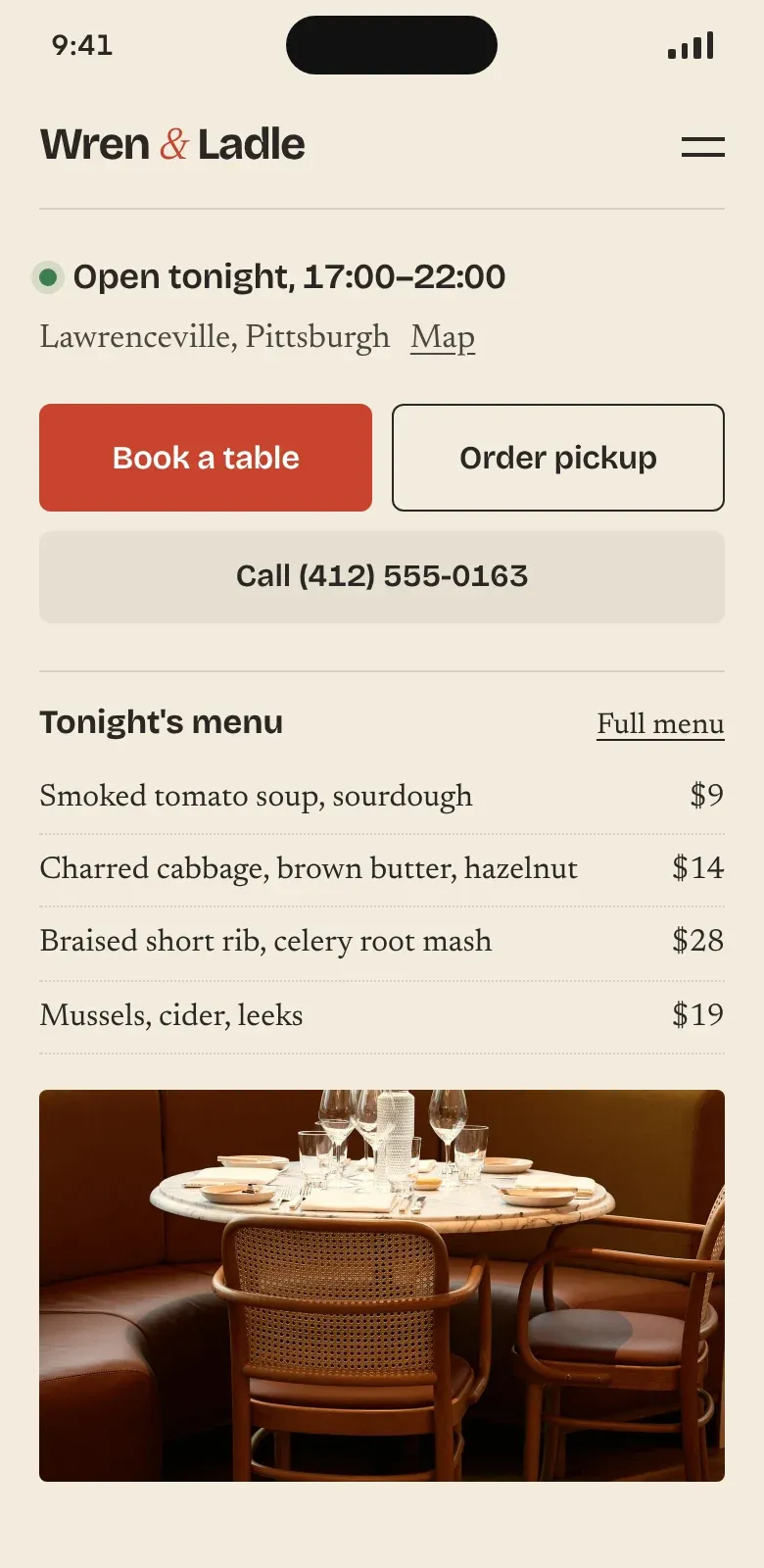
Wren & Ladle on a phone: open tonight 17:00 to 22:00, Lawrenceville with a map link, Book a table, Order pickup, a call button and tonight's menu with prices
  1. 1

    Today's hours

    "Open tonight, 17:00–22:00" answers the question in one line. The weekly table goes on the visit page.

  2. 2

    Where you are, with a map link

    Neighbourhood on the first screen and one tap into the phone's maps app. The full street address sits further down.

  3. 3

    The menu as text, with prices

    Text loads fast, can be read aloud by a screen reader and is indexed by Google. A photo or PDF of the menu is none of those.

  1. 4

    Book a table

    Straight into your reservation tool, the same link you set as preferred on Google.

  2. 5

    Order pickup

    Your own checkout, so a regular's dinner costs you a card fee and no commission.

  3. 6

    A number that dials

    Some people will always call. Make it a tap, not a number they copy by hand.

None of the six needs a scroll or a second page. They are the same six for a café, a takeaway and a tasting menu.

A $40 order, app commission against your card fee

DoorDash and Uber Eats publish their US commission rates, so the table below uses their numbers, not ours. The $40 is the food, with sales tax left out. Change it, and how many orders you take a month, to see your own.

The apps bring you customers who have never heard of you, and that is worth paying for. Your regulars are different: they already know your food, so their repeat orders can go through your own page at card-processing cost. Delivery costs you drivers or a courier, so most places start with pickup.

Commission or card fee on one order and on a month of orders: $40.00 food, 100 orders a month.
ChannelRatePer orderA month
DoorDash Premier, delivery30%$12.00$1,200
Uber Eats Premium, delivery30%$12.00$1,200
DoorDash Plus, delivery25%$10.00$1,000
Uber Eats Plus, delivery25%$10.00$1,000
Uber Eats Lite, delivery20%$8.00$800
DoorDash Basic, delivery15%$6.00$600
Uber Eats, pickup7%$2.80$280
DoorDash, pickup6%$2.40$240
Your own page (Stripe card fee)2.9% + 30¢$1.54$154
  1. 1Commission is charged on the food alone. A card fee is charged on what the guest pays, so the own-page row adds Pittsburgh's 7% sales tax first: $40 of food is $42.80 paid, and 2.9% + 30¢ of that is $1.54.
  2. 2Both apps offer new restaurants 0% for 7 to 30 days on most plans. Pickup rates assume menu prices that match the ones in your room; without validated in-store pricing Uber Eats charges 10% for pickup. Uber Eats Lite is lower in a few cities (15% in Portland).
  3. 3DoorDash also sells its own Online Ordering product, which it describes as commission-free with a payment processing fee it doesn't list.
  4. 4New York City caps what apps can charge restaurants in the city (its consumer protection department's fee-cap flyer, April 2026). Zomato and Swiggy publish no rate card: your rate is in your partner contract.

Rates from: DoorDash merchant pricing (US), Uber Eats merchant pricing (US), Stripe pricing

Make Google send orders to the page you own

Your Google Business Profile has a Food ordering panel. Delivery apps you work with appear there by themselves. You can add your own link, mark it as preferred for pickup or delivery, and hide the providers you don't want shown.

Three steps: swipe sideways for the next one.

  1. 1

    Add your own link

    In the profile, open Food ordering, then add the address of your ordering page under pickup, delivery or both.

  2. 2

    Set it as preferred

    Mark your link as preferred. That tells Google which ordering link is the business's own choice, for pickup, delivery or both.

  3. 3

    Hide what you've left

    Stopped using an app? Hide it, so nobody orders through a menu you no longer update.

Table bookings follow similar rules

A profile can carry up to 10 booking links per category, shown as "Make a reservation", and one of them can be marked as the business's preferred link. A link that a booking provider added can only be removed through that provider.

Drawn in our own style from Google's help pages for Business Profile, not Google's screens, which look different and change often. We do all of this in setup and send you a screenshot of the result.

Menus that phones and Google can read

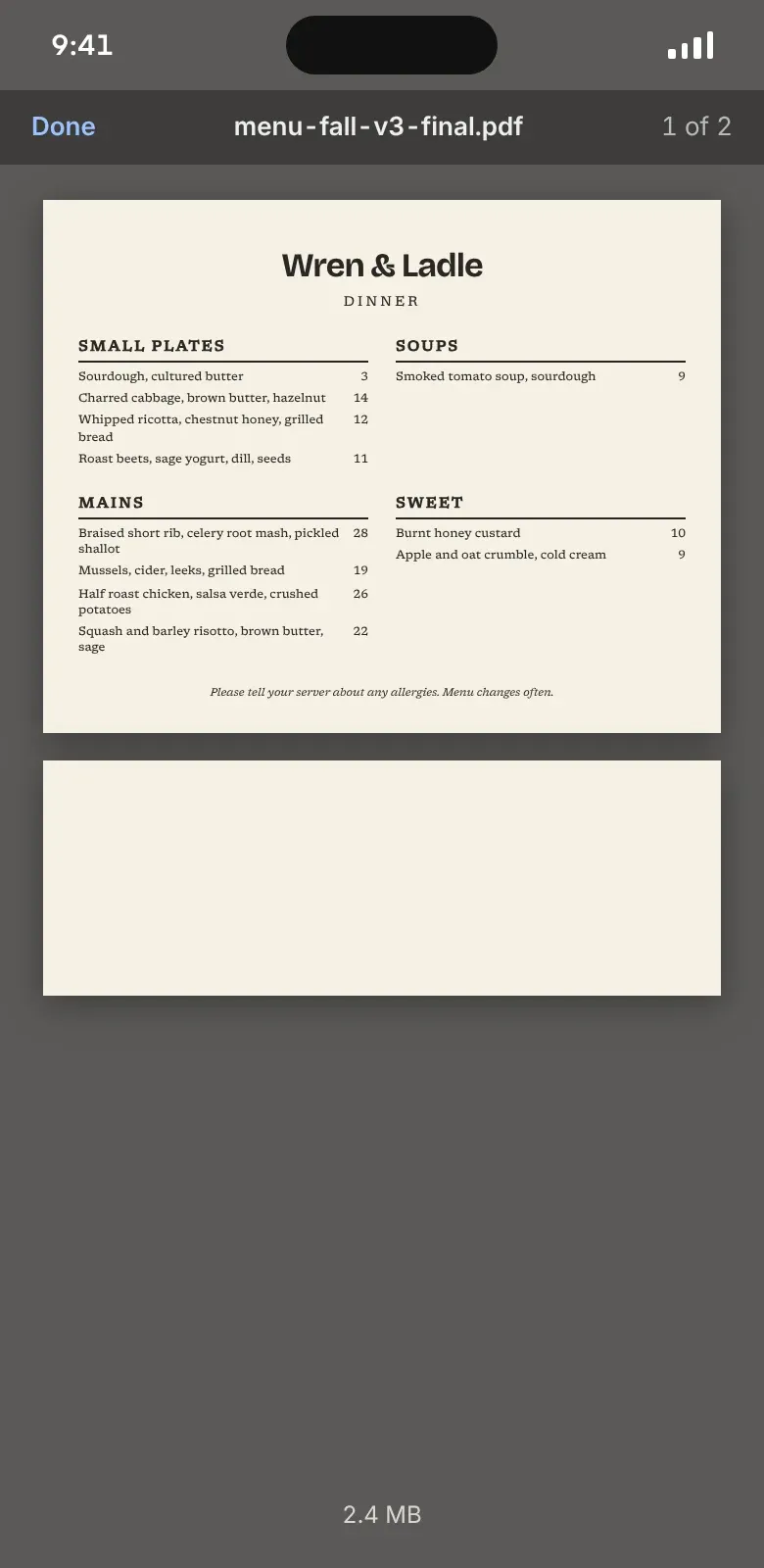
The same Wren & Ladle menu twice: as the PDF the designer exported for print, and as a page on the website. A PDF isn't wrong. It just shouldn't be the only menu.

The menu as a PDF on a phone: a whole printed page shrunk to the screen width, dish names in six-point type

The PDF

Good at

  • Keeps the printed design exactly as it was set
  • Quick to upload when nothing else is ready
  • Useful as a download for groups and catering

Watch out for

  • Pinch and zoom to read a dish on a phone
  • Every price change is a new file, and old copies linger in search results
  • Screen readers and search engines get much less out of it
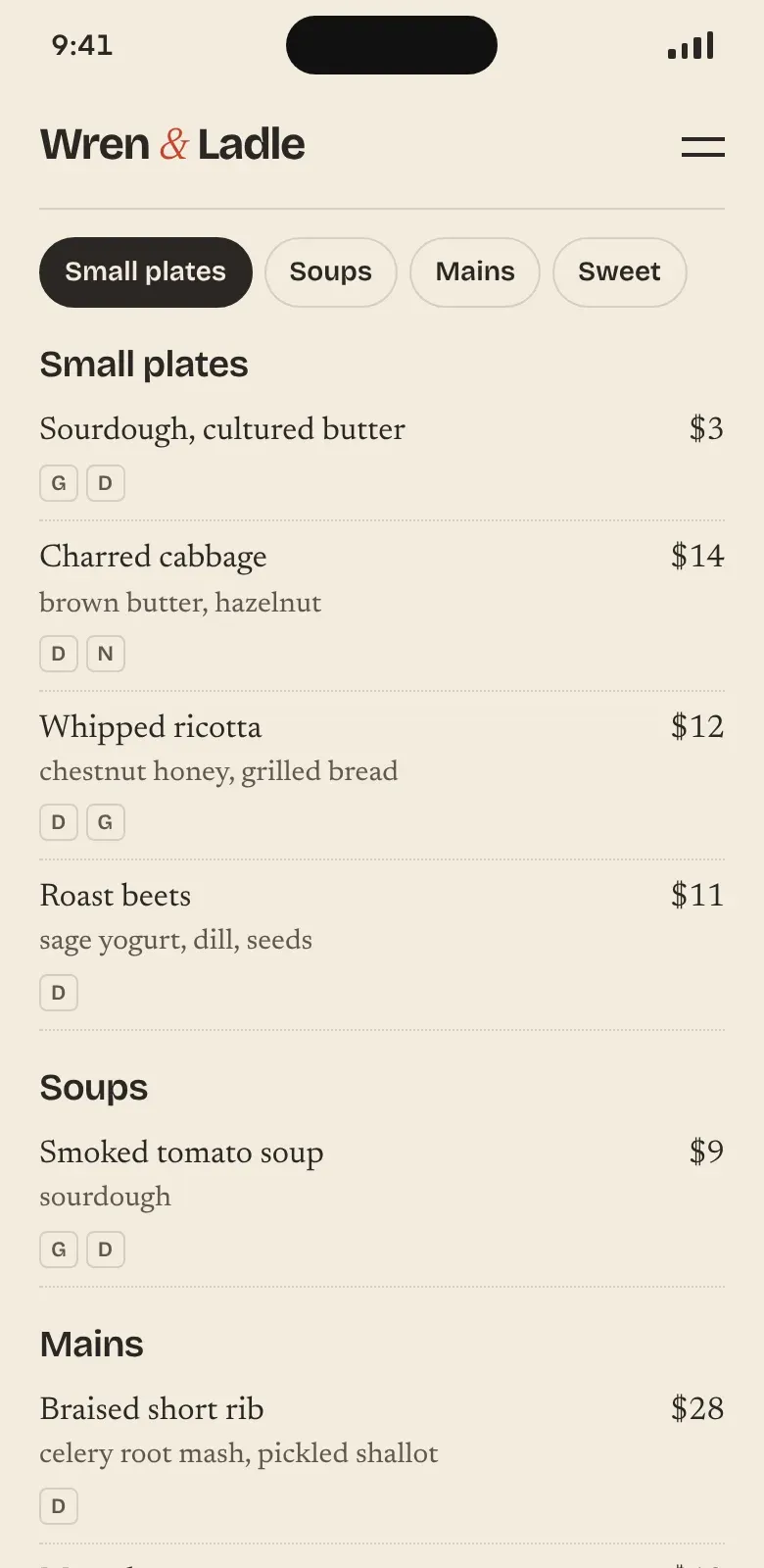
The same menu as a web page on a phone: section tabs, readable dish names, prices and allergen letters

The web page

Good at

  • Readable at arm's length without zooming
  • Change a price in one place and it's live everywhere the menu shows
  • Allergen letters on every dish, and a sold-out flag for tonight
  • Google reads the dishes and the prices

Watch out for

  • Set up once in your site's editor, which is our job

Allergens one click from the dish

In the UK, Food Standards Agency guidance for food sold online is that allergen information is available before the order and again when the food arrives, on the menu or no more than one click away. Customers must be told if any of the 14 named allergens are present. Other countries set their own rules; a lettered key on every dish works for all of them. This is a summary of the guidance, not legal advice.

Labelled for search engines

We add schema.org Restaurant and Menu markup: a few lines in the page that tell search engines your name, hours, dishes and prices in a format they don't have to guess at.

Keep the PDF for printing

Link it under the web menu for anyone who wants a copy. Table QR codes then point at the web menu, which is always the current one.

Make a table QR code →

Restaurant website examples, by how the place makes money

The best restaurant websites tend to follow one of four patterns. Three of these crops come from Wren & Ladle's site; the fourth is one of our own restaurant concepts.

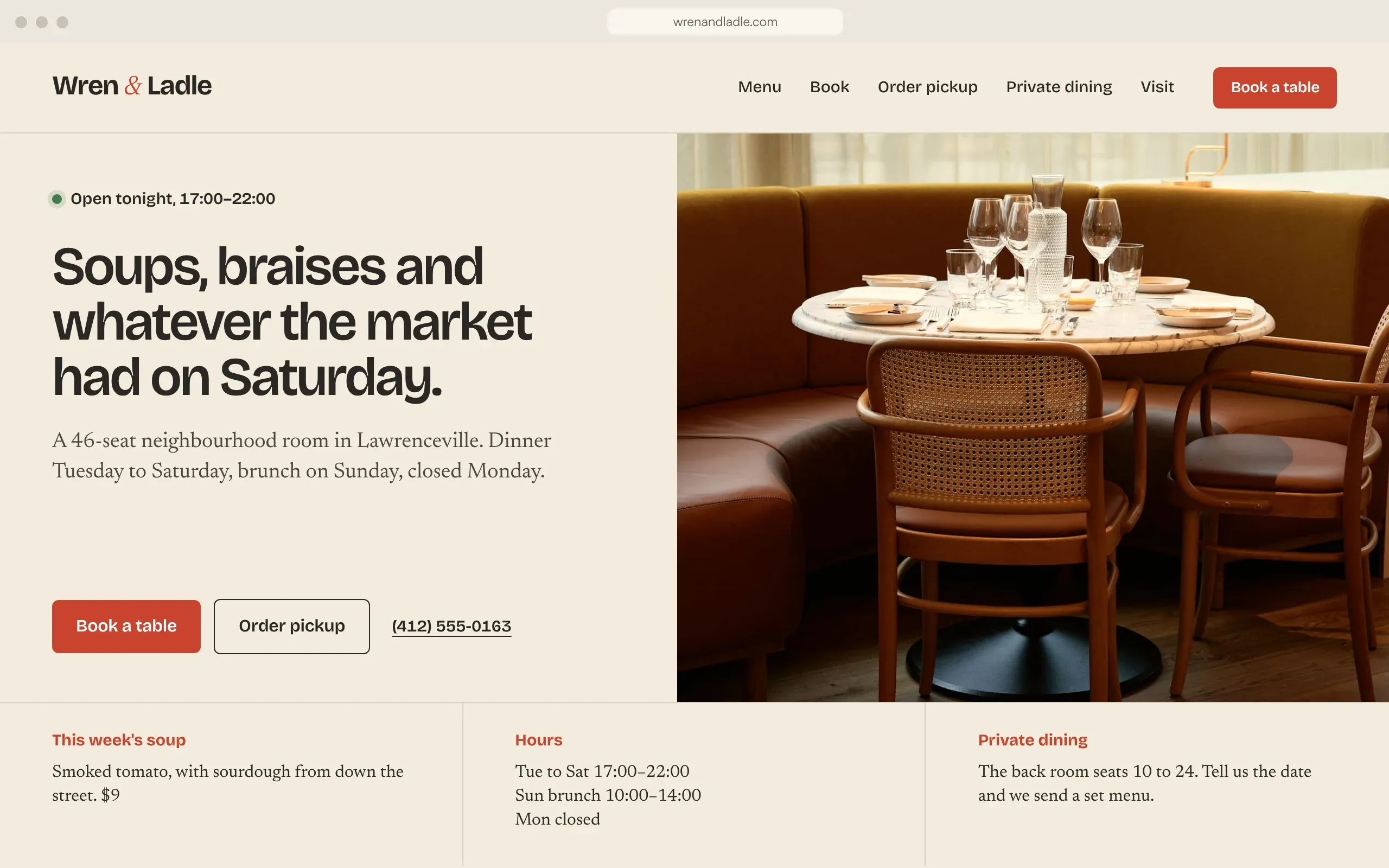
  1. Wren & Ladle's home page: open tonight, a short line about the food, Book a table, Order pickup and the phone number beside a photo of the room
    Wren & Ladle, home page
    1

    One screen, everything local

    Neighbourhood places where most visits start on a phone nearby

    Open tonight, what the food is, then book, order and call, all before any scrolling. On a phone the same page stacks into one screen, with tonight's menu in four lines under it.

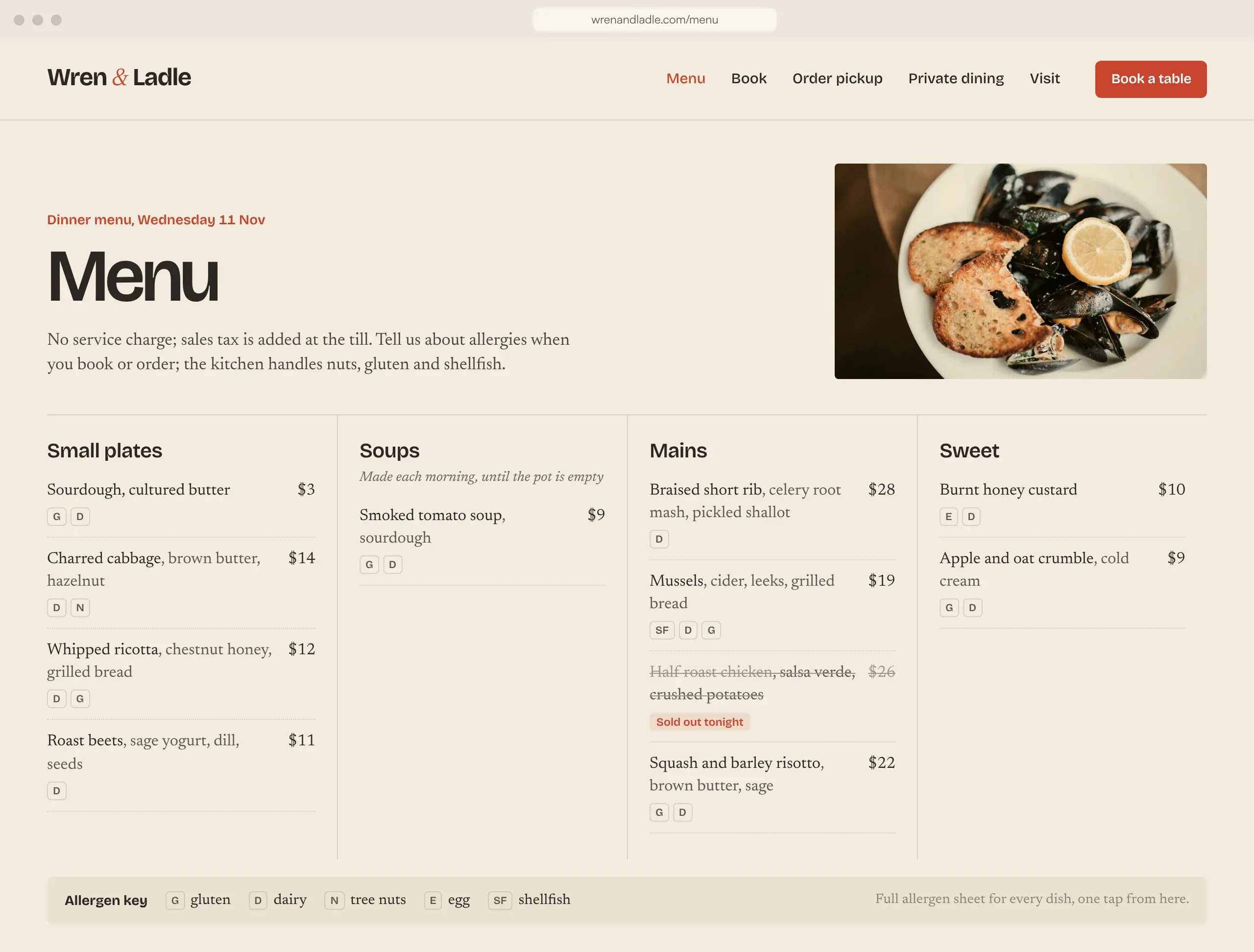
  2. Wren & Ladle's desktop menu page with four sections, allergen letters and a sold-out dish
    Wren & Ladle, menu page
    2

    Menu-led bistro

    Menus that change weekly and get read closely

    The menu is the main page: four columns, prices to the right, allergen letters on every line and a key at the foot. A dish that runs out gets struck through for the night.

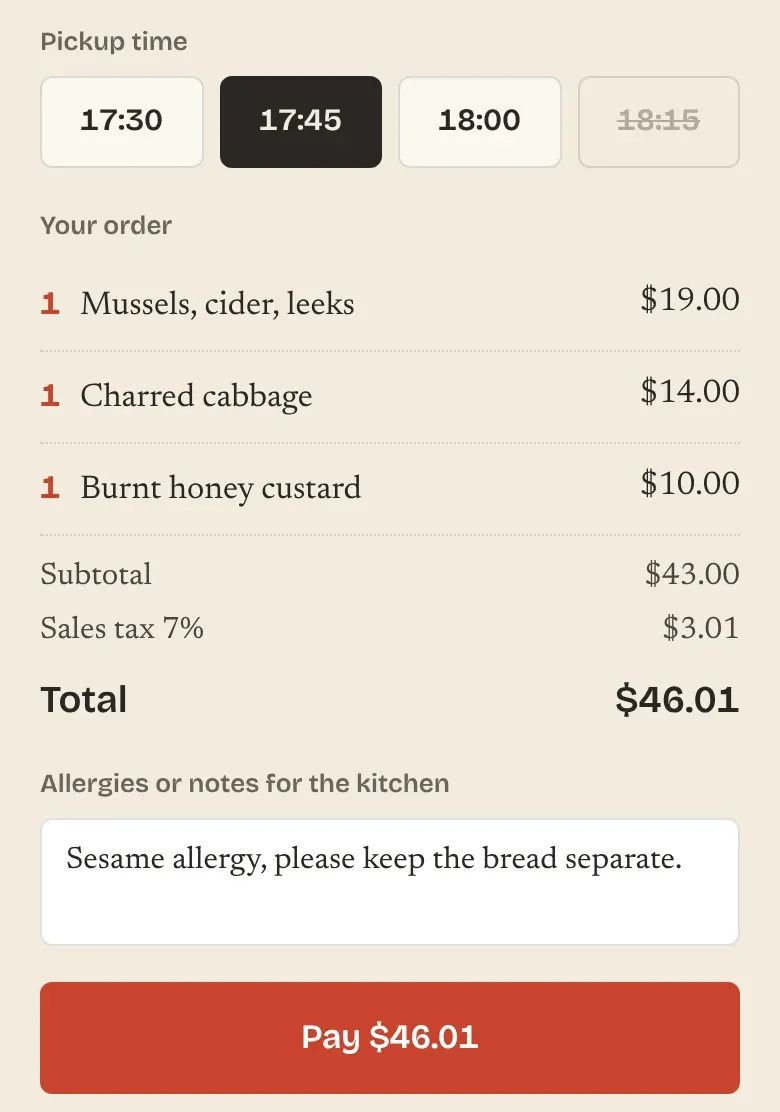
  3. Wren & Ladle's pickup checkout on a phone: time slots, three dishes, sales tax, a notes box for allergies and the pay button
    Wren & Ladle, pickup checkout
    3

    Order-first takeaway

    Kitchens where pickup is half the trade

    Time slot first, then the bag, then pay. No account to create, tax shown before the button, and a box for allergy notes the kitchen reads.

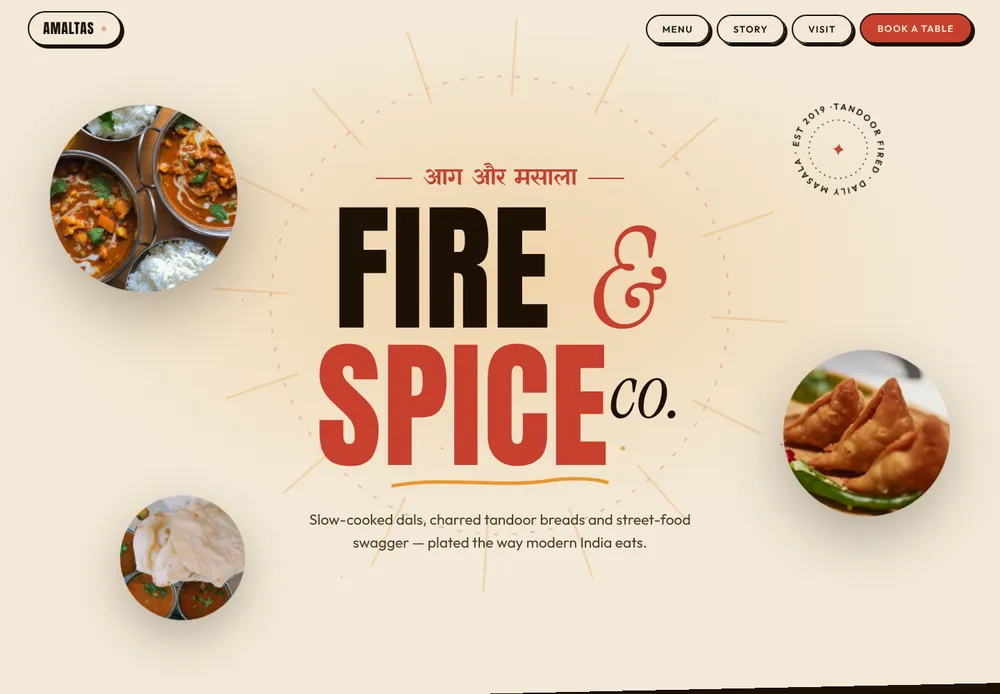
  4. Amaltas home page: large Fire and Spice type with round food photos
    Amaltas, a restaurant site we've designed (concept)
    4

    Story-led

    Places people travel to, where the food needs explaining

    Big type, a few lines about the food and where it comes from, and a scrolling menu, with reservations one tap away. JOLT! Espresso Bar, a café concept of ours, goes further: poster type, the menu and a visit page.

    See Amaltas and JOLT in our portfolio →

A day of service on your website

A Thursday at Wren & Ladle, from the website's side. Each change is one edit by the team; the site, the Google listing and the QR codes on the tables follow it.

  1. 10:40

    The soup changes

    Dana swaps the tomato soup for the white bean broth from her phone. The menu page and the pickup page both show it.

    On the siteSoups: white bean and kale broth, $10

  2. 14:00

    Pickup opens for tonight

    Slots every 15 minutes from 17:30, six orders a slot, so the kitchen never gets twenty bags at once.

    On the siteOrder pickup: 17:30, 17:45, 18:00

  3. 16:00

    Online booking stops for tonight

    After four the book button turns into a call button, so late tables come through someone who can see the room.

    On the siteTonight? Call (412) 555-0163

  4. 19:50

    The chicken runs out

    Theo marks it sold out on the pass. It greys out on the menu and drops off the pickup page.

    On the siteHalf roast chicken: sold out tonight

  5. 21:30

    Ordering closes

    The last slot goes, and the first screen says when you open next, which is tomorrow at 17:00.

    On the siteClosed now. We open Friday at 17:00

Client, Pittsburgh

46 seats in Lawrenceville, pickup on their own page

Wren & Ladle, Pittsburgh, Pennsylvania

Forty-six seats in Lawrenceville and a menu that changes most weeks. They edit it from a phone, take pickup orders on their own card processor, and their Google listing sends ordering to that page first. A private-dining form asks for the date, the numbers and a budget. Delivery stays on the apps.

  • Menu edited from a phone
  • Pickup taken on their site
  • Preferred link on Google
  • Allergen letters per dish
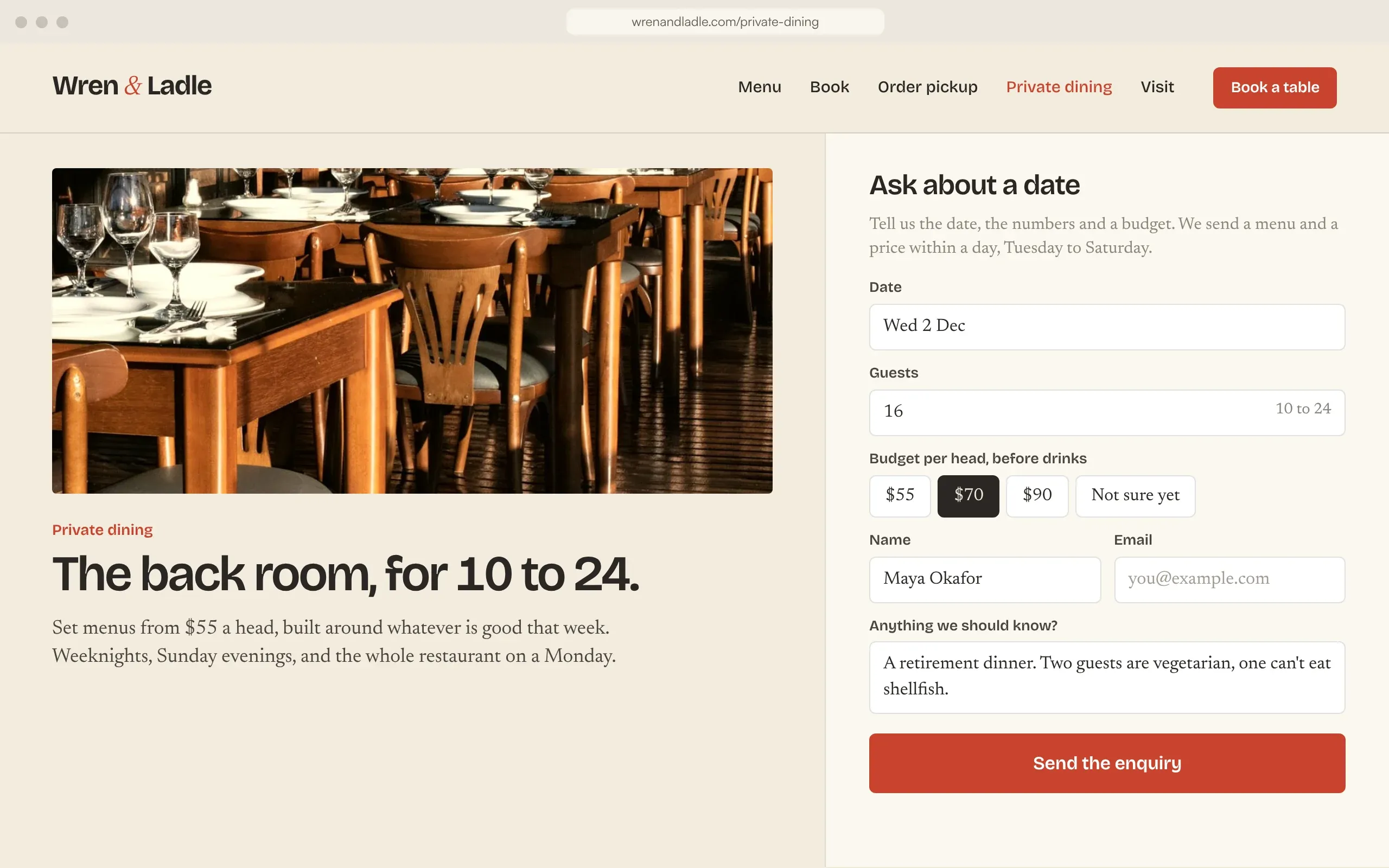
Wren & Ladle private dining page: a photo of the back room and an enquiry form asking for date, guests, budget per head and dietary notes
I put up Tuesday's menu in four minutes, three new dishes and their allergen letters included.
Dana KowalczykOwner, Wren & Ladle
Pickup orders print at the bar with the allergy note on top, so I read it before the kitchen does.
Theo MarshFront of house, Wren & Ladle

What we charge for a restaurant site

One price for restaurant website design and build, set in writing once we've seen your menu and how you take orders. Ordering providers, card processing and couriers bill you directly; we never add a margin on them.

Build

Half at the start, half at launch

Essentials

Bookings by phone or one booking link

from
$1,400
  • Up to 5 pages, built for phones first
  • Menu written as text, with an allergen key by each dish
  • Hours, map and tap-to-call at the top of the page
  • Your booking link on the site and on Google
  • On-page and technical SEO
Book a call →

Restaurant Growth

Moving your regulars off the apps

from
$2,800
  • Everything in Essentials
  • Menu as editable content, with sold-out flags
  • Pickup ordering connected to your POS or ordering provider
  • Google food-ordering and booking links set as preferred
  • Table QR codes that open the web menu
  • A training call for whoever edits the menu
Book a call →

Custom

Several locations, catering or gift cards

from
$4,600
  • Design drawn for your brand
  • Menus and hours per location
  • Integrations: POS, gift cards, catering enquiries
  • Moving content and links from your current site
Book a call →

After launch

Optional, monthly

Care

$69/month

Hosting, tested updates and backups. Menu edits stay yours to make, any time.

  • Managed hosting
  • Daily backups
  • Updates tested on a copy first
  • Uptime monitoring

Care Plus

$169/month

Care, plus up to two hours of changes a month: a new season's menu, holiday hours on the site and the Google listing, a private-dining form.

  • Everything in Care
  • Up to 2 hours of edits a month
  • Card processing (Stripe US: 2.9% + 30¢ a payment), your ordering provider or POS, couriers and any reservation tool are paid to those companies.
  • Paying in rupees? Our web development in India page lists INR prices.
Prices in USD, before local tax.Book a free 20-min call →
All articles →

Still paying a cut to the delivery apps?

What should a website for a restaurant include?

Today's hours, the address with a map link, the menu as text with prices, a way to book, a way to order pickup and a phone number that dials when tapped. All six belong on the first screen of a phone; the story, photos and private dining come below.

How much does a restaurant website cost?

With us, from $1,400 for menu, hours, location and a booking link, and from $2,800 with your own pickup ordering linked from Google. Website builders cost less if you're happy to build the site and keep it up to date yourself.

Can I take online orders without DoorDash or Uber Eats commission?

Yes, through an ordering page you own. You pay the card processor (Stripe US charges 2.9% + 30¢ a payment), not 15 to 30% commission. Delivery adds drivers to the bill, so pickup is the usual first step.

Should my restaurant menu be a PDF?

Not on its own. A menu written as text loads faster on phones, can be read by Google and by screen readers, and one price can change without anyone redesigning a file. Keep the PDF as a printable download if you like it.

How do I add an order button to my Google listing?

In your Google Business Profile, open Food ordering, add the link to your ordering page and mark it as preferred for pickup or delivery. You can hide providers you no longer use there too. We do this as part of setup.

Do I need allergen information on my website?

In the UK, the Food Standards Agency expects allergen details before the order and again on delivery, a click at most from the menu. Rules elsewhere differ. We put an allergen key on every dish whatever the country.

Can I update the menu myself?

Yes. Dishes, descriptions, prices, allergen letters and the sold-out flag are separate fields you edit from a phone or laptop, and the change shows on the menu page and the ordering page at once.

Is a website builder better for a small restaurant?

If you have the time and don't need your own ordering, a builder such as Squarespace or Wix is fine and costs less. We're for owners who want their own ordering link preferred on Google, a menu Google can read, and nobody on their side maintaining the site.

Sources: DoorDash merchant pricing (US), read 11 Nov 2026; Uber Eats merchant pricing (US), read 11 Nov 2026; Stripe pricing; NYC DCWP fee-cap flyer, April 2026; Google Business Profile Help: food ordering; Google Business Profile Help: ordering providers; Google Business Profile Help: booking links; FSA distance-selling guidance (allergens); CIEH: allergen responsibilities for food sold online; Pennsylvania Department of Revenue: local sales tax.

Book a call →

Last month's app statement already shows what your regulars cost you.

On a 20-minute call we compare it with the card fee on your own pickup page, and quote the build in writing.

Free 20-min call
Your own ordering page, linked from Google.Book a call →