How to make an invoice in 4 steps
- 1
Pick your tax preset (India GST, EU/NL VAT, UAE VAT or simple tax) and your currency.
- 2
Add your business details and logo once. They are remembered in this browser for next time.
- 3
Fill in the client, invoice number, dates and line items. Totals, tax and the amount in words update as you type.
- 4
Choose a template, add your signature and a payment QR, then download the PDF or share it.
What every invoice must include
Rules differ by country, but almost every tax authority expects the same core details. If one is missing, your client's accounts team will usually send the invoice back.
- Your business name, address and tax number (GSTIN, VAT number, TRN or EIN where you have one).
- The client's name and address, plus their tax number for business-to-business sales.
- A unique, sequential invoice number and the invoice date.
- A description, quantity and price for each item or service.
- The tax rate and tax amount per rate, and the total payable.
- Payment terms: due date, bank details and any late fee.
Download invoice format in Excel, Word and PDF
Want a blank invoice to keep on your computer? Download a simple invoice format below. The Excel invoice multiplies quantity by rate, adds tax at the rate you type and shows the balance due; the Word file is an editable A4 invoice. For a GST tax invoice with CGST/SGST or IGST, use the GST invoice format instead.
- Download invoice format in Excel (.xlsx)Excel · 10 KB
15 item rows, tax %, discount, deposit and balance due. Works in Excel and Google Sheets.
- Download invoice format in Word (.docx)Word · 38 KB
Editable A4 invoice with payment details and a signature line.
- Download invoice format in PDFPDF · 57 KB
Blank, print-ready A4 invoice.
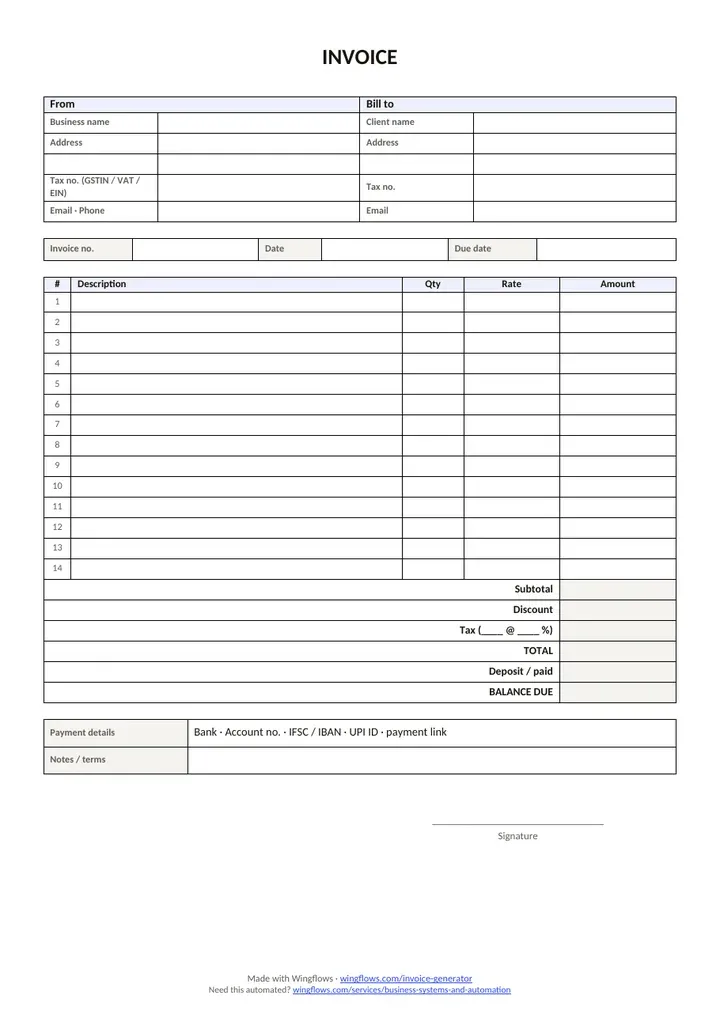
Free to use and share. No sign-up, no email. A4, with a small Wingflows credit in the footer.
Invoice, quotation, receipt or proforma?
| Document | When you send it | What it does |
|---|---|---|
| Quotation | Before the work | Offers a price for a fixed time. Not a demand for payment. |
| Proforma invoice | Before delivery | A preview of the final invoice, often for advance payment or customs. |
| Invoice | After delivery | Asks for payment and is the record for tax. |
| Receipt | After payment | Confirms the money arrived. |
This tool makes quotations and invoices. Start with a quote, and convert it to an invoice in one click when the client says yes.
Tax, currency and payment options
- India GST: GSTIN, HSN/SAC per item, place of supply, and CGST + SGST or IGST worked out from the two state codes.
- EU / Netherlands VAT: 21%, 9% or 0%, KVK number, and the small business scheme (KOR) note when you charge no VAT.
- UAE VAT: the "Tax Invoice" heading, your TRN, 5% VAT and the VAT amount in AED when you bill in another currency.
- Simple tax: name any tax (like US sales tax) and set its rate, or leave it at zero.
- Six currencies with the right symbol and number format, including Indian lakh/crore grouping for rupees.
- Payment QR codes: a UPI QR for rupee invoices and a SEPA (EPC) QR for euro invoices, with the details printed as text too.
Invoice numbering, due dates and late fees
Use one numbering series and never skip or reuse a number. A format like INV-2026-001 works everywhere: it sorts well and shows the year. The tool suggests the next number each time you download.
Set a due date on every invoice. Net 14 or Net 30 (14 or 30 days after the invoice date) is common. If you charge a late fee, say so on the invoice, for example: "Payments after the due date incur a 1.5% monthly fee."
When a free generator isn't enough
If you send more than a handful of invoices a week, typing them one by one costs real time. Invoicing that pulls from your orders, sends reminders on its own and feeds your GST or VAT reports needs a small system behind it. We build those as part of custom ERP and automation work.
Free invoice generator vs accounting software
| This free tool | Accounting software | |
|---|---|---|
| Cost | Free | Monthly subscription |
| Sign-up | None | Account required |
| Where data lives | Only in your browser | On the vendor's servers |
| Reminders and reports | No | Yes |
| Best for | A few invoices a month | Regular invoicing and bookkeeping |
If you send a handful of invoices a month, a generator is enough. Once you need reminders, bank matching and tax reports, move to accounting software or a custom system.
How to write a good item description
The description line is where most invoices get queried. Your client's accounts team often wasn't in the project meetings, so write for someone who has never heard of the work.
Name the deliverable, the period or the quantity, and anything that changes the price. "Website design — homepage and 4 inner pages, 2 revision rounds" is clearer than "Web work". For hourly work, say what the hours were for and when they happened, for example "Bug fixes, 3–14 Nov".
If the client gave you a purchase order (PO) number, put it in the notes or the description. Larger companies often can't pay an invoice that doesn't quote their PO.
Sending your invoice and getting paid
- Send the PDF the same day you finish the work, while it's fresh in the client's mind.
- Use a clear email subject: invoice number, your business name and the amount.
- Address it to whoever approves payment, not only your day-to-day contact.
- Put the due date in the email body as well as on the invoice.
- Follow up politely a few days before the due date, and again the day after it passes.
- Keep a copy of every invoice you send. The tool saves your last draft in this browser, but the PDF is your record.
Your data stays on your device
Everything you type is processed in your browser. The PDF is built on your device and nothing is uploaded to Wingflows. Your business details and last draft are saved in this browser's local storage so you don't have to retype them; clearing your browser data removes them. On a shared computer, use a private window.
Choosing a template
Clean suits most businesses: a thin accent line and lots of white space. Bold puts your brand colour in a header band, good for studios and agencies. Minimal is black and white and prints well on any office printer. Classic draws a bordered table, which many accounts teams in India and the Middle East are used to. All four contain exactly the same information, so pick the one that matches your brand.
Sample invoice, worked through
Here is what a finished invoice looks like for a freelance designer billing a US client, with a deposit already paid. The tool does this maths for you.
| Description | Qty | Rate | Amount |
|---|---|---|---|
| Brand identity design | 1 | 1,800.00 | $1,800.00 |
| Design consulting (hrs) | 6 | 95.00 | $570.00 |
- Subtotal
- $2,370.00
- Discount 5%
- -$118.50
- Total
- $2,251.50
- Deposit received
- -$1,000.00
- Balance due
- $1,251.50
Common invoicing mistakes (and how to avoid them)
- Reusing or skipping numbers. Tax offices expect one unbroken series. Let the tool suggest the next number.
- No due date. "Payable on receipt" is easy to ignore. Pick Net 14 or Net 30 so the date is printed.
- Missing tax numbers. A GSTIN, btw-id or TRN that is missing or mistyped can make the invoice invalid for your client's tax return.
- Vague descriptions. "Services" gets queried. "Homepage design, 2 revision rounds" gets paid.
- Sending a Word file. Editable files can be changed. Send a PDF.
- Forgetting how to pay. Put bank details, a UPI/SEPA QR or a payment link on the invoice itself.
Invoices for your country
- GST invoiceGSTIN, HSN/SAC, CGST/SGST or IGST and amount in words.
- Freelance invoiceHourly or fixed fee, deposits and late fees.
- UAE tax invoiceTRN, 5% VAT and VAT shown in AED.
- Factuur maken (Netherlands)Dutch invoice with btw, KVK number and KOR.
Document types
- Delivery challanRule 55 challan with Original, Duplicate and Triplicate copies and an e-way bill check.
- Cash memoShop bill paid on the spot: Cash, UPI or Card, with a UPI QR.
Sending a price first? Use the quotation maker. For a payment QR on its own, try the UPI QR code generator. Need invoicing that runs itself? See our services or book a call.