How to make a cash memo
- 1
Add your shop name, address and phone (and your GSTIN if you are registered).
- 2
Add the customer's name if you like (it's optional), then check the memo number and date.
- 3
List the items with quantity and rate. The amounts, total and amount in words fill in as you type.
- 4
Pick the payment mode (Cash, UPI or Card), add your signature, then download the PDF or print it.
What is a cash memo?
A cash memo is a written record of a sale that is paid for at the time of purchase. It lists what was bought, the quantity, the rate and the total, and confirms that the money has been received. For the buyer it is proof of purchase; for the seller it is a record of the day's sales.
Cash memos are common in Indian retail: stationery shops, hardware stores, medical shops, small restaurants and market stalls hand one over with each sale. Shopkeepers also call it a cash bill. Despite the name, the same memo works for UPI and card payments; only the payment mode changes.
Download a blank cash memo format (Word, Excel, PDF)
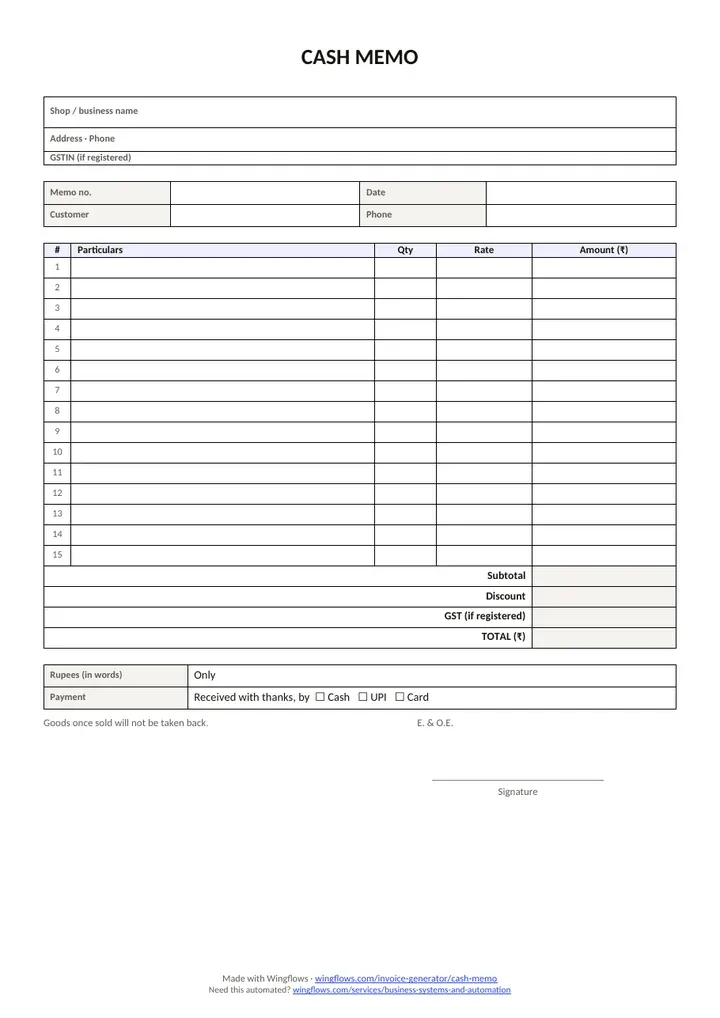
Need a cash bill format to keep at the counter? Download a blank cash memo below. Free, no sign-up, no email gate.
The Excel cash memo multiplies quantity by rate, takes off a discount and adds an optional GST column, with a payment-mode dropdown (Cash, UPI, Card). The PDF has two memos on one A4 sheet, so you can cut it in half and write by hand.
- Download cash memo format in Excel (.xlsx)Excel · 10 KB
15 item rows, automatic totals, optional GST %, payment-mode dropdown. Works in Excel and Google Sheets.
- Download cash memo format in Word (.docx)Word · 38 KB
Editable A4 cash memo with your shop details, item table, total and signature line.
- Download cash memo format in PDFPDF · 76 KB
Blank, handwriting-friendly: two cash memos per A4 sheet.
Free to use and share. No sign-up, no email. A4, with a small Wingflows credit in the footer.
Cash memo format: what to include
- Your shop or business name, address and phone number, and your GSTIN if you are registered.
- A memo number from one unbroken series, and the date.
- The customer's name (optional for walk-in customers).
- Each item with quantity, rate and amount.
- Subtotal, any discount, and the total.
- The total in words, so it can't be altered easily.
- How it was paid: cash, UPI or card, with "Received with thanks".
- "E. & O.E." (errors and omissions excepted) and your signature.
- Optional: "Goods once sold will not be taken back", if that is your shop's policy.
Cash memo vs tax invoice vs bill of supply vs delivery challan
| Document | Used when | Shows price | Shows GST |
|---|---|---|---|
| Cash memo | Sale paid on the spot, often by an unregistered shop | Yes | Only if the seller is registered (then issue a tax invoice) |
| Tax invoice | Taxable sale by a GST-registered seller | Yes | Yes |
| Bill of supply | Composition dealer, or exempt goods | Yes | No |
| Delivery challan | Goods move without a sale (job work, repair, approval) | Value only | Only if the movement is a supply |
See also: Delivery challan maker · GST invoice generator
Is a cash memo valid under GST?
"Cash memo" is a shop term, not a document named in the GST law. What matters is what the memo carries. A GST-registered seller of taxable goods must issue a tax invoice with the particulars listed in CGST Rule 46: GSTIN, a serial number of up to 16 characters, HSN code, taxable value, tax rate and amount, place of supply for inter-State sales, and so on. A memo that carries all of those fields counts as a tax invoice; a plain memo without them does not.
If you are not registered for GST, you cannot charge GST, and a plain cash memo is the normal record of a sale. Composition dealers and sellers of exempt goods issue a bill of supply. For small sales to unregistered customers who don't ask for an invoice, Rule 46 also lets a registered seller issue one consolidated tax invoice at the close of each day for those sales; check the current conditions before relying on it.
In the maker, switch on "I'm GST-registered" and you get a clear note and a one-click switch to a GST tax invoice, with your items carried across.
See also: Make a GST tax invoice
Cash memo, receipt or bill: which word to use?
In everyday Indian trade, "cash memo", "cash bill" and "bill" usually mean the same thing: a document handed over at the counter that lists the goods and the amount paid. A receipt is narrower. It only confirms that money was received, often against an earlier invoice, and doesn't need to list the items.
If the customer pays on the spot, one cash memo does both jobs: it describes the sale and confirms the payment, which is why it carries "Received with thanks". If the customer pays later, send an invoice with a due date first, and issue a receipt when the money arrives.
See also: Invoice generator
Filling in a cash memo by hand
The PDF format has two cash memos on one A4 sheet, so you can print a stack, cut each sheet in half and keep them at the counter. Write the memo number before you use each one, so the numbers run in order even when two people are billing.
Write the total in words as well as in figures, strike through empty rows so nothing can be added later, and tick the payment mode. Keep a carbon copy or photograph each memo, and enter the day's memos in your sales book or accounting software in one go at closing time.
Cash memo for UPI and card payments
Most counter sales are now paid by UPI. Pick "UPI" as the payment mode and add your UPI ID: the memo then shows a UPI QR with the exact amount, which the customer can scan from any UPI app. The memo prints "Received with thanks … by UPI", so it doubles as a payment receipt.
For card payments choose "Card". If you want a standalone QR for your counter, make one with the UPI QR code generator and print it.
See also: UPI QR code generator
Keeping cash memos organised
Start a fresh series each financial year (for example 2026-27/0001) and never skip or reuse a number. Keep the duplicate or a PDF copy of every memo, and total them once a month so the sales in your books match the memos you issued.
Once you issue dozens of memos a day, retyping them into your accounts takes hours. A billing system that records each sale once and feeds your books and GST returns saves that time; that is the kind of system we build in our business systems and automation work.
See also: Business systems and automation · How to automate your accounting process
Sample cash memo, worked through
Sharma Stationers in Kolkata is not GST-registered, so it issues a plain cash memo with no GST.
| Item | Qty | Rate | Amount |
|---|---|---|---|
| Notebook A4 | 10 | 60 | ₹600.00 |
| Ball pens (box) | 2 | 120 | ₹240.00 |
| Geometry box | 3 | 85 | ₹255.00 |
- Subtotal
- ₹1,095.00
- Discount
- -₹45.00
- Total
- ₹1,050.00
Common cash memo mistakes
- Skipping or reusing numbers. Keep one unbroken series per financial year; gaps raise questions when your books are checked.
- Totals that don't match. Let the tool add the lines and the discount so the figures and the words agree.
- A plain memo when a tax invoice is required. Registered sellers of taxable goods need the Rule 46 fields. Switch to a tax invoice in one click.
- No date or signature. Without them the memo is weak proof for either side.
- No duplicate copy. Keep a carbon copy or the PDF of every memo for your records.
- Mixing GST and non-GST items. If you are registered, put taxable and exempt items on the right document instead of one plain memo.
Related: GST invoice generator · Delivery challan maker · Online quotation maker · All-in-one invoice generator · UPI QR code generator · Automating your accounting
Sources: CBIC: CGST Rule 46 (tax invoice) · CBIC: CGST Rule 55 (delivery challan)