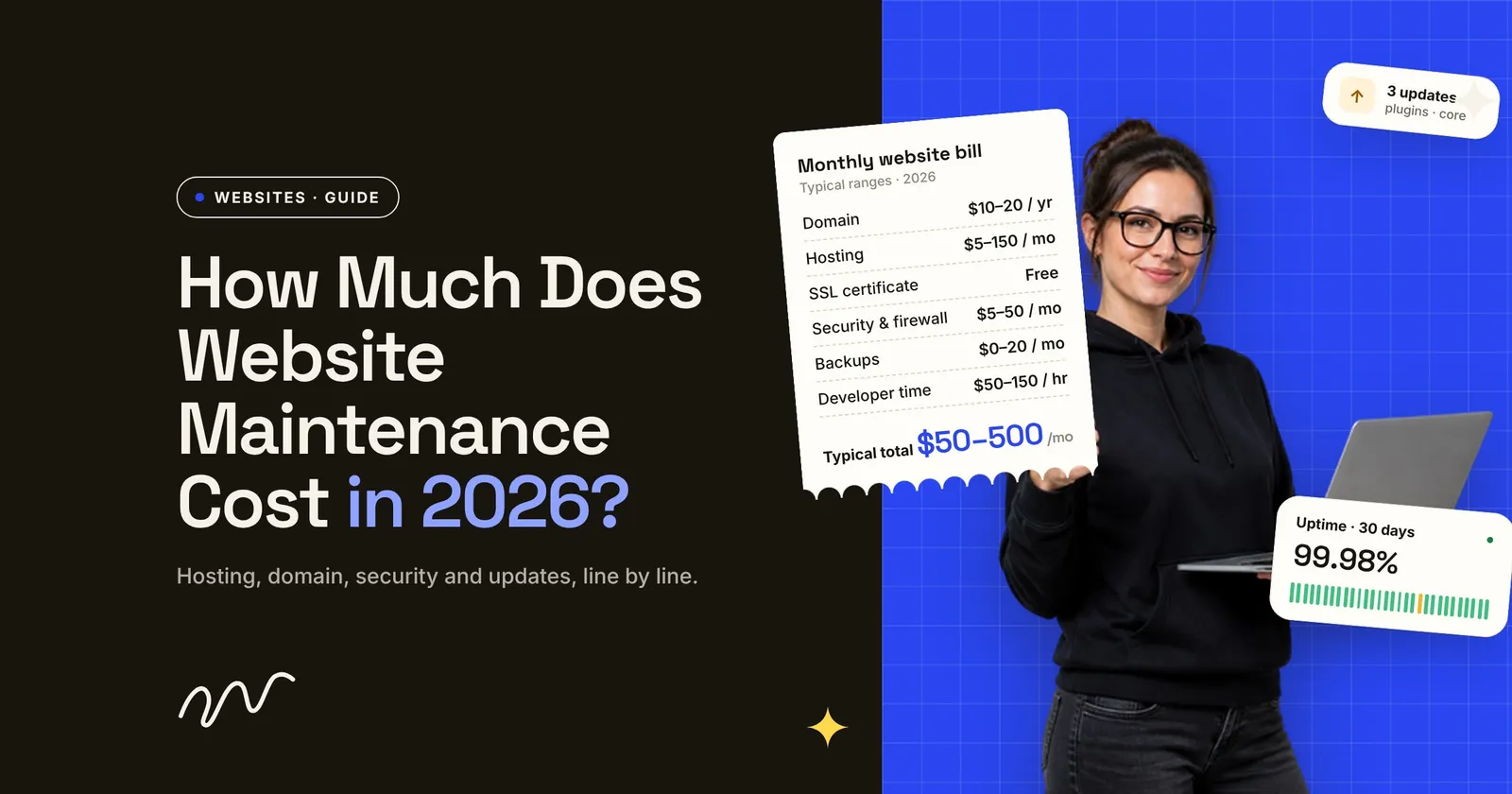
How much does website maintenance cost? For a small business site, published price guides put it at roughly $50 to $500 a month. The tools themselves (hosting, domain, security, backups) are a small part of that. Most of the spread comes from one line: the hours someone spends updating, fixing and checking the site.
This guide is for owners and ops leads who pay for a website, or are about to. It breaks the bill down line by line, shows where the published ranges come from, flags the 2026 changes that will affect what you pay, and ends with a 30-minute check you can run on your own setup today.
I maintain client websites after launch, and many sites I take over come from another builder: too many plugins, a subscription the owner can’t leave, or a domain in the builder’s name. This guide is what I’d want every owner to know before paying for maintenance.
Key takeaways
- Price guides put small business website maintenance at about $50–$500 a month. These are vendor estimates, not survey data, and they disagree with each other.
- The tools are cheap. In our calculation from one guide’s ranges, they total about $130–$3,520 a year. The hours for updates and fixes are what make a bill large.
- Patching can’t wait for a monthly visit. In Patchstack’s 2025 data, the weighted median time to first exploit for heavily targeted WordPress flaws was 5 hours.
- Two dates matter now: PHP 8.2 loses security support on 31 December 2026, and SSL certificate lifetimes drop to 100 days in March 2027.
How much does website maintenance cost per month?
The two price guides we compared put a small business website in a similar zone: tens to a few hundred dollars a month. Online stores and custom sites cost more because there is more to keep working. The figures below are estimates published by two companies that sell websites and maintenance. Neither explains how it arrived at its ranges, so treat them as a starting point, not a benchmark.
Sources: GoDaddy (published April 2026, updated July 2026) and WebFX (last updated December 2025). Both are commercial price guides, and their numbers are estimates.
Notice the ecommerce row: WebFX’s low end is above GoDaddy’s high end. The ranges are this far apart because “maintenance” means different things to different sellers. To one it’s hosting plus automatic backups. To another it’s a monthly retainer with a developer on call. So before you compare two quotes, check what each one includes.
What you’re paying for, line by line
A maintenance bill is made of a handful of recurring items. Here is GoDaddy’s estimate for each, with a note on what actually drives the price.
Source: GoDaddy, estimates. For context on that last line, the median wage for web developers and digital designers in the US was $47.85 an hour in May 2025 (US Bureau of Labor Statistics). That’s a wage, not a billing rate: a freelancer or agency also covers tools, insurance and unbilled time, which is why quoted rates sit higher.
Content work (new pages, blog posts, photos) is usually priced separately, per piece or per hour. It isn’t maintenance in the strict sense, but it often ends up on the same invoice. Ask for it as a separate line.
Our calculation: what a small business site costs per year
To see where the money goes, we added up GoDaddy’s per-item ranges for a typical small business site: one domain, shared or managed hosting, a free certificate, security tools, backups, monitoring and CMS tools such as paid plugins. This is our own arithmetic on one published estimate, not survey data.
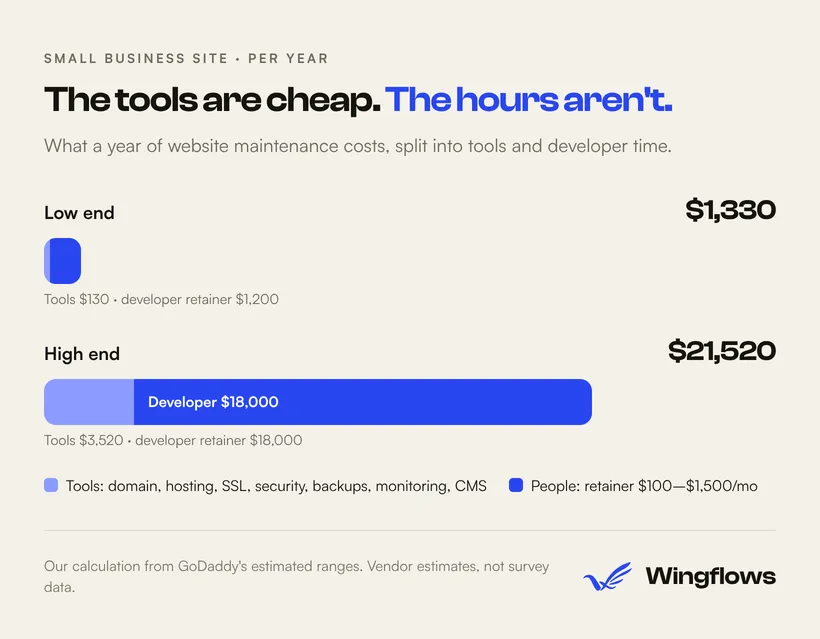
Calculated from the item ranges in GoDaddy’s guide. The “+” on GoDaddy’s upper figures means the real high end can go further.
Two things stand out:
- The labor line is at least five times the tools line, at both ends (about 9x at the low end, 5x at the high end). If your bill is high, the question to ask is how many hours you’re paying for, and for what.
- Your tool costs often overlap. A managed host that includes backups, a firewall and monitoring can replace three separate subscriptions. If you’re paying for both, it’s easy to fix.
Why updates are the line you shouldn’t cut
Many small business sites run on WordPress, and in that ecosystem most newly reported vulnerabilities are in plugins. Patchstack’s report on 2025 counts 11,334 new vulnerabilities in the WordPress ecosystem, 42% more than in 2024. Of those, 91% were in plugins and 9% in themes; WordPress core had only six, all low priority (Patchstack).
Two more numbers from the same report matter for how you buy maintenance:
- 46% of vulnerabilities had no fix from the developer in time for public disclosure. Updating isn’t always possible, so someone has to decide whether to disable or replace a plugin.
- For heavily targeted vulnerabilities, the weighted median time to first exploit was 5 hours. Patchstack also reports that about half of high-impact vulnerabilities are exploited within 24 hours.
A plan where someone logs in once a month to click “update all” doesn’t match that timeline. What does:
- Turn on automatic updates for plugins you trust. Since WordPress 5.5, administrators can opt in plugin by plugin and theme by theme. WordPress then emails you when an update succeeds or fails (WordPress.org). Make sure those emails reach a person.
- Use fewer plugins. Every plugin you remove is one less thing to patch, renew and pay for.
- Pay for judgment, not clicks. Good maintenance hours go to the cases automation can’t handle: a plugin with no fix, an update that breaks a form, a backup that won’t restore.
If your site isn’t on WordPress, the same logic applies to whatever it runs on. A site built with a static framework has far less running on the server to patch, which is one reason we build many sites that way (Astro development).
Two 2026 deadlines that change your maintenance bill
PHP 8.2 loses security support on 31 December 2026
PHP is the language WordPress runs on. Each PHP release branch gets two years of full support, then security fixes only, then reaches end of life. PHP 8.2’s security support ends on 31 December 2026; 8.3 is supported until the end of 2027 (PHP.net). WordPress recommends PHP 8.3 or greater and warns that older versions “have reached their official End Of Life and may expose your site to security vulnerabilities” (WordPress.org).
Switching PHP versions in your hosting panel takes a minute. Finding out that an old plugin or theme breaks on the new version can take much longer. Budget a few hours of developer time to test the switch on a staging copy first, and if your site is on 8.2 or older, do it before the end of the year.
SSL certificates are getting shorter lifetimes
The CA/Browser Forum, the group of certificate authorities and browser makers that sets the rules for SSL certificates, approved a phased cut in how long a certificate can be valid. The maximum went to 200 days on 15 March 2026, drops to 100 days on 15 March 2027 and to 47 days on 15 March 2029 (DNSimple).
If your certificate renews automatically through your host, nothing changes for you. If someone renews and installs it by hand each year, that job will soon come round several times a year. An expired certificate puts a browser warning in front of every visitor. Ask your host or developer now whether renewal is automatic.
How to check your own website maintenance bill in 30 minutes

You don’t need a developer for this. You need your invoices, your hosting login and half an hour.
List every recurring charge. Domain, hosting, email, plugin and theme licenses, backup or security services, and any retainer. Note what each costs per year and when it renews.
Cross out duplicates. If your hosting plan already includes backups, a firewall or monitoring, you may be paying twice.
Check who owns the domain. The registrar account should be in your company's name, with your email, not only your developer's. Compare the renewal price with an at-cost registrar such as Cloudflare Registrar, which says it charges only the registry and ICANN fees, with no markup.
Check your PHP version. In WordPress, go to Tools → Site Health → Info → Server. If it shows 8.2 or lower, plan the upgrade before 31 December 2026.
Ask for the last backup and the last restore test. A backup nobody has restored is a guess. CISA advises keeping backups separate from your main systems, being able to roll back at least seven days, and running scheduled recovery tests.
Get the retainer's scope in writing. How many hours, what response time, what counts as maintenance and what is billed extra. Unused hours that don't roll over are a cost too.
The CISA guidance in step 5 is on its Back Up Business Data page.
When you finish, you’ll know three things: what you pay for tools, what you pay for people, and what nobody is doing. That last list is usually the most useful.
When to stop paying for maintenance and rebuild
Sometimes the maintenance bill is the symptom. Signs a rebuild is cheaper over the next few years than keeping the current site alive:
- The site depends on a plugin or theme that is no longer updated, and nothing replaces it cleanly.
- It can’t move to a supported PHP version without breaking.
- Small changes (a new page, a form field) need a developer every time.
- You pay for a page builder plus a dozen add-ons to do what a simpler site does out of the box.
A rebuild isn’t free either, so compare it with what you expect to spend on maintenance and fixes over the same period. If you’re weighing a rebuild, our website development and WordPress development pages explain how we approach both options, and our portfolio shows recent builds.
Frequently asked questions
Is website maintenance really necessary?
Yes, if your site runs software such as WordPress, plugins or a database: new vulnerabilities appear every week, as the Patchstack figures above show. A static site or a hosted builder needs less, but the domain, content and forms still need checking.
How much should a small business pay for website maintenance per month?
Price guides estimate roughly $35–$500 a month. The tools alone come to about $130–$3,520 a year in our calculation; the rest pays for someone’s time.
What does website maintenance include?
Usually hosting, domain renewal, the SSL certificate, software and plugin updates, security scanning, backups and uptime monitoring. Developer time for fixes and small changes may be included or billed by the hour. Content work such as new pages or blog posts is often priced separately, so ask for it as its own line.
Can I maintain my website myself?
Many owners can handle the routine part: turning on automatic updates, reading the update emails, renewing the domain and checking that forms work. Where help pays off is the exceptions: a plugin with no fix, an update that breaks the site, a PHP upgrade, or a restore after a problem.
Do Wix or Squarespace sites need maintenance?
Less of it. On hosted builders like Wix and Squarespace, the platform generally handles hosting, security patches and SSL certificates for you as part of the monthly plan price. You still own the domain renewal, the content, and checking that forms and integrations work. You also have less control over speed and how far you can customize the site.
Want a second opinion on your website bill?
If you’ve run the 30-minute check and something doesn’t add up, or you’re deciding between maintaining and rebuilding, talk to us. We’ll look at what you pay and tell you plainly what it covers. Agencies that want a build or maintenance partner can use the same page.