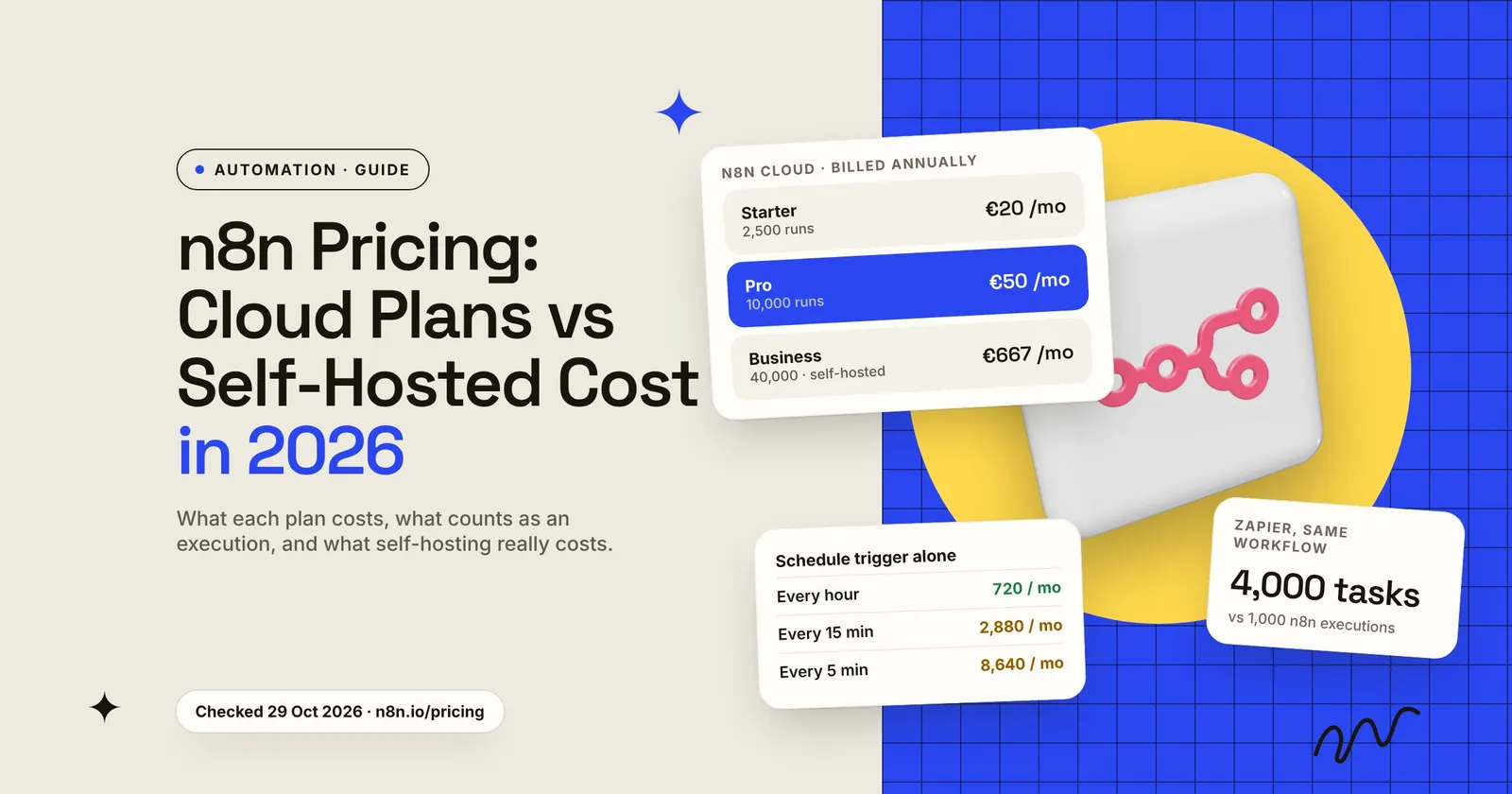
n8n is a workflow automation tool that connects your apps and runs multi-step tasks for you. n8n pricing comes down to two choices. You can pay n8n to host it, from €20 a month (Starter, billed annually), or you can run it on your own server. The self-hosted Community edition has no plan price, but you pay for the server and, more importantly, for someone’s time to keep it updated and secure. n8n’s paid self-hosted plan, Business, starts at €667 a month billed annually.
If you are an owner or ops lead deciding how to run n8n, the parts that matter are how executions are counted, what self-hosting costs once you count the hours, and what the licence allows. There is a 20-minute check at the end to run on your own workflows before you choose a plan.
I run n8n for my own automations, so I know what setup, updates and the server cost in practice. This guide is what I’d tell a business before it picks Cloud or self-hosting.
Key takeaways
- n8n Cloud costs €20 a month (Starter, 2,500 executions) or €50 a month (Pro, 10,000 executions), billed annually. Business is self-hosted only, at €667 a month billed annually for 40,000 executions.
- You pay per execution: one full run of a workflow, however many steps it has. Manual test runs, sub-workflow calls and error workflows don’t count.
- A Schedule Trigger that fires every 15 minutes uses about 2,880 executions a month on its own. That is more than the Starter plan includes.
- Self-hosting the Community edition has no plan price, but you own the server, updates and security. In January 2026, two n8n vulnerabilities were rated CVSS 10.0, the maximum score.
n8n pricing at a glance (2026)
These are the plans on n8n’s pricing page as we checked them on 29 October 2026. The page listed prices in euros when we checked and showed annual billing; it may show a different currency where you are. It also has a monthly billing option, but it didn’t show those prices when we checked.
Source: n8n pricing page, checked 29 October 2026. The Business plan’s hosted version was listed as “Not yet” available, with a waitlist.
A few details from the same page that change what you pay:
- Users and workflows are unlimited on every plan. n8n removed its active-workflow limits in August 2025 and moved to charging by runs (n8n community announcement).
- Concurrency differs. Starter runs 5 executions at the same time. The Pro card says “up to 50”, while the comparison table lists “20 / 50”. If you get bursts of webhooks at once, check this before you buy.
- Log retention differs. Starter keeps execution logs for 7 days, Pro for 30. If you need to look back at what a workflow did last month, Starter won’t show it.
- Startup discount: companies under 20 employees can apply for the Startup plan, which n8n describes as 50% off Business.
What counts as an execution in n8n?
n8n defines an execution as “a single run of a workflow” (n8n docs). The pricing page adds that the number of steps and the amount of data don’t matter: a two-step workflow and a forty-step workflow each count once per run.
Not every run counts. According to the same docs page:
- Only production executions count: runs started by triggers, schedules or polling.
- Manual executions don’t count. Runs you start from the editor while building or testing are free.
- Sub-workflows don’t count separately. When one workflow calls another, only the parent run counts.
- Error workflows don’t count. A workflow that runs because another one failed is excluded.
How each trigger counts changes the bill. The same docs page explains: a Schedule Trigger counts every time it fires. A polling trigger counts only when it finds new data. A Webhook Trigger counts for each inbound request, including empty ones.
Executions vs Zapier tasks: our comparison
This is where n8n’s model differs most from Zapier. Zapier bills tasks, and “a task is any successful action that runs in Zapier”. The trigger is free, but each action step uses one task (Zapier Help Center).
Take one workflow: a trigger plus four action steps (say, a new form entry is checked, added to the CRM, logged in a sheet and posted to Slack), running 1,000 times a month. Applying each vendor’s own definition:
This is our calculation from the two vendors’ published definitions, not a price comparison. The longer your workflows, the bigger this gap gets.
How many executions do you need?
Count runs rather than workflows. For each active workflow, estimate how often its trigger fires in a month, then add them up. Scheduled workflows are the ones that surprise people, because they count even when there is nothing to do.
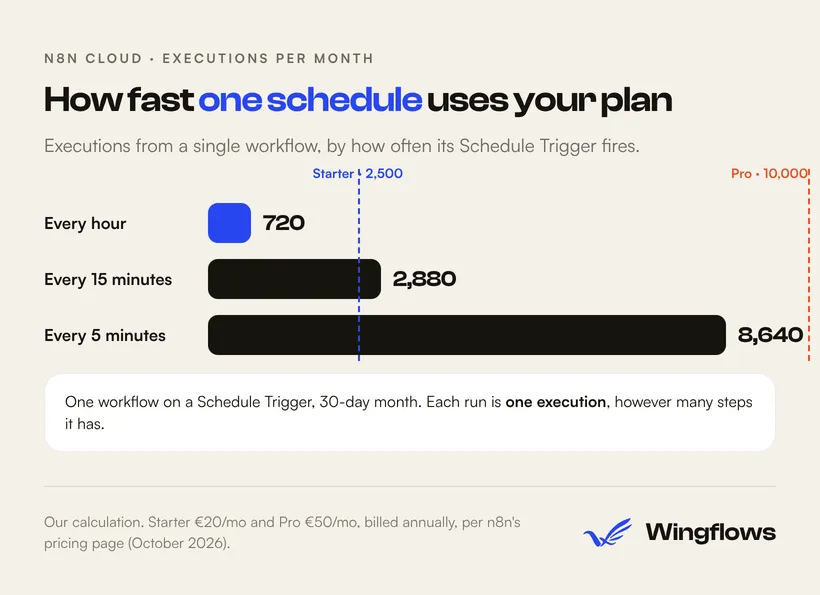
Our calculation: runs per day × 30.
One workflow checking something every five minutes uses most of a Pro plan by itself. Two practical fixes:
- Use a webhook where the other app supports one. A webhook fires only when something happens, so you stop paying for empty checks.
- Use a polling trigger instead of a timer where you can. Polling triggers only count when they find new data.
If you go over, what happens depends on the plan. The comparison table lists overage fees as “Capped” for Starter and Pro; the page doesn’t explain what happens to your workflows at the cap, so ask n8n before you rely on it. For Business and Enterprise, n8n says workflows “will continue running without interruption, but overage charges may apply if you do not upgrade to the next usage tier”, and that its sales team will contact you when you get close (n8n pricing FAQ).
Self-hosted n8n pricing: what it really costs
The self-hosted Community edition is available on GitHub, and n8n’s pricing page lists no plan price for it. That makes it look free. You pay in three places.
1. The server
You need a machine to run it on. As one reference point, Hetzner’s CX23, the cheapest cloud server type in its current price list, costs €5.49 a month (excluding VAT, German and Finnish locations) after its price adjustment of 15 June 2026 (Hetzner Docs). That is about €66 a year. Bigger workloads need bigger servers, and you may want a separate database: n8n uses SQLite by default and also supports PostgreSQL (n8n docs).
2. Your time: setup, updates and security
n8n’s own comparison says self-hosting needs technical knowledge for installation and configuration, that you must “provide and manage infrastructure”, and that maintenance is your responsibility. For people without that expertise, it points to n8n Cloud instead (n8n docs: Choose your n8n).
Updates are part of the cost. In January 2026, Belgium’s national cybersecurity centre warned about two critical n8n vulnerabilities, CVE-2026-21877 and CVE-2026-21858, both rated CVSS 10.0. It advised patching to the latest version after testing and restricting public webhook and form endpoints (CCB Belgium). An automation server holds the passwords and API keys to your other systems, so a missed patch puts all of them at risk.
To put a number on the hours, here is the median US wage for web developers and digital designers, $47.85 an hour in May 2025 (US Bureau of Labor Statistics), applied to a few levels of monthly upkeep.
Our calculation. This is a wage, not a billing rate; a freelancer or agency charges more because they also cover tools, insurance and unbilled time. How many hours you need depends on how many workflows you run and how quickly you patch. It’s the same pattern as website maintenance costs: the software is cheap, the hours are not.
Even at one hour a month, the wage cost alone ($574 a year) is more than the Starter plan’s €240 a year at any realistic exchange rate. Self-hosting pays off when you already have someone who runs servers, when your volume would push you past the cloud plans, or when your data has to stay on infrastructure you control.
3. Features the Community edition doesn’t have
n8n’s docs list what the Community edition leaves out: custom variables, environments, external secrets, external storage for binary data, log streaming, multi-main mode, projects, SSO, sharing, and version control using Git (n8n docs). Registering for a free licence key unlocks a few extras, such as folders and debugging in the editor.
For one person building internal workflows, none of this may matter. For a team where several people edit workflows, missing sharing, SSO and Git version control is the main reason to consider Business.
The n8n Business plan, self-hosted
Business costs €667 a month billed annually (about €8,000 a year) for 40,000 executions, and n8n’s pricing page lists it as self-hosted only. You get a licence key that you apply to your existing Community instance. The key “must ping our license server daily to stay active” and can be used on an unlimited number of instances, with combined usage counted toward your quota (n8n pricing).
So Business doesn’t remove the server and patching work. It adds team features such as SSO, Git version control and multiple environments on top of the instance you already run. If you’re under 20 employees, check the Startup plan first.
What the n8n licence allows
The Community edition uses n8n’s Sustainable Use License. Its core rule: “You may use or modify the software only for your own internal business purposes or for non-commercial or personal use” (n8n docs).
In plain terms, from the licence FAQ:
- Allowed: running n8n for your own company’s workflows.
- Allowed: offering paid consulting or support, such as building n8n workflows for clients.
- Needs a commercial agreement: offering n8n inside your product so your customers can connect their own accounts and build their own workflows.
If your case falls between these, n8n asks you to contact license@n8n.io. Settle it before you build a product on top of n8n.
Which n8n option should you pick?

- Starter if you’re testing a handful of workflows, have nobody to manage a server, and stay under 2,500 runs a month.
- Pro if workflows run your daily operations, you need 30 days of logs, or scheduled triggers push you past Starter.
- Self-hosted Community if someone on your team already runs servers and will patch promptly, or your data must stay on your own infrastructure.
- Business if several people build workflows and you need SSO, Git version control and separate test and live environments.
Before you pay for any automation tool, check what your existing software already does. Our guide to accounting automation for small businesses shows this for QuickBooks and Xero, and where a tool like n8n fits on top.
A 20-minute check before you choose a plan
List every workflow you plan to run. For each one, write down its trigger: schedule, polling, webhook or app event.
Estimate runs per month. Schedules: runs per day × 30. Webhooks and app events: how many times that thing happens in a normal month. Leave out manual test runs; they don't count.
Add a margin. Busy months, retries and new workflows add up. If your total is close to a plan limit, plan for the next tier.
Swap timers for webhooks where you can. Every schedule that checks for nothing still uses executions.
Name the person who patches. If you self-host, write down who applies updates and how fast. If nobody, choose Cloud.
Check the licence. If customers will use n8n through your product, contact n8n about a commercial agreement before you build.
At the end you’ll have a monthly execution number, a list of team features you need, and an owner for upkeep, which is enough to pick the plan.
Frequently asked questions
Is n8n free?
The self-hosted Community edition has no plan price, and its licence lets you use it for your own internal business purposes. You still pay for the server and the time to run it. n8n Cloud starts at €20 a month on the Starter plan, billed annually.
How much does n8n cost per month?
On n8n’s pricing page in October 2026: Starter €20, Pro €50 and Business €667 a month, each billed annually. Enterprise is priced on request.
Does n8n charge per step or per workflow?
n8n charges per execution, meaning one full run of a workflow. A workflow with 40 steps that runs once uses one execution. Manual test runs, sub-workflow calls and error workflows aren’t counted.
Is self-hosting n8n cheaper than n8n Cloud?
On the invoice, often yes: a small cloud server can cost a few euros a month. Once you count the hours for setup, updates and security, it is usually cheaper only if someone on your team already runs servers, or if your volume is beyond what the cloud plans include.
Can I use n8n to build workflows for clients?
Yes. n8n’s licence FAQ says you can offer paid consulting and support, such as building workflows for clients. Embedding n8n in your own product so your customers build their own workflows needs a commercial agreement with n8n.
Want help choosing or setting up n8n?
If you’ve run the 20-minute check and still aren’t sure whether Cloud or self-hosting fits, talk to us. We build and run n8n workflows for clients, plus workflow automation and business systems for small teams and can tell you plainly what your workflows will cost on each option. Agencies looking for an automation build partner can use the same page.