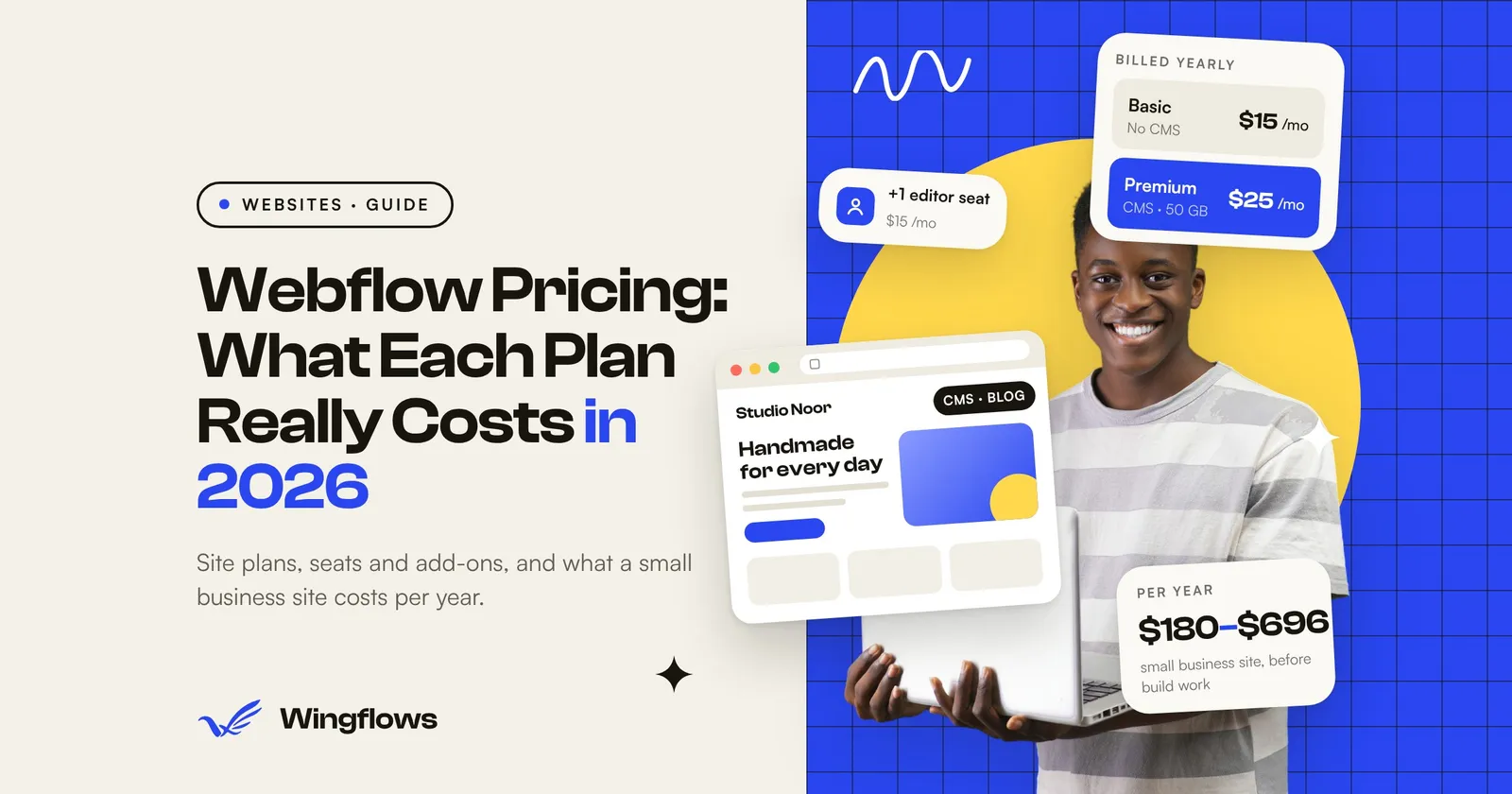
Webflow is a visual website builder that also hosts your site. Webflow pricing has two layers. You pay a Site plan for each published site: $15 a month for Basic or $25 a month for Premium, both billed yearly, plus tax. You pay for Workspace seats only when more people need to build or edit. For most small business sites, the real yearly cost lands between $180 and about $700 before anyone is paid to design or build the site.
Webflow changed its plans in May 2026. The old CMS and Business plans became one Premium plan, and Basic went up. If an agency or freelancer runs your site from their Workspace, your price changes at your next renewal on or after November 16, 2026. This guide covers what each plan costs now, what pushes the bill up, and a 15-minute check to run before you renew or sign up.
I build and maintain websites for small businesses. Some come to me stuck on a platform subscription they can’t easily leave, so before anyone picks a platform, I want them to know what it really costs each year.
Key takeaways
- Basic costs $15 a month and Premium $25 a month, billed yearly, per site, in USD plus tax. Monthly billing costs $25 and $39.
- Basic has no CMS, so no blog or other content collections. If you want to publish articles, case studies or team pages from a list, you need Premium.
- Extra people cost extra: a full seat is $39 a month and a limited seat (marketer or content editor) $15 a month, billed yearly.
- Ecommerce Standard ($29 a month) takes a 2% transaction fee on top of Stripe or PayPal fees. By our calculation, Plus ($74) works out cheaper once you sell more than $27,000 a year.
- Leaving Webflow is a partial rebuild: exported code leaves out CMS content, and forms and site search stop working.
Webflow pricing at a glance (2026)
These are the plans on Webflow’s pricing page, checked on November 5, 2026. The page says: “All prices in USD, per site, plus applicable taxes added at checkout.” Monthly prices come from Webflow’s help article on the May 2026 changes.
Source: Webflow pricing and Webflow Help Center, checked November 5, 2026.
Basic and Premium both include a custom domain, 300 static pages, unlimited form submissions and a free Starter Workspace. Premium adds the CMS, form file uploads, site search and more bandwidth. For a typical small business, the choice is between those two.
What changed in May 2026
Webflow announced the new plans on May 13, 2026 (Webflow blog). According to its help article:
- CMS and Business merged into Premium, at $25 a month billed yearly ($39 monthly). Former CMS sites go from 2,000 to 20,000 CMS items. Former Business sites pay less, but included bandwidth drops from 100 GB to 50 GB.
- Basic went up to $15 a month yearly ($25 monthly), and its page limit doubled from 150 to 300.
- CMS item add-ons are gone. Premium includes 20,000 items.
- Ecommerce plans didn’t change (Webflow says “for now”).
Webflow itself says some customers will pay more, some less and some the same. Existing sites move to the new plans at the next renewal or billable change, on these dates:
Source: Webflow Help Center. A billable change means upgrading or downgrading the site plan, or switching between monthly and yearly billing.
If an agency built your site and hosts it in its Workspace, the last row is you. Ask them which plan your site is on, when it renews, and who pays the new price. Webflow says owners can keep their current plan for one more year by switching from monthly to yearly billing before their change date.
Site plans vs Workspace plans: why there are two bills
Webflow sells two kinds of plan:
- A Site plan puts one site live on your domain. You need one per site.
- A Workspace plan is for the people who design and build. It sets how many staging sites you can have, the seats, and features like code export.
A Basic or Premium site comes with a free Starter Workspace, and the Starter Workspace includes “one full seat” for the owner (Webflow pricing). So if one person runs the site, the Site plan is the whole bill.
Costs grow when more people need access. Seats are priced per person, billed yearly (Webflow pricing):
Roles from Webflow’s seats help article. A colleague who only writes blog posts needs a limited seat, not a full one.
Paid Workspace plans for in-house teams are Core ($19 a month) and Growth ($49 a month), billed yearly. Freelancers and agencies have their own Freelancer ($16) and Agency ($35) plans. Code export, which matters if you ever want to leave, is only available on paid Workspace plans, not Site plans or the free Starter Workspace (Webflow Help Center).
Add-ons that change the bill
The pricing page lists these add-ons per site, except AI credits, which are bought per Workspace. Webflow shows them as monthly prices; Localize and Analyze show starting prices that rise with usage.
Sources: Webflow pricing; yearly bandwidth prices from the Webflow Help Center.
Watch the bandwidth line. The pricing page says Premium “covers temporary bandwidth spikes” but “two consecutive months over the limit triggers an automatic plan upgrade.” Basic includes only 10 GB, so a site with large images or video can hit it quickly. Compressing images and hosting video on YouTube or Vimeo keeps you inside the limit.
What a small business site costs per year
Here is what the plans add up to in four common cases. Our calculation from the listed prices, in USD, billed yearly, before tax and before any design or build work.
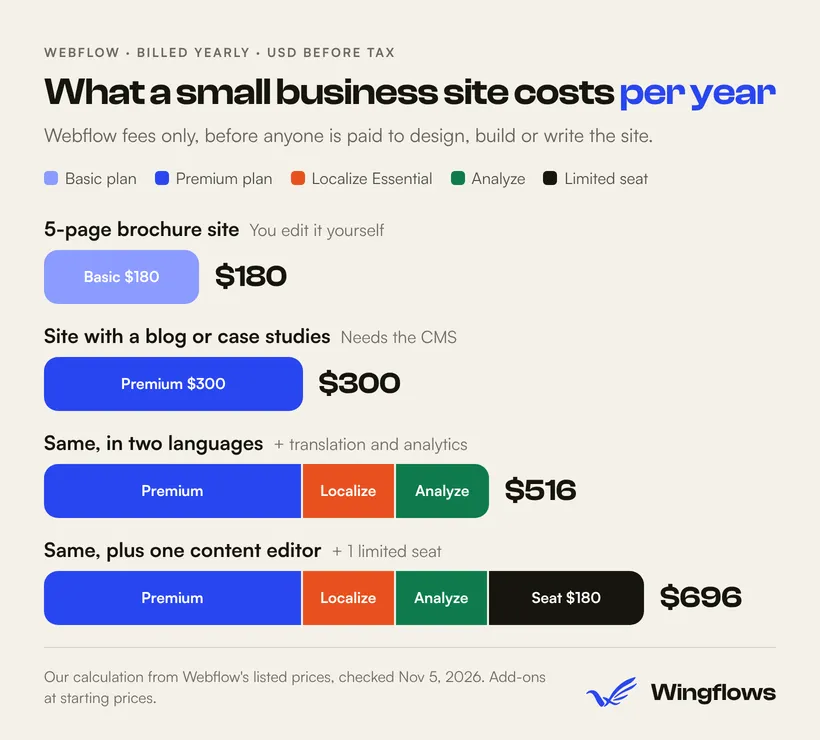
Two things move these numbers most:
- Monthly billing. Basic on monthly billing is $300 a year instead of $180; Premium is $468 instead of $300. If you’re sure about Webflow, yearly billing saves 40% on Basic and 36% on Premium.
- Tax. Prices exclude tax, which Webflow adds at checkout.
The site plan is rarely the biggest cost. Design, building, content and upkeep usually cost more than hosting, the same pattern as website maintenance costs.
Webflow Ecommerce pricing
If you sell products, you need an Ecommerce site plan instead of Basic or Premium (Webflow pricing):
The pricing page says the transaction fee is “in addition to Stripe or Paypal processing fees.” So on Standard you pay Webflow 2% of sales and then your payment provider’s fee.
When does Plus pay for itself? Plus costs $540 a year more than Standard ($888 vs $348). Standard’s 2% fee reaches $540 at $27,000 in yearly sales. Our calculation: below about $27,000 a year in sales, Standard is cheaper; above it, Plus is.
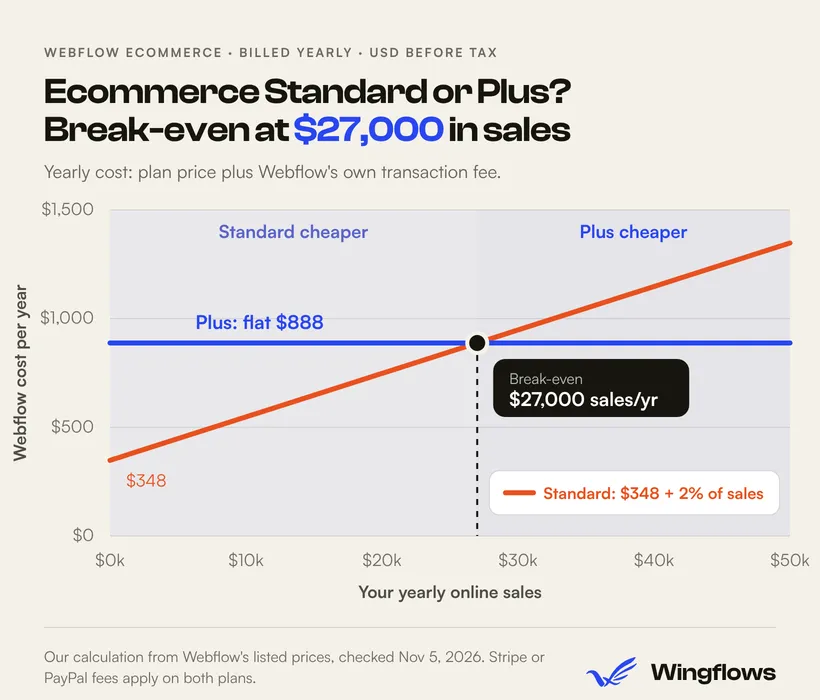
If you expect a large catalog or high volume, compare against a dedicated shop platform too; monthly billing for Ecommerce plans costs more, so check the pricing page. Our e-commerce services page covers when each option makes sense.
What it costs to leave Webflow
Price isn’t only what you pay each month. It’s also what you’d pay to move. Webflow’s code export gives you the HTML, CSS, JavaScript and images of your pages, but its help article on code export lists what doesn’t come with it:
- CMS content and Collection items aren’t in the export. The pricing page notes that dynamic content “must be exported on a collection-by-collection basis.”
- Site search and forms, including file uploads and reCAPTCHA, “will not work on exported sites.”
- Ecommerce products and checkout aren’t included.
- Password-protected pages are no longer protected.
- Only your primary language is exported.
Export itself needs a paid Workspace plan such as Core ($19 a month billed yearly); the free Starter Workspace can’t export (Webflow pricing).
So a site with a blog, forms and a shop can’t simply be lifted to another host. Those parts need rebuilding. That’s not a reason to avoid Webflow, but it’s worth knowing before you put several years of content into it.
Is Webflow the right choice for you?

- Choose Webflow Basic if you want a small, good-looking site you can edit visually, rarely add content, and don’t want to manage hosting or updates.
- Choose Webflow Premium if you publish articles or case studies regularly and want a marketer to edit them without a developer.
- Look at WordPress if you need a specific plugin ecosystem, such as booking or membership tools, and someone will keep it updated. See WordPress development for when that fits (we build both WordPress and custom sites).
- Look at a custom build (for example Astro) if speed, full code ownership and no per-seat fees matter more than visual editing. See Astro development.
Whichever you choose, settle who owns the account and the domain. If an agency holds the site in its Workspace, ask for a transfer to your own account or a written agreement on who pays and who can move it. Our guide on how to hire a web development agency covers what to put in writing.
A 15-minute check before you buy or renew
Find your site's plan and renewal date. Check the billing details in your Webflow account. If the site isn't in your account, ask whoever built it.
Decide if you need the CMS. Will you publish a blog, case studies, jobs or team members from a list? Then you need Premium. If not, Basic.
Count the people. Who designs (full seat), who only writes or updates content (limited seat), and who only reviews (free seat)?
Check your bandwidth. Look at your site's usage. If you're near 10 GB on Basic or 50 GB on Premium, compress images or plan for an add-on.
Pick yearly or monthly. Yearly is cheaper. If your site hasn't moved to the new plans yet, switching to yearly billing before your change date keeps your current plan for one more year. For sites in an agency Workspace, that date is November 16, 2026.
Confirm who owns it. Write down who holds the Webflow account, the domain and the billing card.
At the end you’ll know the plan you need, your seat count and your yearly bill, which is enough to compare Webflow with any quote for another platform.
Frequently asked questions
Is Webflow free?
Webflow’s Starter site plan is free, but it only works on a webflow.io address, with 2 static pages, 50 CMS items and 1 GB of bandwidth. To use your own domain, you need a paid site plan, from $15 a month billed yearly.
How much does Webflow cost per month?
As of November 2026, Basic costs $15 a month and Premium $25 a month when billed yearly, or $25 and $39 billed monthly. Ecommerce plans cost $29, $74 or $212 a month billed yearly. Prices are in USD, per site, plus tax.
What is the difference between Webflow Basic and Premium?
Premium includes the CMS (20,000 items in 40 collections), site search, form file uploads and 50 GB of bandwidth. Basic has no CMS and 10 GB of bandwidth. Both include a custom domain and 300 static pages.
Why did my Webflow price change?
Webflow replaced its CMS and Business plans with Premium in May 2026 and raised Basic. Existing sites move to the new pricing at their next renewal or billable change: from June 29, 2026 for most sites, and from November 16, 2026 for sites in Freelancer or Agency Workspaces or on legacy pricing.
Can I move my site away from Webflow?
Partly. Code export on a paid Workspace plan gives you your pages’ HTML, CSS and images, but CMS content must be exported per collection, and forms, site search and ecommerce stop working outside Webflow. Plan to rebuild those parts.
Want a second opinion on your website costs?
If you’ve run the 15-minute check and still aren’t sure whether to stay on Webflow, move to it, or switch to something else, talk to us. We build websites for small businesses and can tell you plainly what your site will cost on each option. You can also see our work first. Agencies looking for a build partner can use the same page.