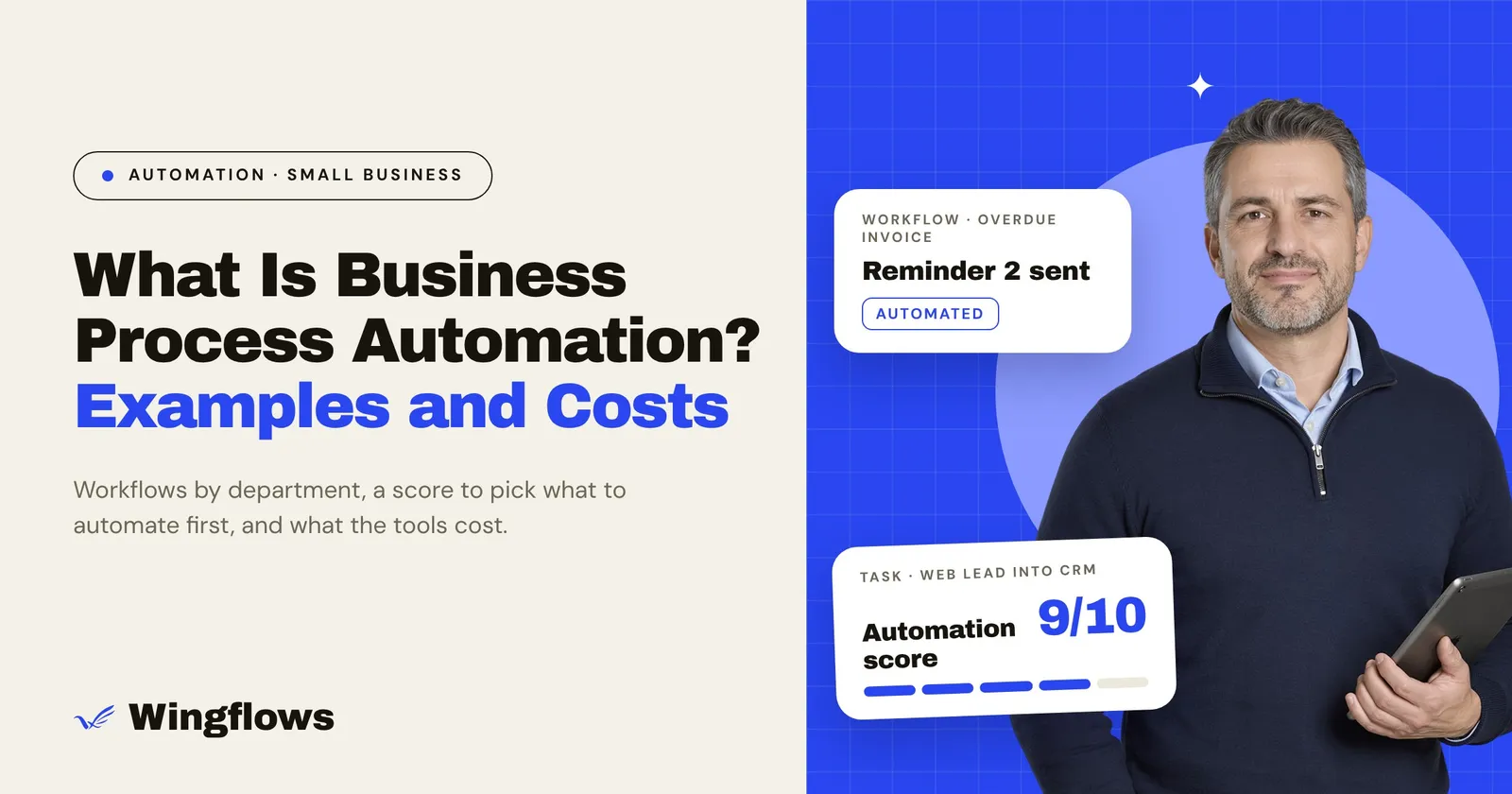
Business process automation (BPA) is the use of software to run a repeat business process from start to finish: when something happens, such as a form being sent or an invoice going overdue, a fixed set of steps runs across your apps without anyone copying data by hand. IBM defines it as “a strategy that uses software to automate complex and repetitive business processes” (IBM).
This guide is for owners and ops leads at firms with roughly 1 to 50 people who want to know which tasks to hand over first, which tool runs them and what the monthly bill looks like. We build these workflows on n8n and ERPNext at Wingflows, we self-host our own n8n, and we have delivered 150+ projects (counting Fiverr work). The examples, the scoring method and the cost calculation below are ours; every price and vendor rule links to the page we checked on 23 November 2026.
Key takeaways
- The best first automations run often, follow written rules and start from data already in an app: web leads, recurring invoices, overdue reminders, client onboarding.
- Score each task 0 to 2 on five questions. Totals of 8 to 10 go first; 0 to 4 stay manual with a checklist.
- Billing units matter more than sticker prices. In our calculation, a 4-action order workflow at 1,000 orders a month needs Zapier’s $89 tier but fits n8n Cloud’s €20 Starter plan.
- The failure that costs small firms most is a workflow that stops quietly. Every workflow needs an error alert that reaches a person.
- Use AI to read messy input and draft replies. Put a human approval step before anything that moves money or deletes data.
Business process automation examples by department
Each row is a workflow a small business can run with off-the-shelf tools. The trigger starts it; the steps run on their own.
IBM’s own list covers the same ground for larger firms: routing time-sensitive invoices for approval, matching purchase orders to invoices, HR onboarding (welcome emails, software access, orientation, paperwork) and “automating ticket routing, prioritization and resolution processes” on IT service desks (IBM).
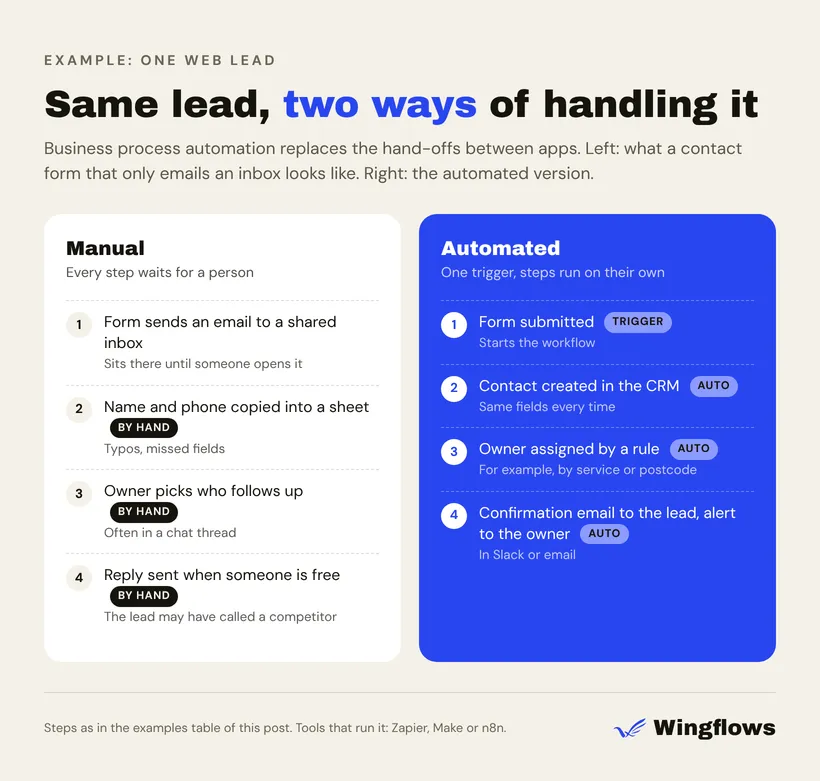
Sales: every lead in one place within a minute
A contact form that only emails an inbox is an easy leak to miss: the lead waits until someone opens the mail. The automated version creates the CRM contact, assigns it by a rule (service, postcode, or whoever is on duty), confirms receipt to the lead and pings the owner. In Zapier that is one Zap; triggers and Zapier’s built-in tools such as Filter and Formatter don’t count as tasks (Zapier pricing).
For open quotes, ERPNext’s Notification feature can fire a set number of days before or after a reference date. Its docs say this “can be useful in reminding you of upcoming due dates or reminding you to follow up on certain leads of quotations” (ERPNext Notifications).
Accounts: recurring bills and late payers
ERPNext’s Auto Repeat creates a document on a Daily, Weekly, Monthly, Quarterly, Half-yearly or Yearly schedule. Tick “Submit on Creation” and each invoice is submitted as it is made; “Notify by Email” sends it to the contacts you pick (ERPNext Auto Repeat).
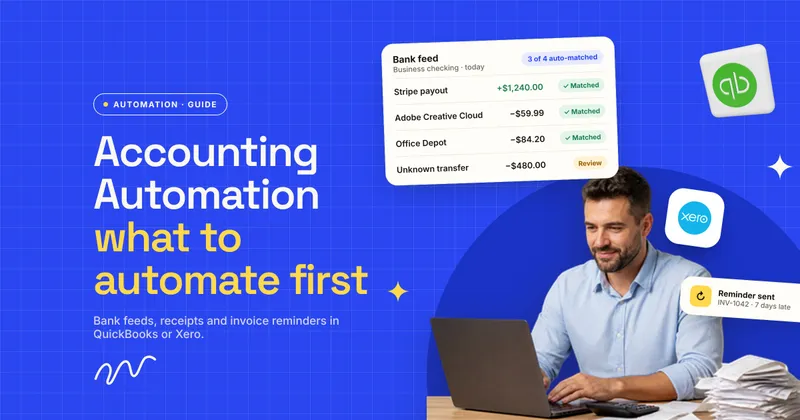
For late payers, ERPNext Dunning lets you create Dunning Types for a first reminder, second reminder and final notice, each with its own letter text, a fixed Dunning Fee and a yearly interest rate (ERPNext Dunning). On QuickBooks or Xero, most of this is built in; our guide on how to automate your accounting process covers the order to switch it on. If you send a handful of invoices a month, the free invoice generator we built for our own billing may be enough for now.
Onboarding and operations
Client onboarding suits automation because the steps repeat and a missed one is visible to the client. For a shop, the order is the trigger, and this is where a workflow tool starts to strain: once stock and purchasing records must match the invoices, an ERP such as ERPNext should hold the records and the workflow tool should only connect the edges.
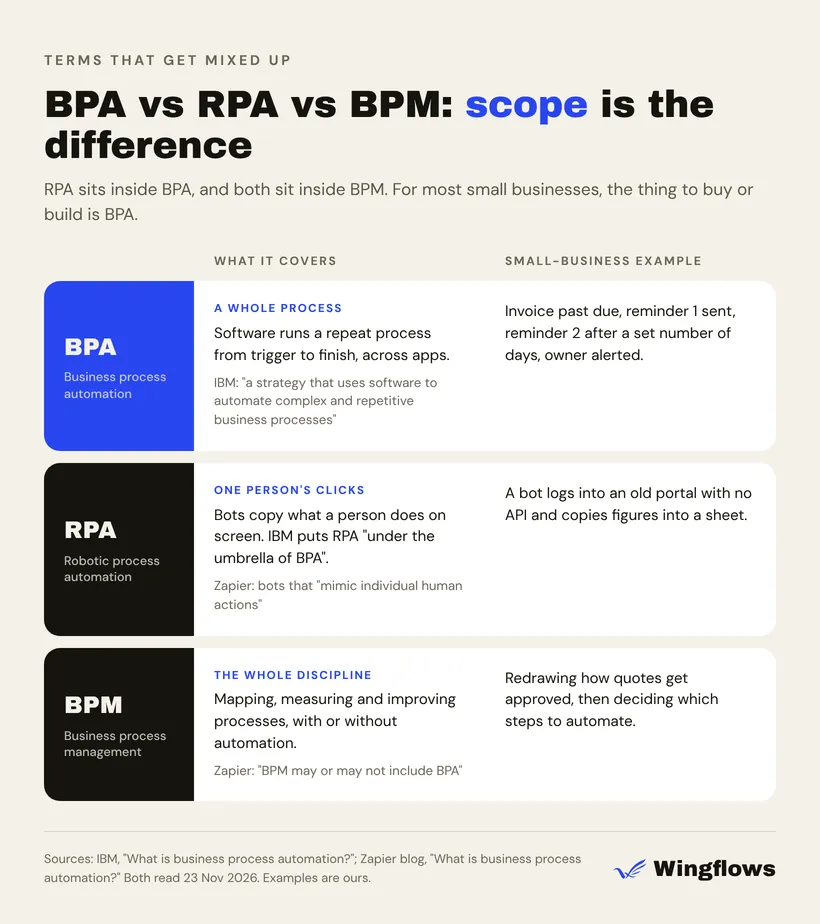
BPA vs RPA vs BPM: what each term covers
These three get used as if they meant the same thing. The difference is scope.
IBM says “RPA falls under the umbrella of BPA” and treats BPA and RPA as tools within the BPM framework (IBM). Zapier describes RPA as bots that “mimic individual human actions” and notes that “BPM may or may not include BPA” (Zapier). For most small firms, RPA is a last resort: if an app has an API or a native integration, a normal workflow is cheaper to run and breaks less often than a bot clicking through screens.
Does BPA need AI? No. Zapier’s guide says BPA “may or may not include AI solutions” (same source). Every example in the table above runs on plain rules.
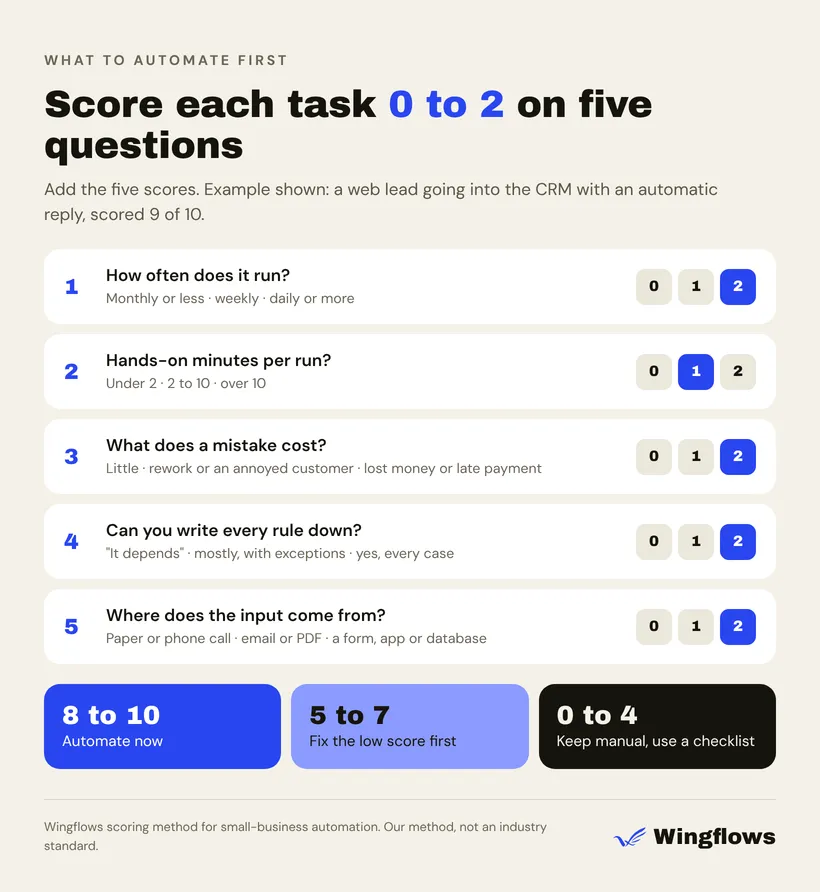
How to pick what to automate first: a five-question score
Most owners can name ten tasks they want gone; the hard part is the order. We score each task 0, 1 or 2 on five questions and add them up.
A total of 8 to 10 means automate now. At 5 to 7, fix the low score first (usually the rules or the input format). At 0 to 4, leave it manual and write a checklist.
Applied to four common tasks, scores listed in question order (our worked example; your scores will differ):
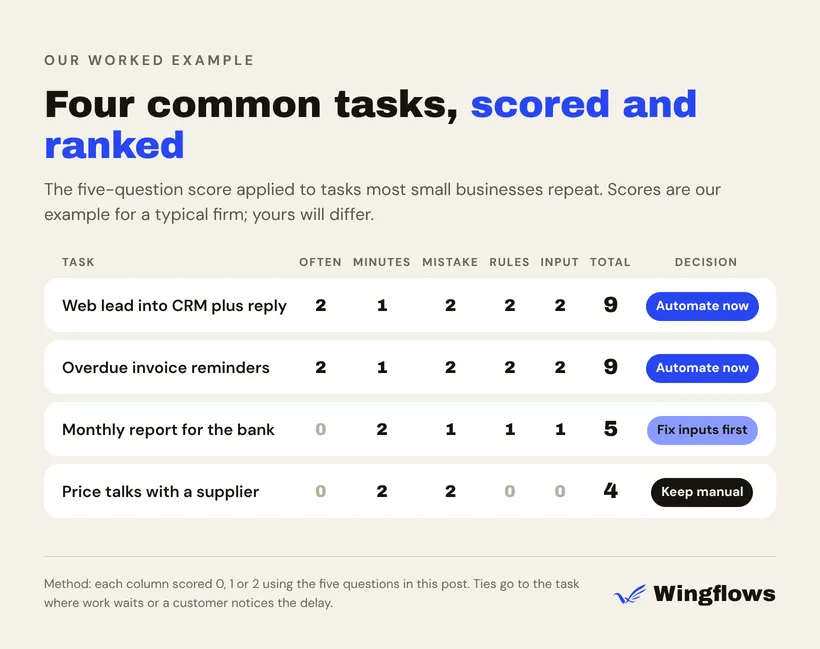
The supplier row shows what the score is for. It takes real time and a mistake is costly, yet it fails on rules and input, because it runs on judgment and phone calls. Zapier’s guide makes the same point about tasks that need a human touch, creativity or emotional intelligence (Zapier). When two tasks tie, pick the one where work waits or a customer notices the delay.
What business process automation costs (as of November 2026)
Software is the smaller part of the bill. These are entry prices from each vendor’s own pricing page, checked on 23 November 2026.
Sources: Zapier pricing, Make pricing and Make credits, n8n pricing, Frappe Cloud sites. Make offers firms with under 20 employees a Start-up Plan at 50% off Business, if they qualify. Frappe Cloud points heavier ERPNext workloads to its Server plans.
Our calculation: one workflow at four volumes
The billing unit changes the bill more than the entry price. We priced one order workflow with 4 actions (create invoice, email customer, add a sheet row, post to team chat) at four monthly volumes, picking the cheapest plan that fits, billed annually.
Method: Zapier tasks = orders × 4, because the trigger is free and failed steps aren’t billed (Zapier pricing). n8n executions = orders × 1, because n8n defines an execution as “a single run of a workflow” (n8n docs). Zapier is priced in US dollars and n8n in euros, so read the table for how each bill grows with volume; we did not convert currencies. The figures leave out build time, AI steps and the apps the workflow connects to.
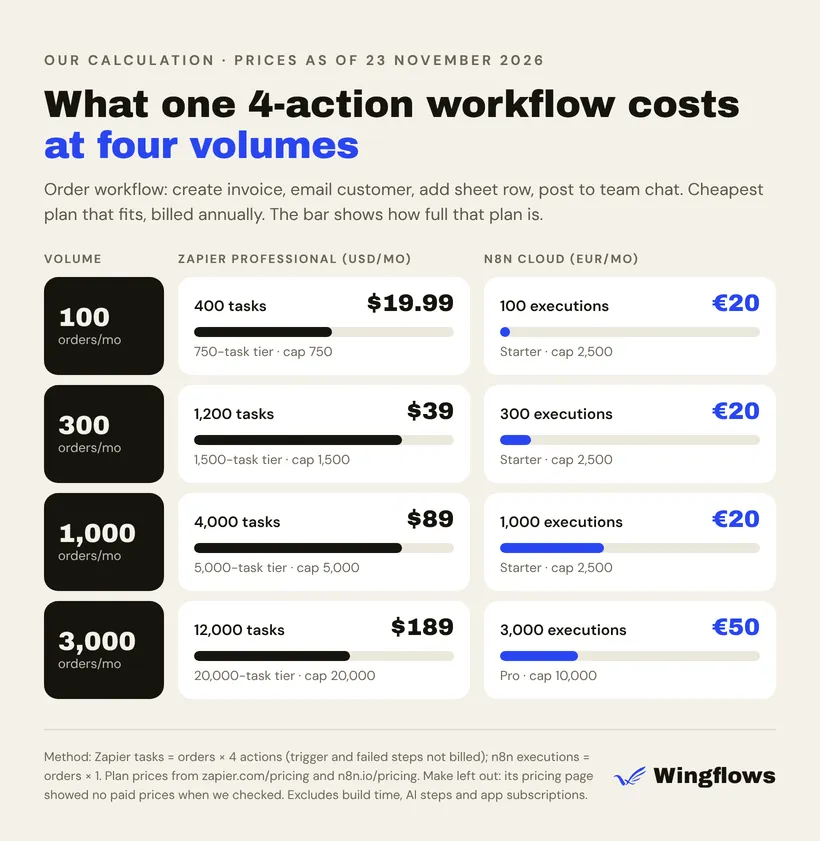
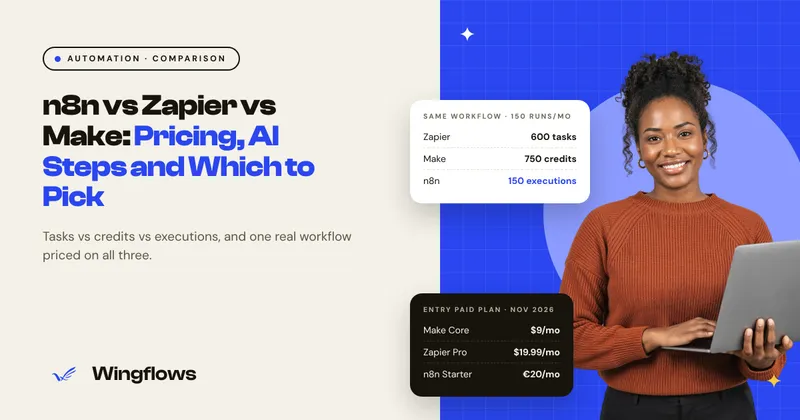
Zapier is still the quickest tool for a short two-app workflow and cheap at low volume; the gap opens when one trigger fans out into many actions. Our n8n vs Make vs Zapier comparison and n8n pricing breakdown go further.
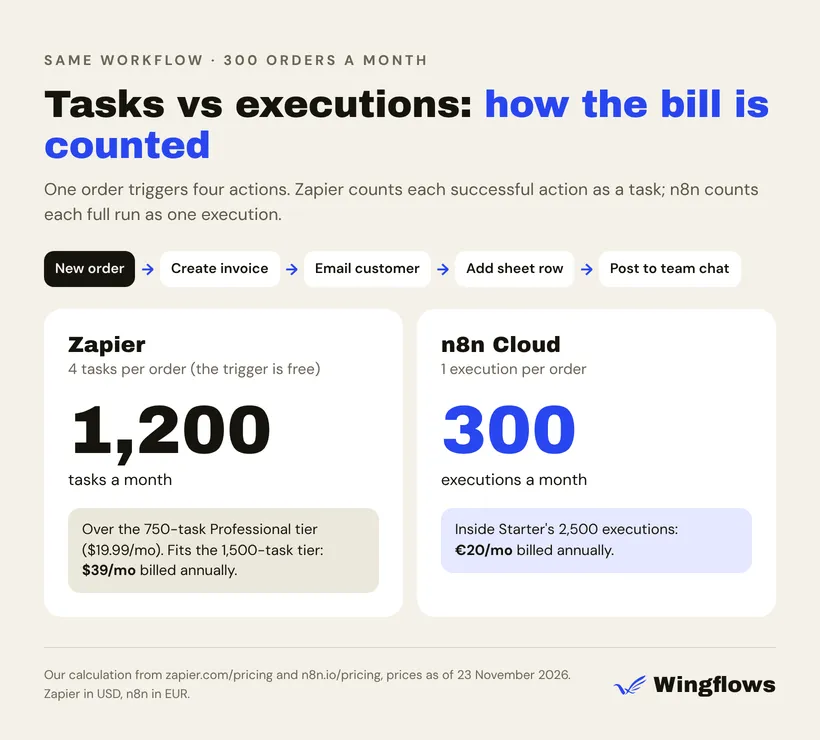
The larger cost is the build and upkeep: mapping the process, handling errors and checking the workflow still does the right thing after your apps change. G2’s 2026 guide puts the median payback for business process management tools at 14 months, with reviewers of Zapier and Power Automate reporting 6 months and Laserfiche 22 (G2). Those are review averages across firm sizes, so treat a vendor promising payback “in weeks” with care.

What breaks after go-live, and how to catch it
Building the workflow is the easy half. The problems show up weeks later, and nobody notices until a customer does. Check for these four in every build:
- A connected app changes. A form field gets renamed or a CRM adds a required field, and the step that wrote to it fails.
- A connection’s login expires or belongs to the wrong person. If the accounts sit under a freelancer’s or a former employee’s email, the workflow dies when they leave.
- The plan cap is reached. On Zapier, if pay-per-task billing is off, “usage stops once you reach your task limit, until the next cycle”. Even with it on, usage stops at 3× your task subscription (Zapier pricing). n8n lists its Starter and Pro execution limits as “Capped” (n8n pricing).
- The same trigger fires twice. A customer double-submits a form and gets two invoices. A duplicate check on order or email ID prevents it.
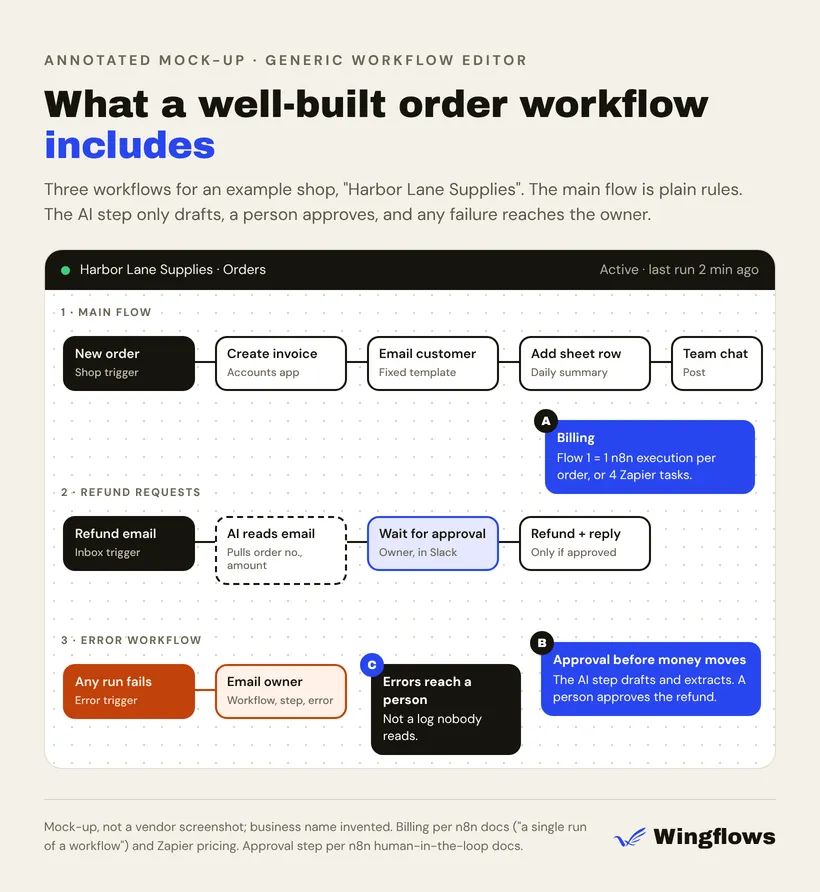
The fix for all four is the same: an error path that reaches a human. In n8n, an Error Trigger workflow starts when an automatic run fails and receives the workflow name, error message and last node that ran (n8n docs). Point it at an email or chat message to the owner. A log nobody reads doesn’t count.
Where AI steps fit, and where they don’t
AI earns its place where input is messy and a person would otherwise read it:
- Pulling the name, amount and due date out of an email or PDF into a structured record.
- Sorting incoming messages by topic before they’re routed.
- Drafting a reply that a person approves before it goes out.
Keep plain rules wherever a rule exists. Totals, tax, due dates and “if overdue by 7 days, send reminder 2” are rules; a model adds cost and a chance of a wrong answer for no gain.
Don’t give an AI step the final say on actions you can’t undo. OWASP’s list of risks for LLM applications includes prompt injection and excessive agency, where a model with too many permissions acts on unexpected output (Cloudflare summary of the OWASP Top 10 for LLMs). n8n’s human-in-the-loop option pauses the workflow until a reviewer approves or denies the tool call in Chat, Slack, Teams, Gmail, WhatsApp Business Cloud or another listed channel, and its docs recommend it for tools that take irreversible actions (n8n docs).
AI steps bring their own meter. Zapier Agents has a free tier of 400 activities a month and a Pro tier from about $33.33 a month billed annually for 1,500 activities. Zapier’s rate card gives “one MCP tool call = 2 tasks” as an example rate (Zapier pricing).
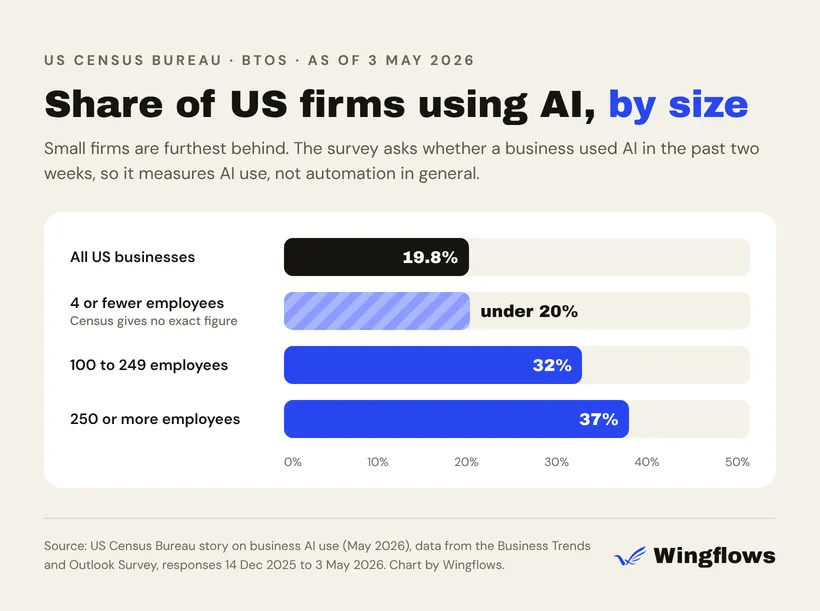
Most small firms haven’t started. The US Census Bureau’s Business Trends and Outlook Survey found 19.8% of US businesses used AI as of 3 May 2026, and fewer than 20% of firms with four or fewer employees, against 37% of firms with 250 or more (US Census Bureau). The survey asks about AI use in the past two weeks, so it measures AI, not automation in general. Get the rule-based workflows running first; an AI step is easier to add once the data already flows.
How to measure the return
Measure before you build, so you can check the result after a month.
G2 suggests a simple formula: average time per instance × instances a month × hourly staff cost, minus the platform and implementation cost (G2). Our worked example, with example numbers: 300 orders a month at 4 minutes of copying each is 20 hours. At a staff cost of $25 an hour, that’s $500 a month of time, against $39 a month on Zapier’s 1,500-task tier or €20 on n8n Starter, before build cost. Put your own hourly cost in; the hours are what you measure.
When to bring in a business process automation consultant
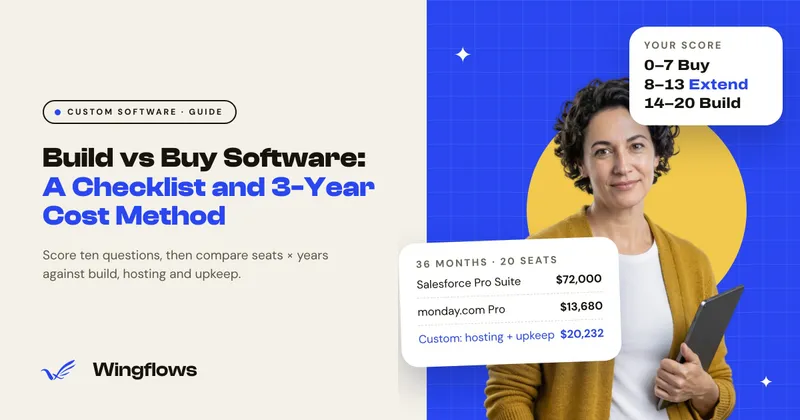
A two-app Zap is an afternoon’s work for most owners. Bring in help when a workflow touches three or more systems, handles money, needs self-hosted n8n, or when the real fix is an ERP rather than another connector (our build vs buy guide covers that choice).
Whoever you hire, ask for these in writing:
- Every account is in your company’s name and you hold the logins.
- Every workflow has an error alert that reaches a named person.
- A one-page description per workflow: trigger, steps, and who to call.
- A handover call so someone on your side can pause or edit it.
At Wingflows we build on n8n and ERPNext and ask most new clients for up to 40% upfront. See our business systems and automation service, n8n automation agency page or ERPNext implementation for how we work.
Start this week
- List every task someone repeats at least weekly.
- Score each one with the five questions.
- Take the top two. For most small firms that’s lead capture and overdue reminders.
- Write the trigger, every step and what happens when a step fails on one page.
- Build it on a free tier, run it next to the manual process for two weeks, then switch the manual one off.
G2 puts a single automation at one to four weeks from documentation to go-live, with multi-step workflows at the longer end (G2).
Frequently asked questions
What is business process automation in simple terms?
Software that runs a repeat business process for you. Something happens (a form arrives, a due date passes) and a fixed list of steps runs across your apps without anyone copying data by hand.
What are examples of business process automation?
Web leads into a CRM with an auto-reply, scheduled recurring invoices, overdue payment reminders, client onboarding, order-to-invoice flows and support emails routed by topic.
What is the difference between BPA and RPA?
BPA automates a whole process across apps. RPA uses bots that repeat one person’s on-screen clicks, and IBM places it under the BPA umbrella. Small firms usually need BPA; RPA fits old systems with no integration.
What is the difference between BPA and BPM?
BPM is the wider practice of mapping and improving processes, with or without software. BPA is one way to carry out the improvements BPM finds.
Does business process automation require AI?
No. Most small-business workflows run on plain rules. AI helps only where input is unstructured, such as reading emails or PDFs.
Can small businesses use business process automation?
Yes. Free tiers exist on Zapier (100 tasks a month), Make (1,000 credits a month) and self-hosted n8n, and paid entry plans start at $19.99 or €20 a month billed annually as of November 2026.
What are the benefits of business process automation?
Faster replies to leads, fewer copy-paste errors, invoices and reminders that go out on schedule, and hours back each week for the person who used to do the copying. Measure them with the before-and-after table above rather than taking a vendor’s figure.
Which tasks should not be automated?
Tasks that run on judgment, negotiation or empathy, and tasks whose input arrives by phone or on paper. On our score, anything at 0 to 4 stays manual with a checklist.
How long does business process automation take to implement?
A simple trigger-and-action workflow can run the same day. G2 puts a single business process automation at one to four weeks to go-live. We add a two-week parallel run before switching off the manual process.
Want a second pair of eyes on your list?
Send us the tasks you’d like to automate. We’ll score them with you, tell you which tool fits, and say plainly if a task is better left manual. Talk to us.