Build vs buy software comes down to this: buy when the job is common and a tool already does it, and build only when the workflow is how you compete, seat fees over three years exceed what a build costs to make and run, and someone is named to own the code after launch. For most small teams the answer is buy, or extend an open-source platform, and the numbers below show where that flips.
This guide is for owners and ops leads of businesses with roughly 5 to 80 staff. It gives you a 10-question scorecard, a 3-year cost method with list prices checked on official pricing pages on 23 November 2026, the same sum run at five team sizes, and the middle route most comparisons skip. We build custom apps in Django and vertical ERPs on ERPNext (Frappe), so we see both sides of this choice.
Key takeaways
- Buy when the job is common. The UK Government Digital Service (GDS) says configuring commercially available technology is likely to “work well” for a lot of projects, and that customisation can make a product “harder to maintain or update”.
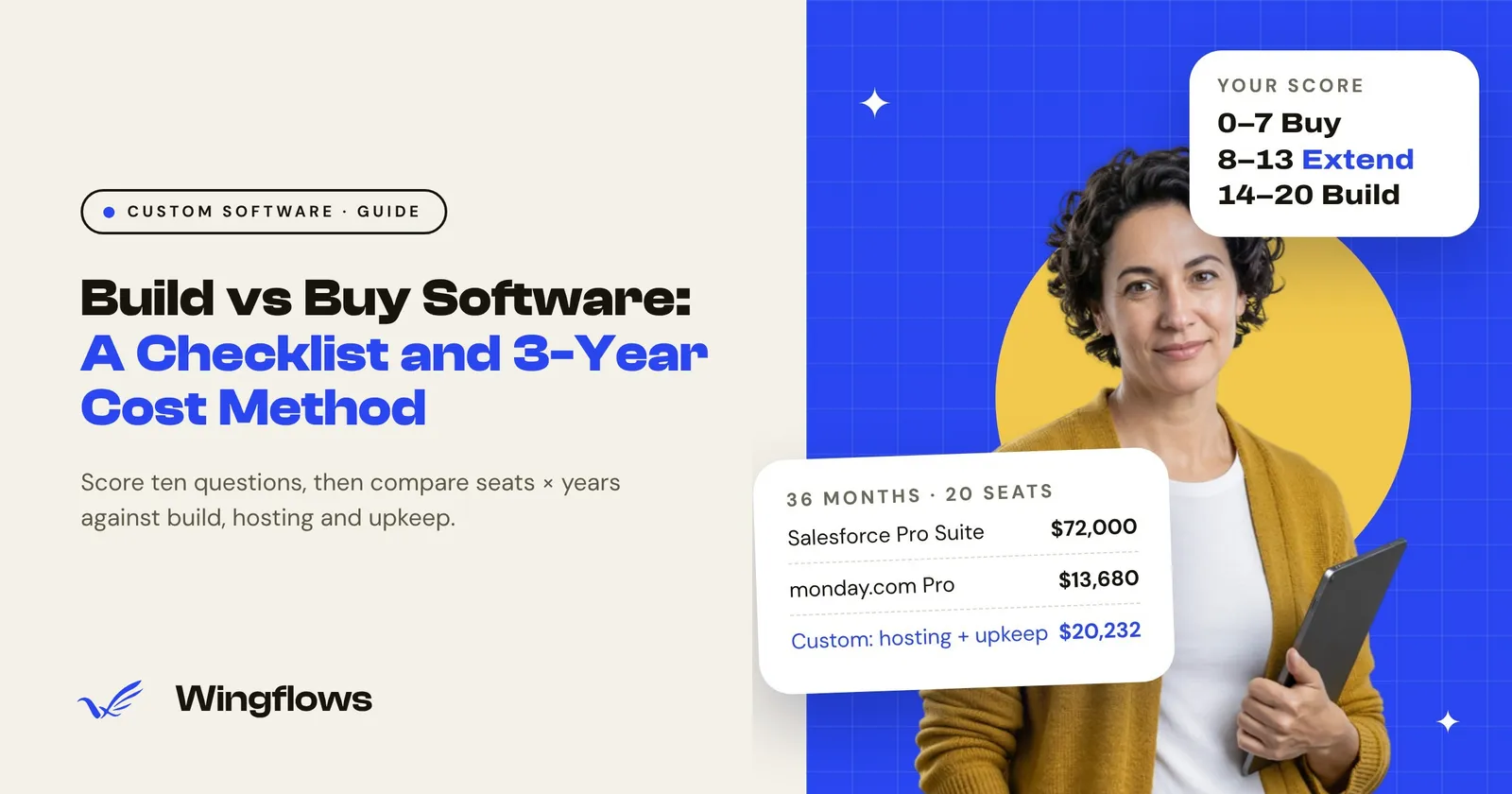
- Compare 36 months, never a one-off quote. For 20 seats, Salesforce Pro Suite costs $72,000 over three years at list price and monday.com Pro costs $13,680 (our calculation).
- A custom app has to pay for hosting and upkeep before the build itself: $20,232 over three years in our worked example.
- Below about 30 seats, a $19 seat beats a custom build on cost alone. Against a $100 seat, a build has $15,768 to work with at 10 seats and $51,768 at 20.
- Extending ERPNext or joining tools with n8n often beats both routes: no per-user fee and code you can change.
Build vs buy software: score this checklist first
Answer each question with 0, 1 or 2 points. Score 2 only when you can point to the evidence.
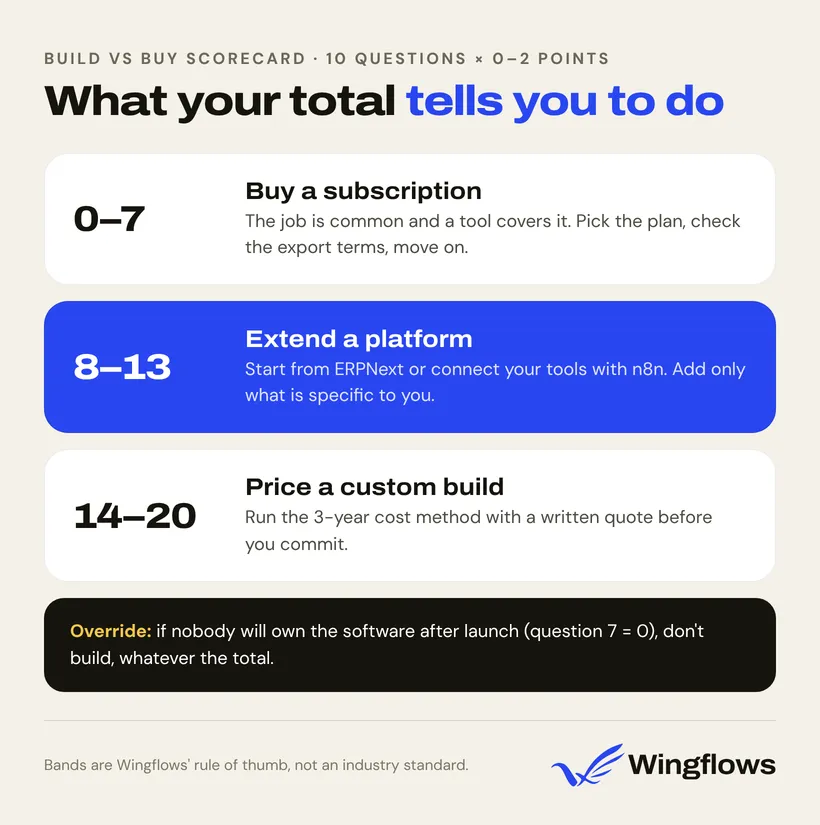
The bands are our studio’s rule of thumb, not an industry standard:
- 0 to 7: buy. The rest of this guide is a sanity check.
- 8 to 13: read the middle option below before you commit to either side.
- 14 to 20: a custom build is worth pricing properly with the 3-year method.
Question 7 is the easiest to skip, and a 0 there stops a build whatever the total. The GDS puts it in one line: “Regardless of the route you choose, you cannot outsource risk” (GDS Technology blog, 2021).
Custom software vs off-the-shelf: the 3-year cost method
Most comparisons put one year of subscription next to a one-off build quote. That flatters the build. Use 36 months for both and count everything that recurs.
- Buy side: seats × monthly price × 36, plus setup and add-ons.
- Build side: the build quote, plus hosting × 36, plus maintenance hours × hourly cost × 36.
One correction before you plug in a seat count: count the people who log in, not the licences on the invoice. Zylo’s 2026 SaaS Management Index, built on more than 40 million licences, found organisations leave an average of 36% of SaaS licences unused against recommended utilisation (Zylo, January 2026). Zylo sells SaaS management software, so read that as a vendor’s figure, but the check costs nothing: an inflated seat count makes building look cheaper than it is.
Inputs from official pricing pages (as of November 2026)
Our calculation for a 20-person team
Two assumptions are ours, so replace them with yours: 20 seats for three years, and 8 hours of developer time a month to keep a custom app patched and working. We turn the BLS median wage into $65.375 an hour (÷ 2,080 hours). That is a wage, not a billing rate. A freelancer or agency charges more because the rate also covers tools, insurance and unbilled time.
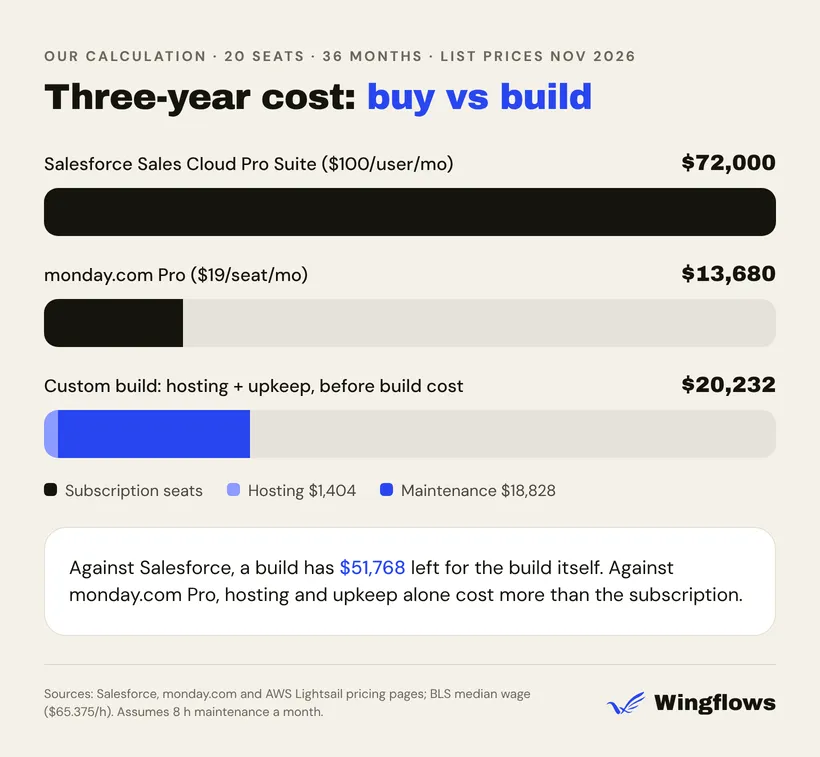
Against a $19 seat, a build cannot win on cost at this size. Hosting and upkeep alone exceed three years of monday.com Pro for 20 people.
Against a $100 seat, a build has $51,768 to work with. At the median wage that buys about 790 developer hours; at agency rates it buys fewer. Get a written quote and see whether it fits under that line.
The hosting line is the cheapest version. The $15 Lightsail database plan has no data encryption listed on AWS’s page, and the high-availability plan costs $30. Moving to it adds $540 over three years (our calculation), which is small next to the maintenance line but worth knowing before anyone calls the cheap setup production-ready for client data.
The same sum at 5, 10, 20, 40 and 80 seats
The 20-seat answer changes as you hire. Seat fees rise in a straight line with headcount, while a custom app’s hosting and upkeep stay roughly flat. We ran the sum at five team sizes with the same inputs.
The custom app’s running cost is $20,232 in every row. The last column is what is left for the build itself, against Salesforce and against monday.com.
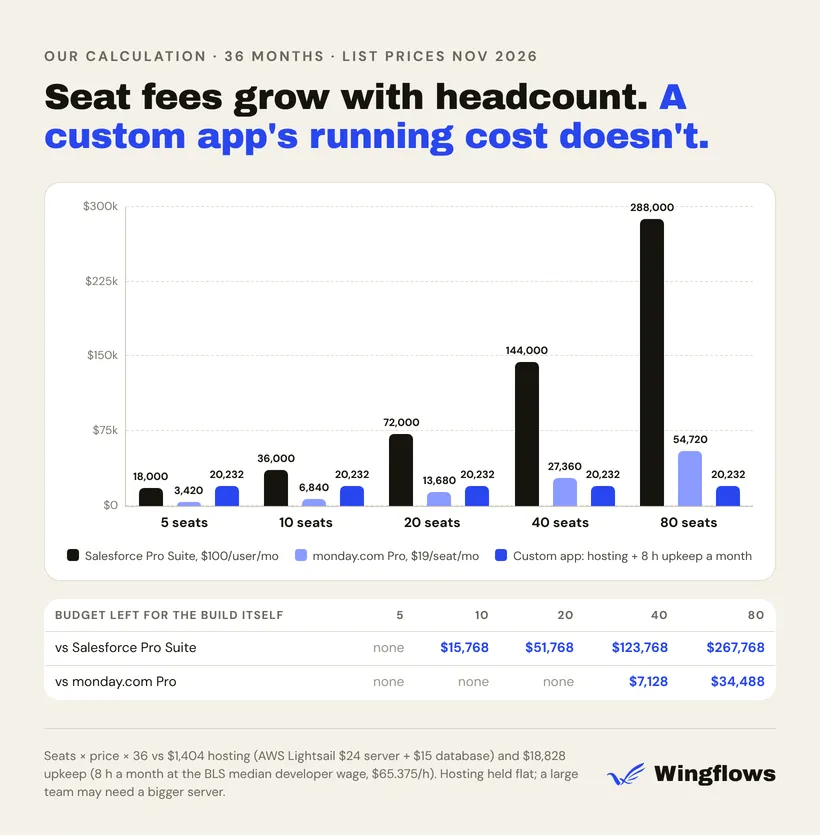
At 5 seats, even a $100 subscription is cheaper than just running a custom app, so a five-person firm should almost never build on cost grounds. And against a low-cost tool, the build budget only turns positive somewhere past 30 seats, and even at 80 seats $34,488 is a small budget for a real business system. We hold hosting flat in this table; at 80 users you may need a bigger server, so treat the larger columns as a ceiling.
Run your own version with the plan you would actually buy, then ask the vendor what the price will be at renewal.

The middle option: extend a platform instead of starting from zero
Between a closed subscription and a blank-page build sits a third route: take an open-source platform that already does most of the job and add only what is specific to you. The NSW Government’s digital guidance calls this “borrow”: buy a base, then extend it (Digital NSW). If you scored 8 to 13, start here.
ERPNext is the platform we build on most for operations, stock and accounting. It is published under GPLv3, and its documentation says you can change the software to suit your needs and host it anywhere, “including your own server to gain complete ownership and privacy of the data” (ERPNext docs). Frappe Cloud hosting starts at $5 a month for a site, and the pricing page says you “pay only for what you use, and not per user” (Frappe pricing). The seat line in our table drops to near zero; what remains is setup, custom fields or small apps, and support. If you are moving off Tally, our Tally alternative page compares the two, and our ERPNext implementation page covers how a rollout runs.
n8n covers the other common gap: two bought tools that don’t share data. Instead of building a system to replace both, you connect them. n8n Cloud Starter costs €20 a month billed annually for 2,500 workflow executions, and the self-hosted Community Edition is free (n8n pricing, n8n docs). Our n8n pricing guide shows which plan fits which volume, our n8n vs Make vs Zapier comparison covers the alternatives, and our guide to automating accounting shows a workflow this route handles well.
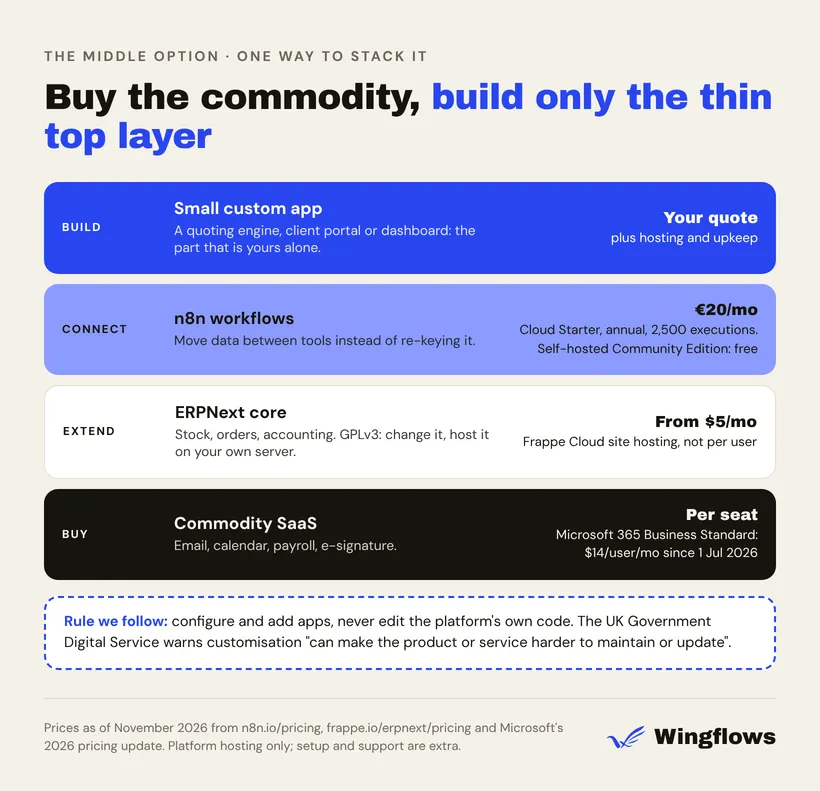
The GDS warning applies here too: “In most cases, customisation is not only expensive, but can make the product or service harder to maintain or update.” Our working rule on ERPNext projects is to use settings, custom fields and separate apps, and never edit the platform’s own code, so each upgrade stays a routine job.
The risks of each route
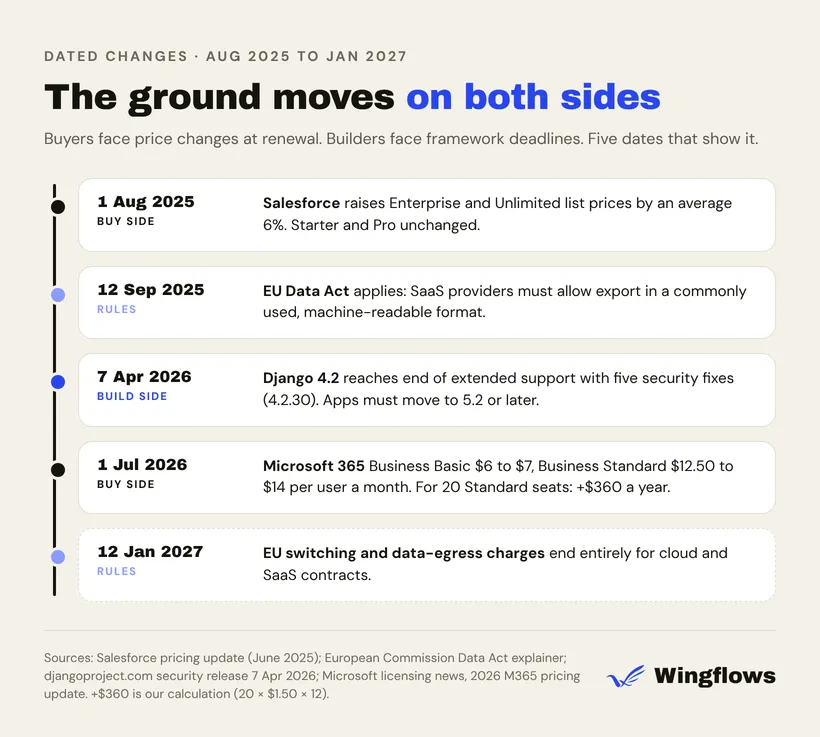
Both columns of the cost table move after you sign. These five dates, from August 2025 to January 2027, show how.
Risks of buying
Prices change at renewal. Salesforce raised list prices for its Enterprise and Unlimited editions (since renamed Core and Advanced on its pricing page) by an average of 6% from 1 August 2025, while Starter and Pro were unchanged that time (Salesforce, June 2025). Microsoft raised US prices from 1 July 2026: Business Basic went from $6.00 to $7.00 per user a month and Business Standard from $12.50 to $14.00, and existing customers move to the new price at renewal (Microsoft). For 20 Business Standard seats that is $360 a year more (our calculation). Neither rise is large alone. Repeat that across every subscription you pay for and the “buy” column in your sum drifts up each year.
Leaving can be hard. In the EU this is improving: under the Data Act, which has applied since 12 September 2025, SaaS providers must offer open interfaces and let customers export data in a commonly used, machine-readable format, and switching and data-egress charges end entirely on 12 January 2027 (European Commission). Outside the EU, read the export clause before you sign.
Risks of building
You own every upgrade. Django 4.2 was released in April 2023 with at least three years of security fixes (Django). On 7 April 2026 the Django team released fixes for five security issues and confirmed that 4.2 had reached the end of extended support, telling users to move to 5.2 or later (Django). Any custom app on a 2023 stack hit that deadline this year. Budget one framework upgrade every three years or so on top of routine patches, and check whether your maintenance hours cover it.
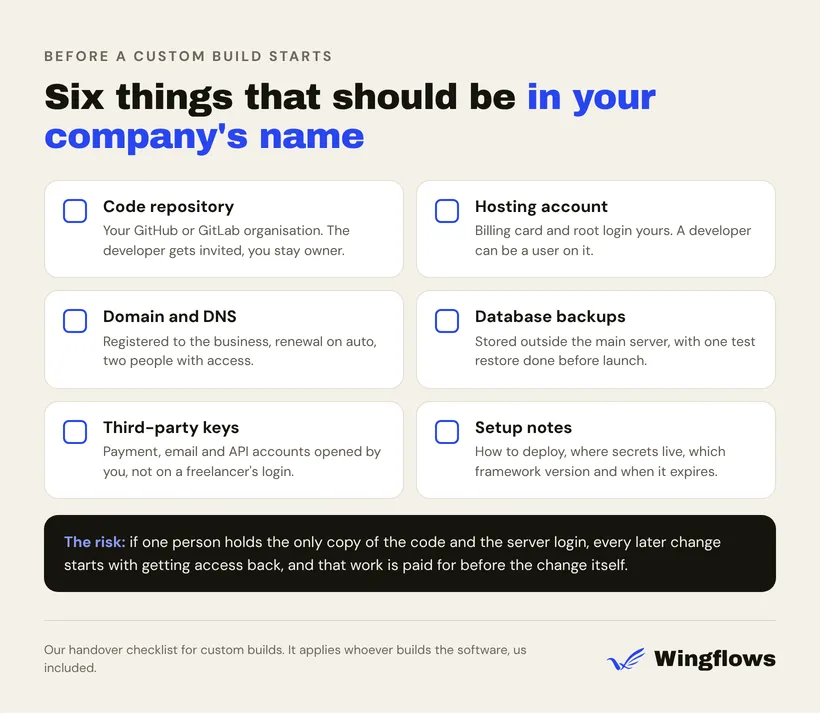
You depend on whoever built it. If one freelancer holds the only copy of the code and the server login, that is a bigger risk than any vendor. It is easy to miss, because nothing goes wrong until the day a change is needed. Before a build starts, put these six things in the company’s name.
A build also starts paying later. A subscription works this week; a first custom version takes months, which is why question 8 is on the checklist.
When to buy and when a custom build is worth it
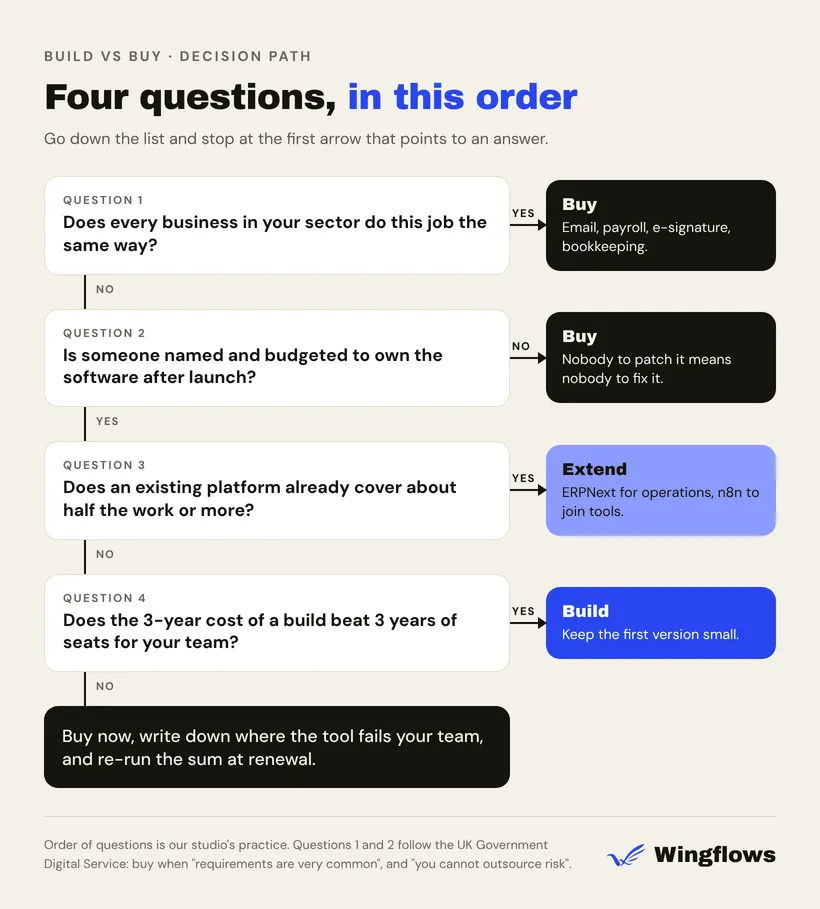
Buy, and stop deliberating, when any of these is true:
- The job is the same in every business: email, payroll, video calls, e-signatures, basic bookkeeping.
- Three years of the subscription for your whole team costs less than the hosting and upkeep line in our table.
- Nobody will own the software after launch (question 7 scored 0).
- You need it working within a month.
The GDS gives the same test from the buying side: “It can make more sense to buy an off-the-shelf product if your requirements are very common and easily met by suppliers.” Its example of the opposite case is a passport-checking supplier that might build its own tool, because checking documents is its core business competency.
A build earns its cost when the workflow is how you compete, the best tools cover little of it, your seat count makes subscriptions expensive, and an owner is named. Keep the custom part as small as the problem allows: a quoting engine, a client portal, or one dashboard that pulls from the tools you already pay for. A small codebase keeps the maintenance line small.
If your score points to a build, our custom solutions page explains how we scope one, and you can hire a Django developer from us for a fixed piece of work. For connecting the tools you already have, see business systems and automation and our guide to business process automation.
Frequently asked questions
Is it cheaper to build or buy software?
For common jobs and small teams, buying is cheaper. In our 20-seat example, hosting and maintenance for a custom app ($20,232 over three years) cost more than monday.com Pro for the whole team ($13,680). Building starts to compete when per-seat prices are high, as with Salesforce Pro Suite at $100 per user per month, and when the team grows past 20 or so.
What is the biggest risk of building custom software?
Ownership after launch. The build itself is a known cost; the ongoing patches, framework upgrades and the risk of one developer holding all the access are what catch owners out. Name the owner and put the code, hosting and domain in the company’s name before work starts.
What is vendor lock-in and why does it matter?
Lock-in means leaving a tool costs so much in data export, retraining or exit fees that you stay even when the price rises. Check the export format and any exit fees before you sign. In the EU, the Data Act requires machine-readable export and ends switching charges from 12 January 2027.
Can I build on top of software I already bought?
Often, yes, and it is usually cheaper than replacing it. Use the vendor’s API, an add-on app, or an automation tool such as n8n to fill the gap. Avoid changing the platform’s own code, which makes every upgrade harder.
How do I know if my workflow is unique enough to build for?
Trial three existing tools against your real daily task. If the best of them covers most of it, your workflow is less unique than it feels. If customers choose you because of how you do this job, and no tool supports it, that is the case for a build.
What is the difference between SaaS, COTS and custom software?
SaaS is software you rent: the vendor hosts it, updates it and charges per user or per month. COTS (commercial off-the-shelf) is any ready-made product sold to many customers, hosted or installed. Custom software is built for one business: you pay to build it, then for hosting and upkeep, and you control what it does and where the data lives.
How long does a custom software build take?
It depends on scope, and an honest answer needs a written specification. Plan for months rather than weeks for a first version of a real business system, and score question 8 to match.
Can we start with SaaS and build later?
Yes, and it is often the safest path. Run the subscription for a year, write down where it fails your team, and you will have a precise brief if you do build. Confirm first that the tool lets you export all your data in a usable format.
Talk to us about your build vs buy decision
Score the checklist, run the 3-year sum with your real seat count, and if the answer still isn’t clear, talk to us. Send the score and the tools you are comparing, and we will tell you whether we would buy, extend or build. Agencies that need a build partner for a client’s custom system can use the same page.