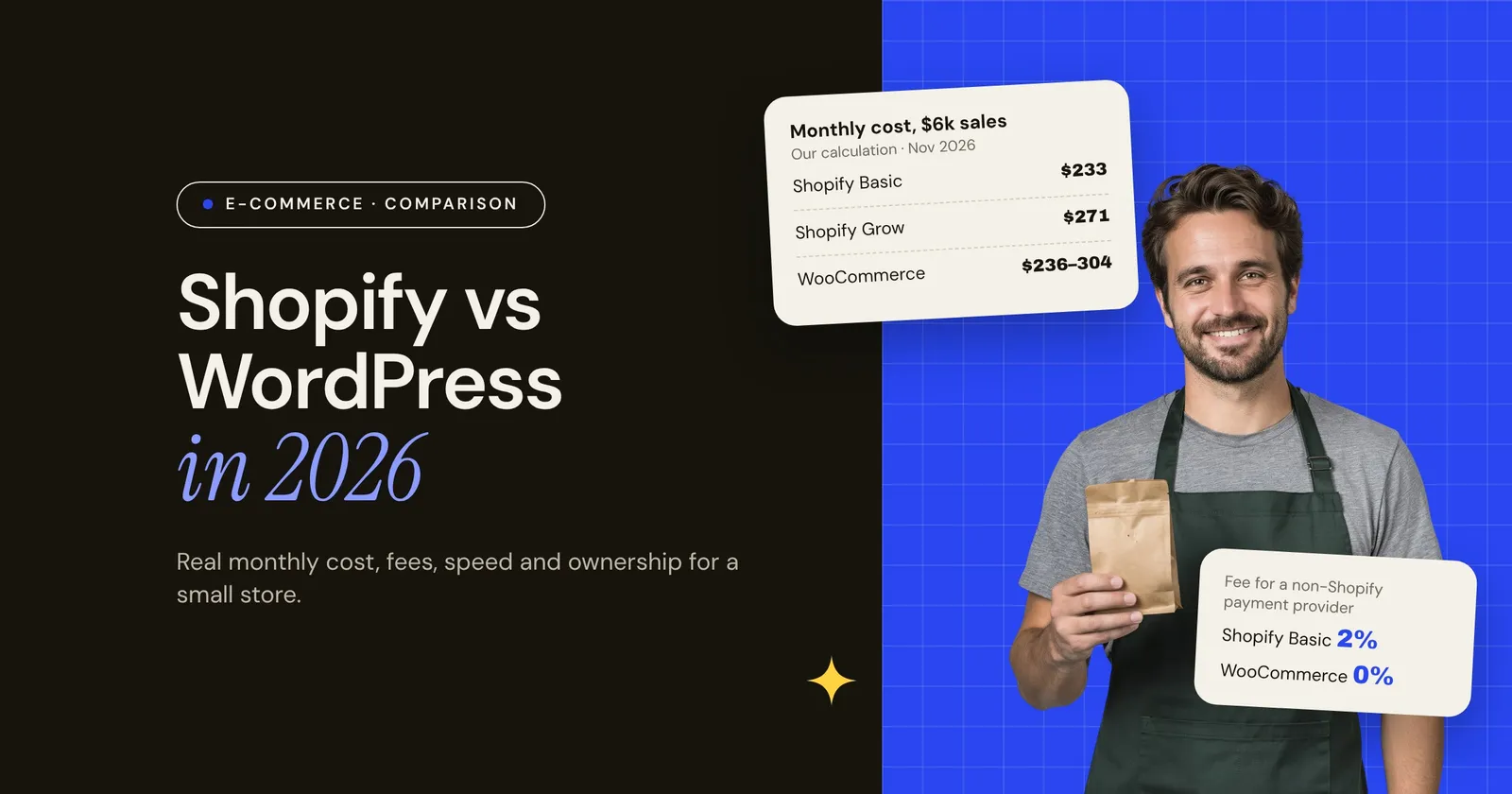
Shopify vs WordPress, for an online store, really means Shopify vs WooCommerce, the free plugin that turns a WordPress site into a shop. For a small US store selling $6,000 a month, both cost roughly $230 to $300 a month by our calculation from the official price pages, and card fees make up most of that bill.
So the plan price is the smaller decision. What decides it is who keeps the store updated and where you sell from.
This guide is for owners opening a first store or thinking about moving one. We build on both platforms at Wingflows, and the numbers below are the ones we work through on a scoping call. All prices are in USD and were checked on the vendors’ own pages on November 23, 2026.
Key takeaways
- Shopify Basic costs $29 a month billed yearly. WooCommerce is free software; you pay for hosting ($25 to $350 a month by WooCommerce’s own estimate) and any paid extensions ($29 to $299 a year each).
- US card fees start at the same rate on both: 2.9% + 30¢ per online order on Shopify Basic and on WooPayments.
- Shopify Payments works in 41 countries. Outside them, Shopify Basic adds 2% to every order. WooCommerce charges no such fee.
- In HTTP Archive’s 2025 data, 76% of Shopify stores passed Core Web Vitals, against 33% to 35% of WooCommerce stores.
- WooCommerce gives you the code and the database. Shopify gives you CSV exports, and some data (traffic history, issued gift cards, saved reports) stays behind.
Shopify vs WordPress at a glance
Sources: Shopify pricing, WooCommerce pricing, WooPayments fees, WordPress licence. Checked November 23, 2026.
On reach, WooCommerce is the bigger platform. HTTP Archive’s 2025 Web Almanac found it on 35.4% of detected e-commerce sites on desktop and 44.4% on mobile, against 21.5% and 25.3% for Shopify. Market share doesn’t change your bill, so the next sections price one store.
WooCommerce vs Shopify: what a small store pays each month
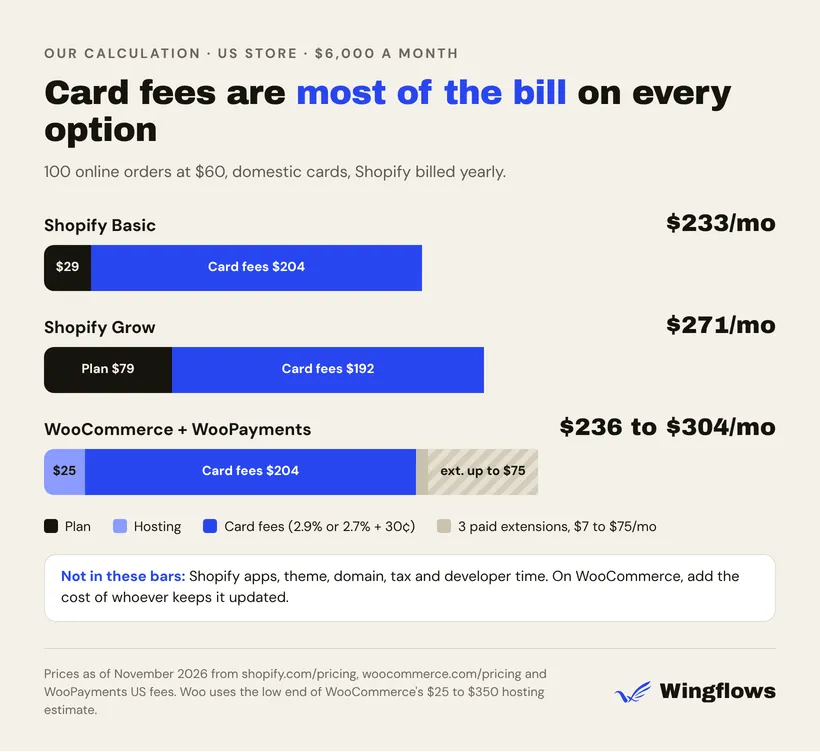
To compare like with like, we priced one realistic store: based in the US, 100 online orders a month at a $60 average, so $6,000 in monthly sales, all paid by domestic card. Shopify plans are billed yearly. For WooCommerce we used the low end of WooCommerce’s hosting estimate and assumed three paid extensions (say shipping rates, product add-ons and a booking tool) at WooCommerce’s stated $29 to $299 a year each.
Our calculation from Shopify’s pricing page, WooCommerce’s pricing page and WooPayments’ US fees, as of November 2026. Excludes domain, theme, Shopify apps, tax and developer time.
The same sum at three sales levels
One sales figure can mislead, so we ran the same formula at $1,800, $6,000 and $24,000 a month, keeping the $60 average order.
Our calculation, prices as of November 2026, at 30, 100 and 400 orders. WooCommerce uses WooPayments. Shopify: plan + card rate × sales + 30¢ × orders. WooCommerce: $25 hosting + three extensions ($87 to $897 a year) + 2.9% + 30¢ per order. We held hosting flat; a busier WooCommerce store often needs a bigger hosting plan, which pushes its column up.
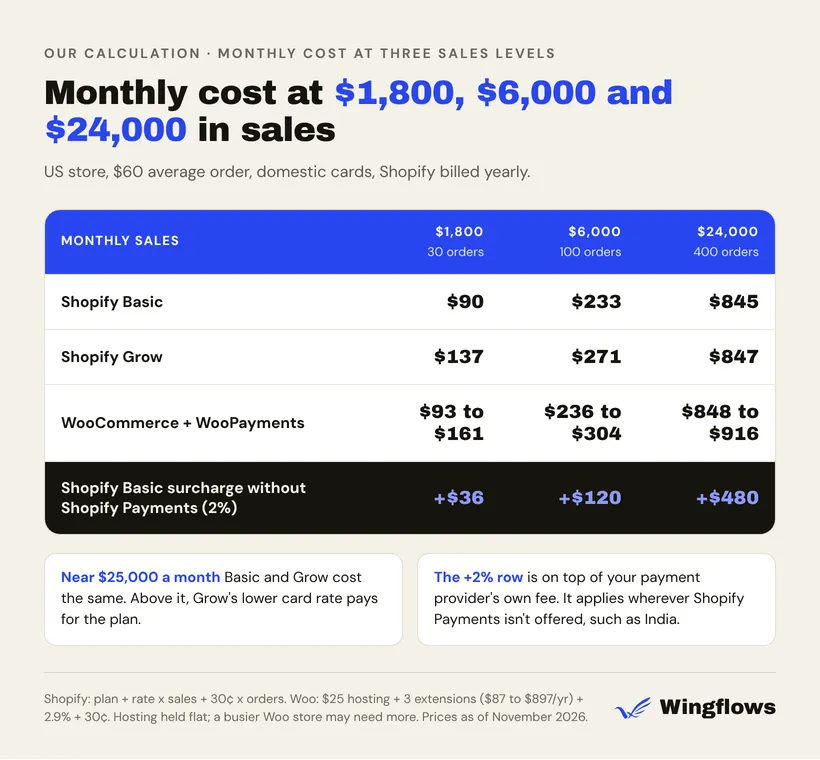
Shopify Basic and the low end of WooCommerce stay within $3 of each other at every level; how many paid extensions you add decides where WooCommerce lands in its range. The line that moves the result is the 2% surcharge, and it grows with your sales.
Three things shift these totals more than the plan choice:
- Card mix. WooPayments adds 1.5% for international cards and 1% for currency conversion on US accounts. Shopify lists a premium card rate of 3.5% + 30¢ on Basic. If many buyers are abroad, rerun the card line with your own mix.
- Apps. Shopify’s own Subscriptions app is free, while WooCommerce’s official Subscriptions extension is $279 a year. Other features go the other way. Price the four or five features you need on both before choosing.
- Developer time. WooCommerce’s low software cost assumes someone keeps WordPress, the theme and every plugin updated. Budget for that time; our website maintenance cost guide breaks the hours down.
Transaction fees: where Shopify gets expensive
Shopify charges a fee on every order taken through a provider other than Shopify Payments: 2% on Basic, 1% on Grow, 0.6% on Advanced and 0.2% on Plus (Shopify pricing). WooCommerce lists a 0% revenue share and “no extra costs, just your solution’s processing fees” (WooCommerce pricing).
For most US stores this never comes up, because Shopify Payments is available. Elsewhere it decides the comparison. Shopify Payments is supported in 41 countries, including the US, UK, most of the EU, the UAE, Australia, Canada, Japan and Singapore. India isn’t on the list, and Shopify’s help page says that outside it you “need to use a third-party payment provider” (Shopify Help Center).
The receipts below show one $60 order four ways.
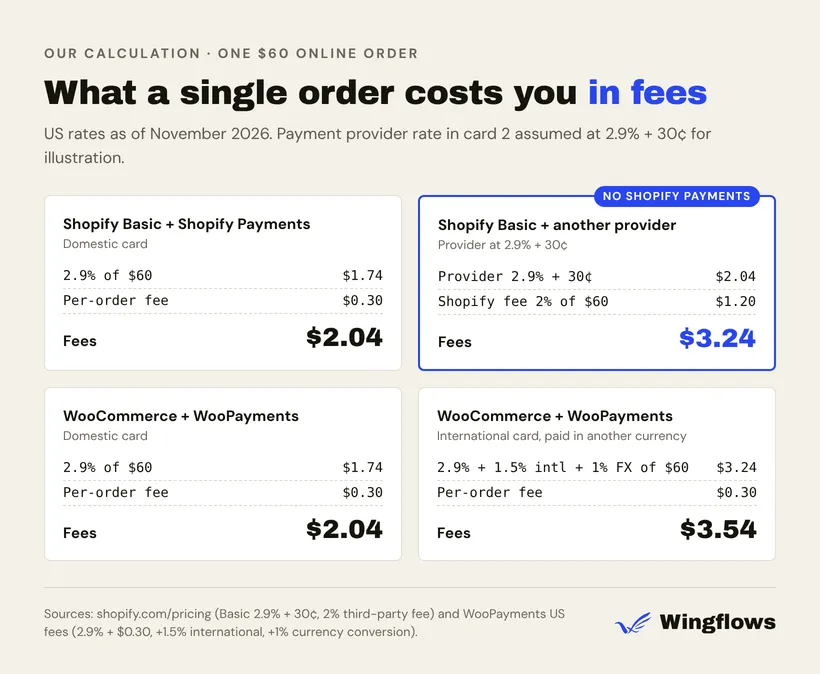
On our $6,000-a-month store, the 2% is $120 a month, or $1,440 a year, before the payment provider takes its own cut. If you sell from a country without Shopify Payments, put that line into your sums first.
When does a bigger Shopify plan pay for itself? By our calculation from the listed rates:
Domestic online cards only, yearly billing. Grow also adds five staff accounts, which Basic doesn’t include (Shopify pricing). For small teams, that is often the real reason to move up.
Speed: what the field data says
HTTP Archive’s 2025 e-commerce chapter measured real Chrome visitors on hundreds of thousands of store origins. Shopify stores passed all Core Web Vitals 76% of the time on desktop and on mobile. WooCommerce stores passed 33% on desktop and 35% on mobile. The authors’ verdict: “WooCommerce has scale, but not automatic speed.”
The per-metric numbers show where the gap sits. Responsiveness (INP) is close: 99% good on desktop for both, 90% for Shopify and 88% for WooCommerce on mobile. Loading (Largest Contentful Paint) is not: 92% of Shopify stores are good on desktop against 45% of WooCommerce stores, and 86% against 39% on mobile.
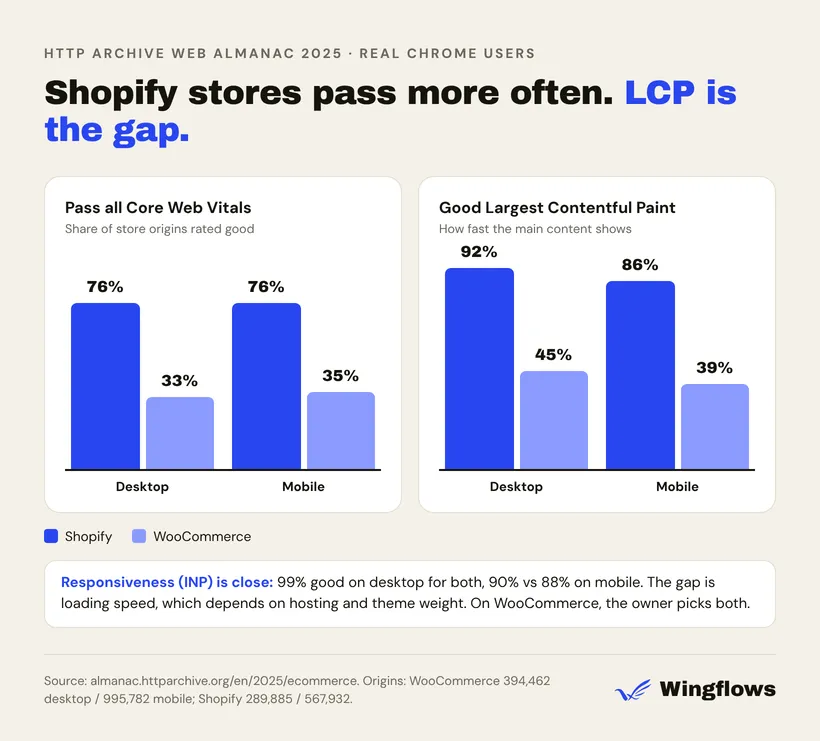
Loading speed on WooCommerce comes down to choices the owner makes: the host, the theme, how many plugins load scripts on every page, how images are sized. A WooCommerce store on decent hosting with a light theme can pass. It takes deliberate work, where Shopify hands you a fast baseline. If nobody on your side will own performance, that points to Shopify.
Ownership and lock-in
On WooCommerce you hold everything. WordPress is released under the GPLv2 (or later) licence (WordPress.org), the store runs on hosting you choose, and you can copy the database and files to another host. The built-in CSV tool exports the product catalogue, and ticking “Yes, export all custom meta” includes fields added by other plugins (WooCommerce docs).
On Shopify you rent the platform. Shopify’s backup and duplicate-store page lists CSV exports for products, customers, orders, gift card codes, discount codes and financial data, plus a theme download. The same page says visitor traffic data, discount codes, issued gift cards and saved custom reports can’t be transferred, that you reconfigure taxes, shipping, checkout and payment settings by hand, and that orders “can’t be imported into a store through the Shopify admin, but they can be imported using third-party apps.”
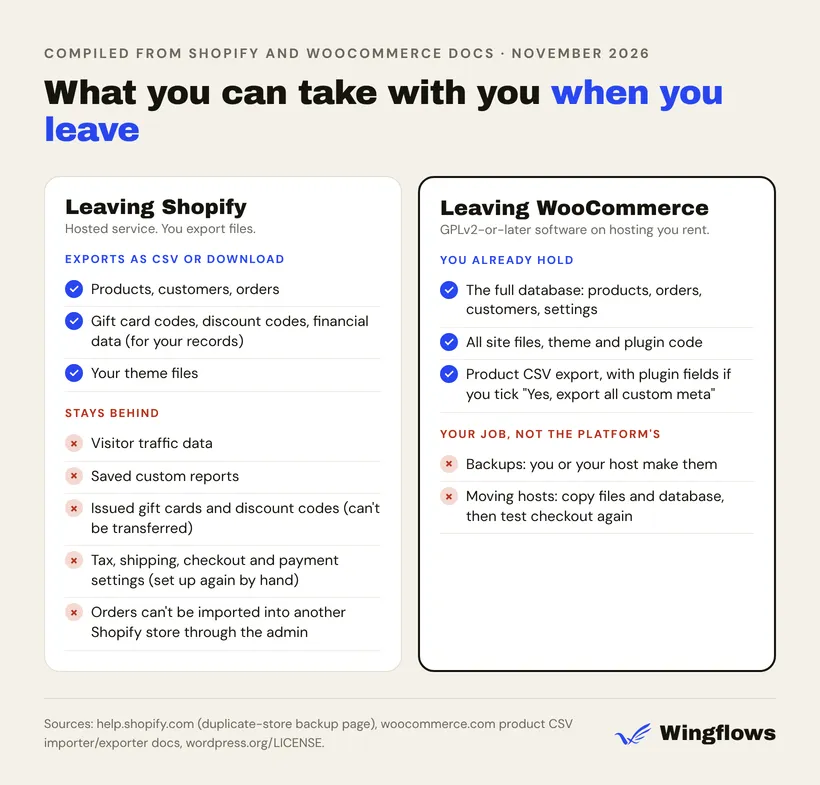
The part owners forget is the sales history. Your reorder patterns and lifetime customer value live in order data, and a move off Shopify needs an app or a developer to carry orders across. If you plan to build custom features on top of the store later, WooCommerce gives you more room.
SEO differences that matter
Both platforms can rank well. The differences are in how much of the structure you can change.
Shopify fixes some URL paths. Products live under /products/ and collections under /collections/, and Shopify’s help page says: “You can’t redirect URLs that use fixed Shopify paths: /products, /collections, /collections/all” (Shopify Help Center). In practice this means a WordPress store moving to Shopify changes the address of every product page, and each one needs a redirect from the old URL.
WordPress lets you set any URL structure, and an SEO plugin controls titles, schema and sitemaps. That freedom also lets you break things, so it pays off only when someone knows what they’re changing.
For a store whose traffic plan is a blog plus product pages, WordPress is the stronger content tool. For a store that sells mostly through paid ads and social, Shopify’s URL limits rarely matter.

Maintenance: the cost nobody puts in the quote
Every Shopify plan includes hosting and an SSL certificate (Shopify pricing), and Shopify runs the platform software. Your work is apps, theme changes and content.
A WooCommerce store needs regular updates to WordPress core, WooCommerce, the theme and every plugin. Patchstack’s State of WordPress Security in 2026 counted 11,334 new vulnerabilities in the WordPress ecosystem in 2025, up 42% on 2024. Of those, 91% were in plugins and only 6 in WordPress core. For heavily exploited flaws, the weighted median time to first exploit was 5 hours, and 46% of vulnerabilities had no fix from the developer by the time they were made public.
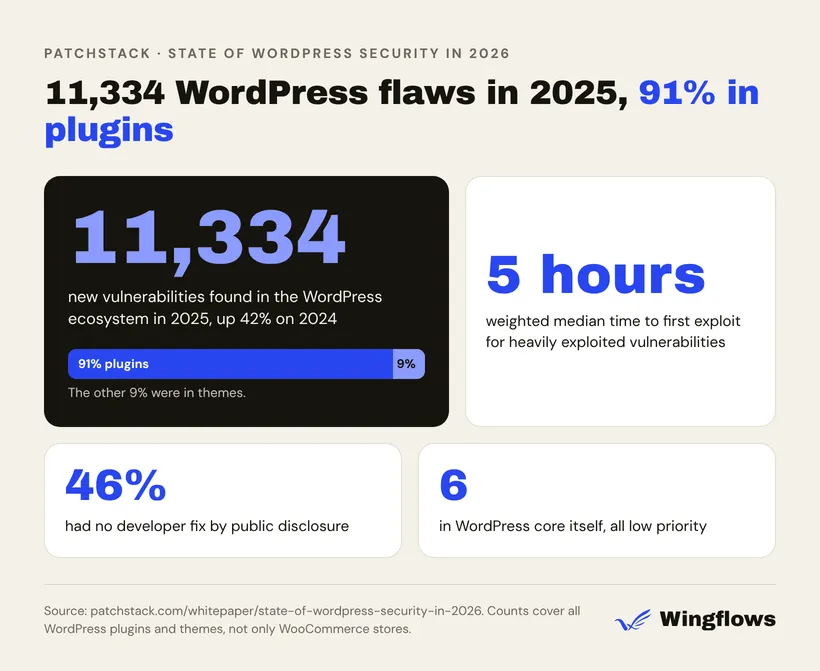
Our reading of those numbers: a store patched once a month can sit exposed for weeks, and a plugin with no fix has to be swapped out or disabled. The plugin count is the lever you control. Every extension you skip is one less thing to update, test and pay for.
When each one wins
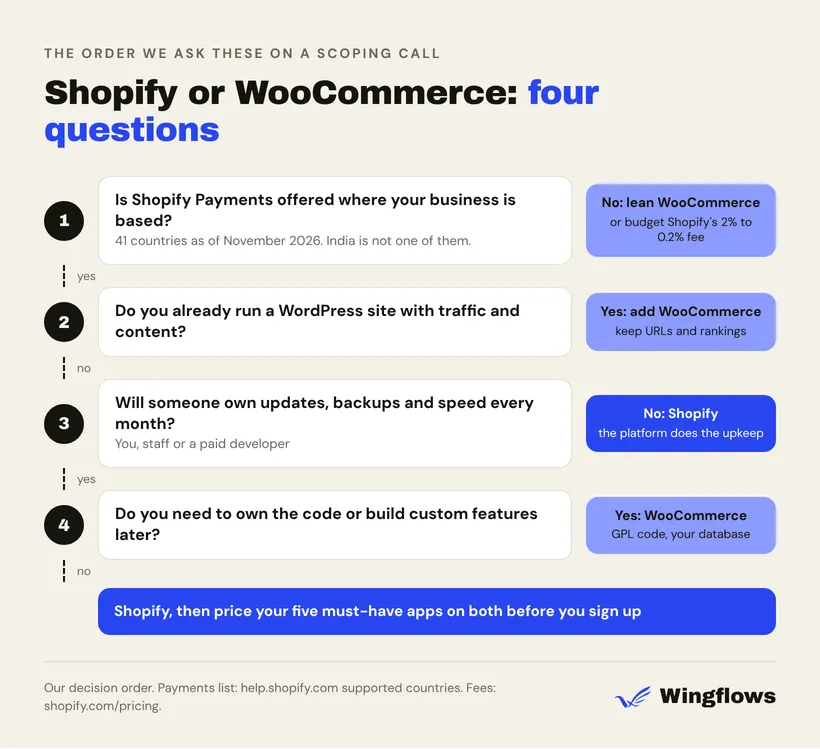
Pick Shopify if:
- you want the store live without managing hosting or updates
- Shopify Payments works in your country, so no extra transaction fee applies
- most sales will come from paid ads and social, and nobody on your side owns speed or security
Pick WordPress with WooCommerce if:
- you already have a WordPress site with traffic and content you want to keep
- you sell from a country without Shopify Payments, such as India
- you want to own the code and data, or plan custom features later
- a developer, in-house or on a plan, handles updates
If you’re torn, list the five features you need, price them on both platforms with your own order volume and card mix, and add the yearly cost of whoever maintains the store.
Moving between Shopify and WooCommerce
Both directions have an official tool. Shopify’s free Store Migration app, built by Shopify, imports data from WooCommerce and several other platforms. Its listing warns that “small edits in Shopify may be required,” and it held 3.1 stars from 77 reviews when we checked, with 27% of ratings at one star. Going the other way, WooCommerce’s Shopify Migrator imports products, customers, orders, coupons, pages and blog posts. It skips any customer with no email address on file, and its rollback deletes everything it migrated, so preview before you use it.
The step that protects your search traffic is redirects. Map every old product and category URL to its new address and import the list; Shopify accepts a CSV of redirects in the admin (Shopify Help Center). Keep the old store running until the new one is checked, then switch the domain.
We handle both moves: our Shopify migration and WordPress migration pages explain what each includes.
FAQ
Which is better: Shopify or WordPress?
Neither wins for every store. Shopify is easier to run and faster by default: 76% of Shopify stores passed Core Web Vitals in HTTP Archive’s 2025 data, against about a third of WooCommerce stores. WordPress with WooCommerce has no software fee, no surcharge for other payment providers, and lets you own the code, but someone has to maintain it.
Is Shopify cheaper than WordPress?
For a store that uses Shopify Payments, the totals are close. Our US example at $6,000 a month came to $233 on Shopify Basic and $236 to $304 on WooCommerce. WooCommerce becomes cheaper where Shopify charges its 2% third-party fee, and dearer once you pay a developer for upkeep.
Does WooCommerce take a percentage of sales?
No. WooCommerce lists a 0% revenue share. You pay your payment provider’s fee, which for WooPayments in the US is 2.9% + 30¢ per card order, plus 1.5% for international cards and 1% for currency conversion.
Can I use Shopify with WordPress?
Yes. Shopify’s Buy Button channel, included in all Shopify plans, embeds products on an outside site or blog, including WordPress, and buyers check out on that page. It suits a content site selling a few products. For a full catalogue, run the store on one platform.
Does WordPress or Shopify have better SEO?
Both can rank. WordPress gives full control over URLs, titles and schema, which helps content-heavy stores. Shopify fixes product and collection paths under /products/ and /collections/, which rarely hurts a store that sells mostly through ads.
Which is more popular, Shopify or WooCommerce?
WooCommerce. HTTP Archive’s 2025 data found it on 35.4% of detected e-commerce sites on desktop and 44.4% on mobile, against 21.5% and 25.3% for Shopify.
Which platform is better for dropshipping?
Both work, so compare the fees. Shopify charges a 2% fee on Basic when you use a provider other than Shopify Payments, and Shopify Payments isn’t available in every country (India isn’t on the list). WooCommerce has no revenue share, but the extensions you add cost $29 to $299 a year each, and someone has to keep them updated. Price your supplier app and payment provider on both before choosing.
Can I move from WooCommerce to Shopify later?
Yes. Shopify’s free Store Migration app imports from WooCommerce, and you can import URL redirects as a CSV file. Plan time to check the imported data and images, and keep the old store live until the new one is ready. Planning the build timeline too? See how long it takes to build a website.
Get help choosing
We build stores on both platforms, so we can price your setup on each before you commit. See our e-commerce services and Shopify development work, then talk to us with what you sell, where you sell from and how many orders you expect.